4.13 Foot Support Module
Chapter 4: Procedures
Affinity® Four Birthing Bed Service Manual (195826 REV 2) 4 - 25
4
ADJUSTMENT
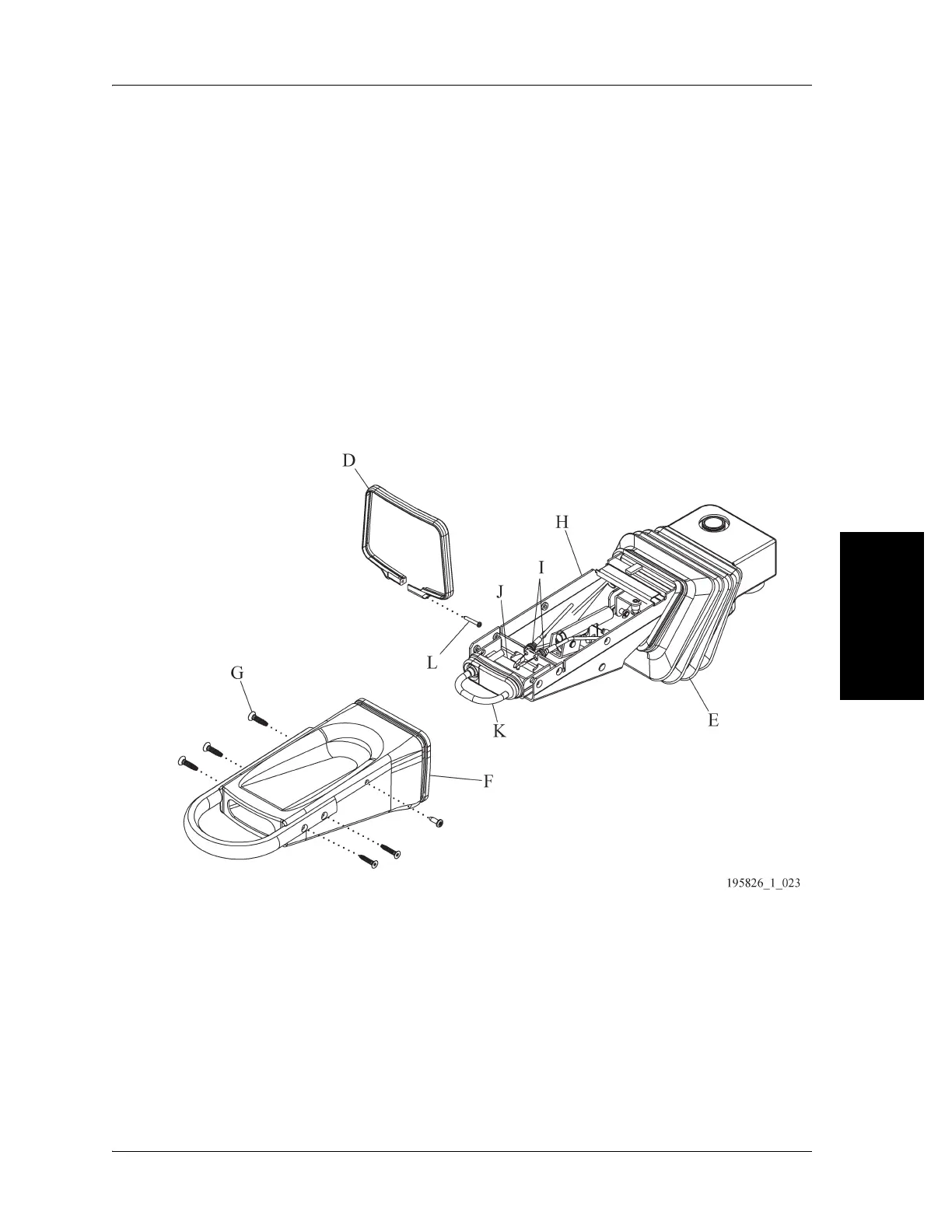
1. Remove the screw (L) that attaches the strap (D) to the foot support bellows (E) and the foot
support heel cup (F). Remove the strap (D). (see Figure 4-15 on page 4-25)
2. Remove the four screws (G) attaching the foot support heel cup (F) to the foot rest weldment (H).
3. Remove the foot support heel cup (F) from the foot rest weldment (H) and the foot support bellows
(E).
4. Adjust the cable tensioning nuts (I) so that the cable ends ride freely in the mounting holes of the
release handle weldment
(J) without binding.
5. Reassemble the foot support heel cup (F), Torx® head screws (G), and bellows wireform (D) to the
foot rest weldment (H) and the foot support bellows (E).
6. Make sure the foot support release handle (K) functions correctly.
Figure 4-15. Disassembled Foot Support














 To Next Page