4.26 Caregiver Siderail (Outboard) P.C. Switch Board
Chapter 4: Procedures
4 - 44 Affinity® Four Birthing Bed Service Manual (195826 REV 2)
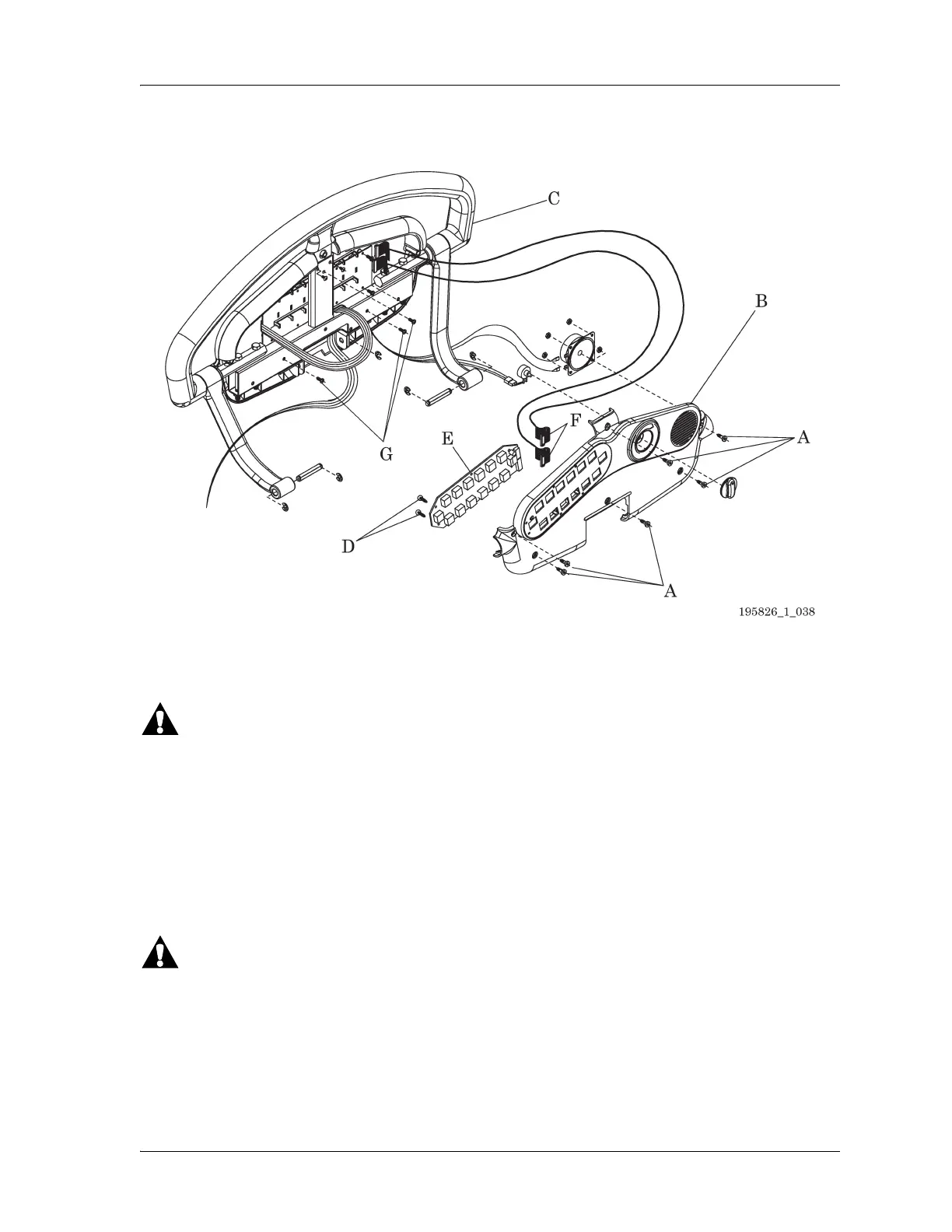
Figure 4-29. Patient Siderail (Inboard) P.C. Switch Board
4.26 Caregiver Siderail (Outboard) P.C. Switch Board
Tools: T25 Torx® head bit Ratchet T10 Torx® head bit
Follow all electrical safety precautions when servicing the bed’s electrical system. Failure to do so could
cause personal injury or equipment damage.
REMOVAL
1. Set the brake/steer pedal to the brake position.
2. Make sure the bed is out of the Trend-Like position.
3. Raise the head section to the high position.
4. Raise the bed to the high position.
Failure to unplug the bed could cause injury or equipment damage.
5. Unplug the bed from its power source.
6. Put the siderail lockout switch at the head end of the bed in the locked position.
7. Remove the eight plastic screws (A) that attach the patient siderail cover (B) to the siderail assembly
(C) (see
Figure 4-30 on page 4-45).
8. Carefully separate the patient siderail cover (B) from the siderail assembly (C).














 To Next Page