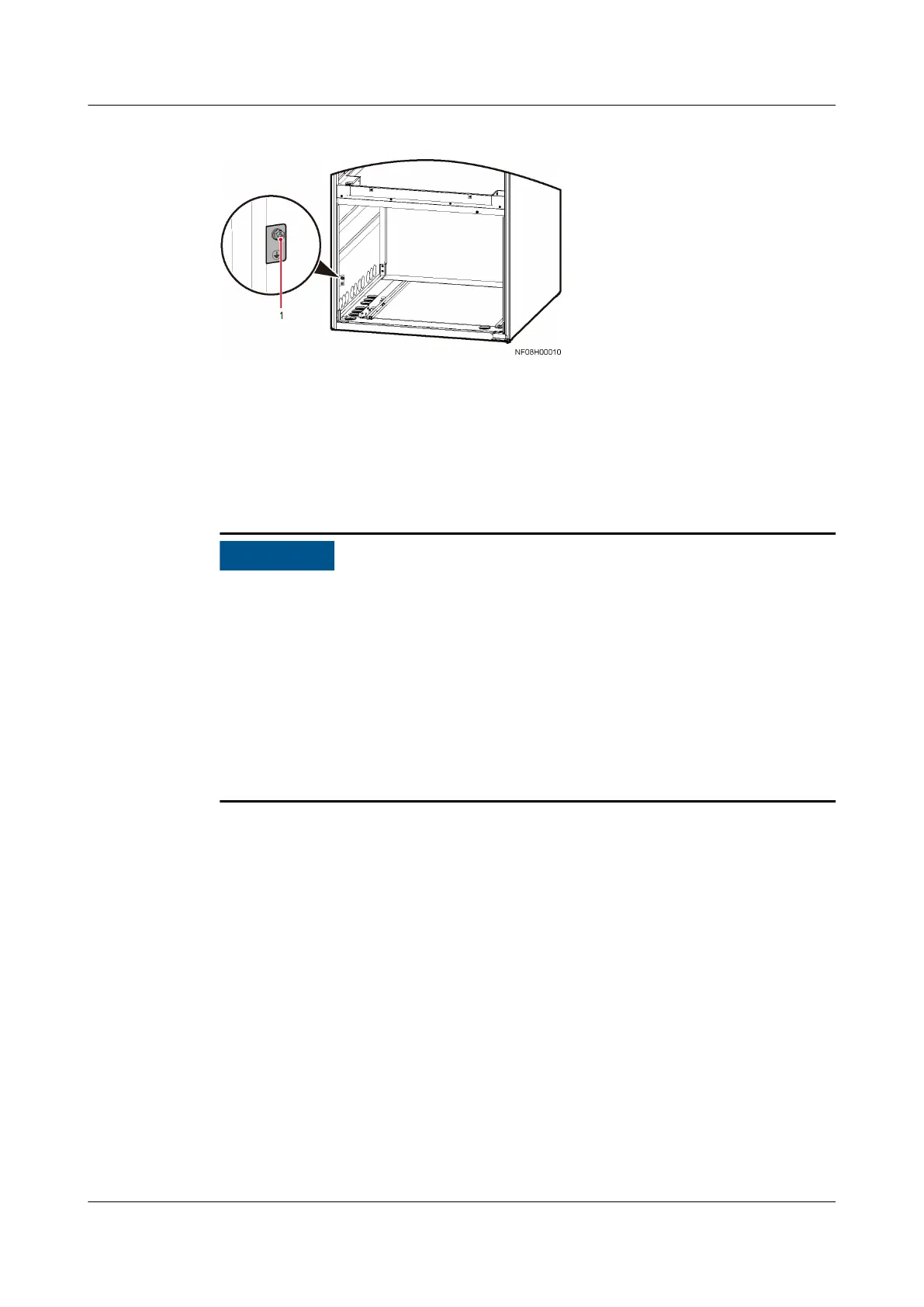
Figure 4-87 Equipotential ground position
(1) Equipotential ground position
4.11.2 Connecting Power Cables
Before connecting cables, remove the top cover of the indoor unit power
terminals.
● Check that the input power cable of the indoor unit has no reverse phase
sequence or open phase.
● Keep cables out of touch with the compressor, fan, and copper pipes (if
unavoidable, take protective measures), and connect cables properly.
● The device must be grounded as required by local electrical regulations.
● Cables must be routed in through cable clips.
● The
gure shows cable connections of two power supplies. If there is only one
power supply, you only need to connect cables to QF1.
● Shielded cables cannot be used as power cables for outdoor units.
Connecting the Power Cable to an Indoor Unit
Step 1 Connect the PE cable to the cabinet ground bar.
Step 2 Route the external power cable through the cabinet cable hole to the L1, L2, L3,
and N ports of the AC1 and AC2 terminals on the indoor unit respectively.
NetCol8000-A(045, 055, 060, 090, 120) In-room Air
Cooled Smart Cooling Product
User Manual 4 System Installation
Issue 05 (2020-10-10) Copyright © Huawei Technologies Co., Ltd. 122



 To Next Page