6.5.2 (Optional) Setting the Pressure Dierence Control
Prerequisites
If the dierential pressure sensors are installed, perform the following operations
accordingly. If the
dierential pressure sensors are not installed, skip this part.
Procedure
Step 1 On the home screen, choose Settings > System Settings > Indoor fan, set Air-
side
dierence pressure sensor type to 0~500 Pa comm port.
Step 2 Set Indoor fan control type to Pressure di ctrl.
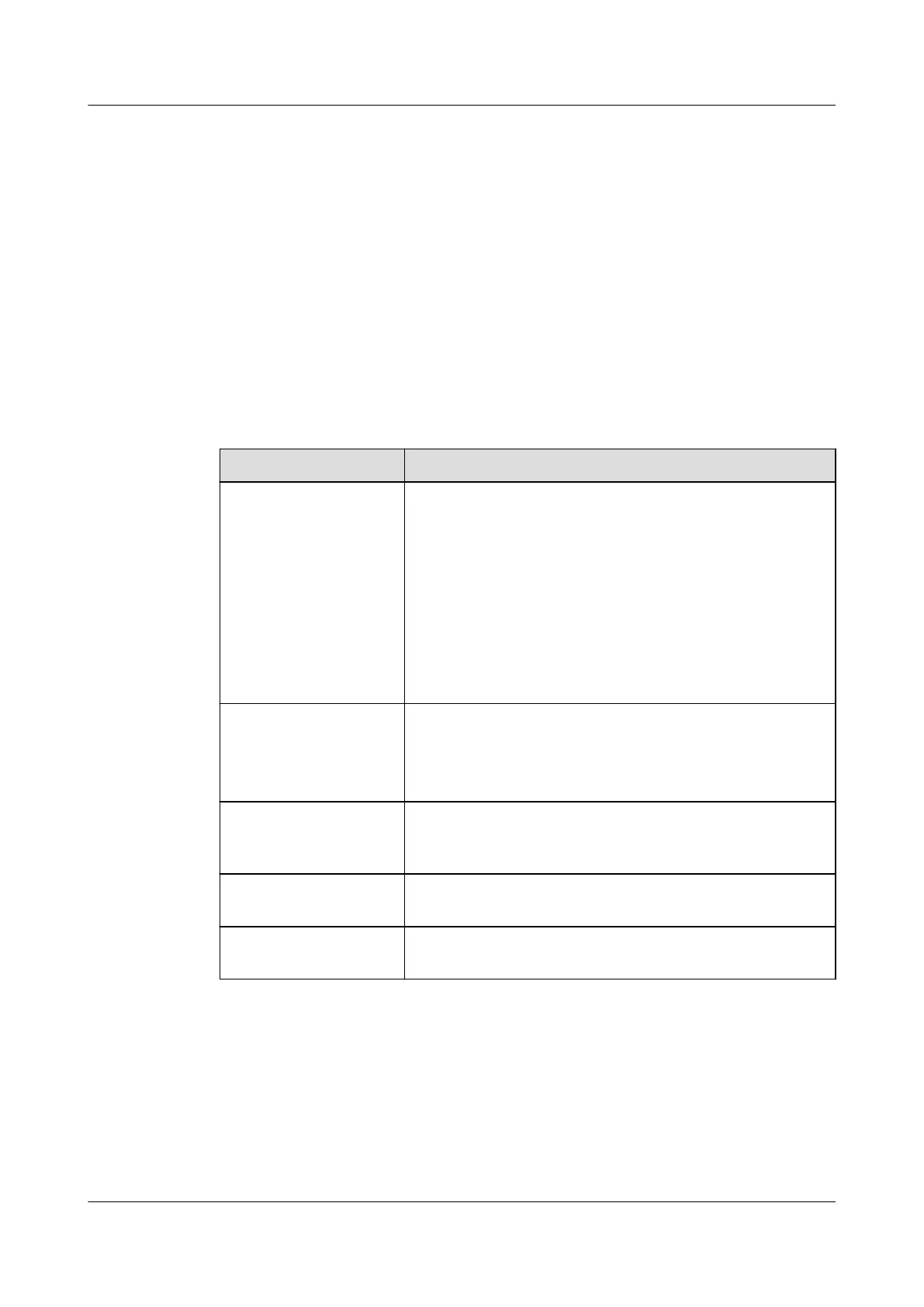
Step 3 Change the other parameters based on the following instructions.
Parameter Description
Indoor fan control
type
● Return/supply air temperature dierence proportion
control: controls the indoor fan speed based on the
proportion of temperature dierence between
return air and supply air.
● Return/supply air temperature dierence control:
controls the indoor fan speed based on the
temperature
dierence between return air and
supply air.
● Pressure
dierence control: controls the indoor fan
speed based on the pressure dierence.
Indoor fan silent
mode
● Disable: The silent mode is disabled.
● Enable: The fan enters the silent mode. The
maximum rotational speed of the fan is limited, and
the fan running sound is reduced.
Air-side dierential
pressure sensor type
Select the proper dierential pressure sensor type
based on the measurement range of the dierential
pressure sensor.
Min indoor fan speed Species the minimum rotational speed of the indoor
fan.
Max indoor fan speed Species the maximum rotational speed of the indoor
fan.
----End
6.5.3 (Optional) Setting Teamwork Parameters
Prerequisites
The teamwork group number and addresses for the units have been set as follows:
NetCol8000-A(045, 055, 060, 090, 120) In-room Air
Cooled Smart Cooling Product
User Manual 6 Power-On Commissioning
Issue 05 (2020-10-10) Copyright © Huawei Technologies Co., Ltd. 182







 To Next Page