Step 2 Open the front door and switch o the QF1 and QF2.
Step 3 Remove the wet lm humidier.
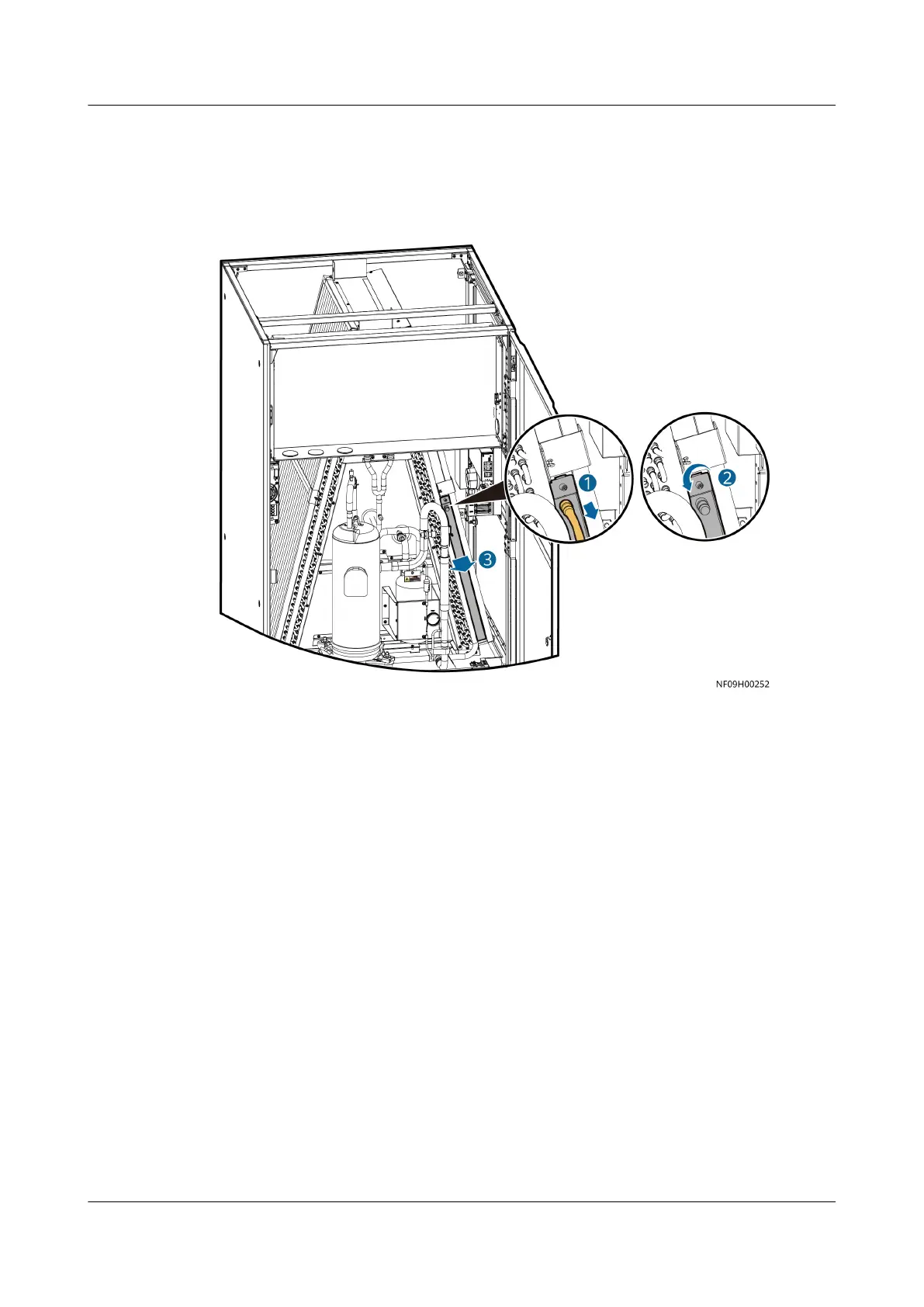
Figure 11-7 Removing the wet lm humidier (for NetCol8000-A045D)
1. Loosen the hose clamp and remove the water inlet pipe.
2. Loosen the nut on the side of the wet lm humidier.
3. Extract the wet lm humidier.
Step 4 Install the new wet lm humidier in the original position by performing the
preceding steps in reverse order, secure the screws, and connect the hose.
Step 5 Turn on the smart cooling product switch in the PDF.
Step 6 Switch on the QF1 and QF2, and close the front door.
Step 7 Power on the device, choose Maint > Performance Maint on the home screen to
access the performance maintenance screen, and clear the runtime of the
humidier.
Step 8 Tap Startup on the home screen. Ensure that the smart cooling product is running
normally without any alarms.
----End
11.6 Replacing an Electric Heater
NetCol8000-A(045, 055, 060, 090, 120) In-room Air
Cooled Smart Cooling Product
User Manual 11 Parts Replacement
Issue 05 (2020-10-10) Copyright © Huawei Technologies Co., Ltd. 263







 To Next Page