4.11.4.3 CAN Teamwork + FE Monitoring
Step 1 Connect teamwork and monitoring communications cables.
Networking CAN Teamwork FE Monitoring
Protocol CAN Modbus-TCP/SNMP
Description One teamwork network
supports a maximum of 32
units. On the Teamwork
Settings screen of the display
modules of the rst and last
units, set Enable teamwork
CAN resistor to Yes.
-
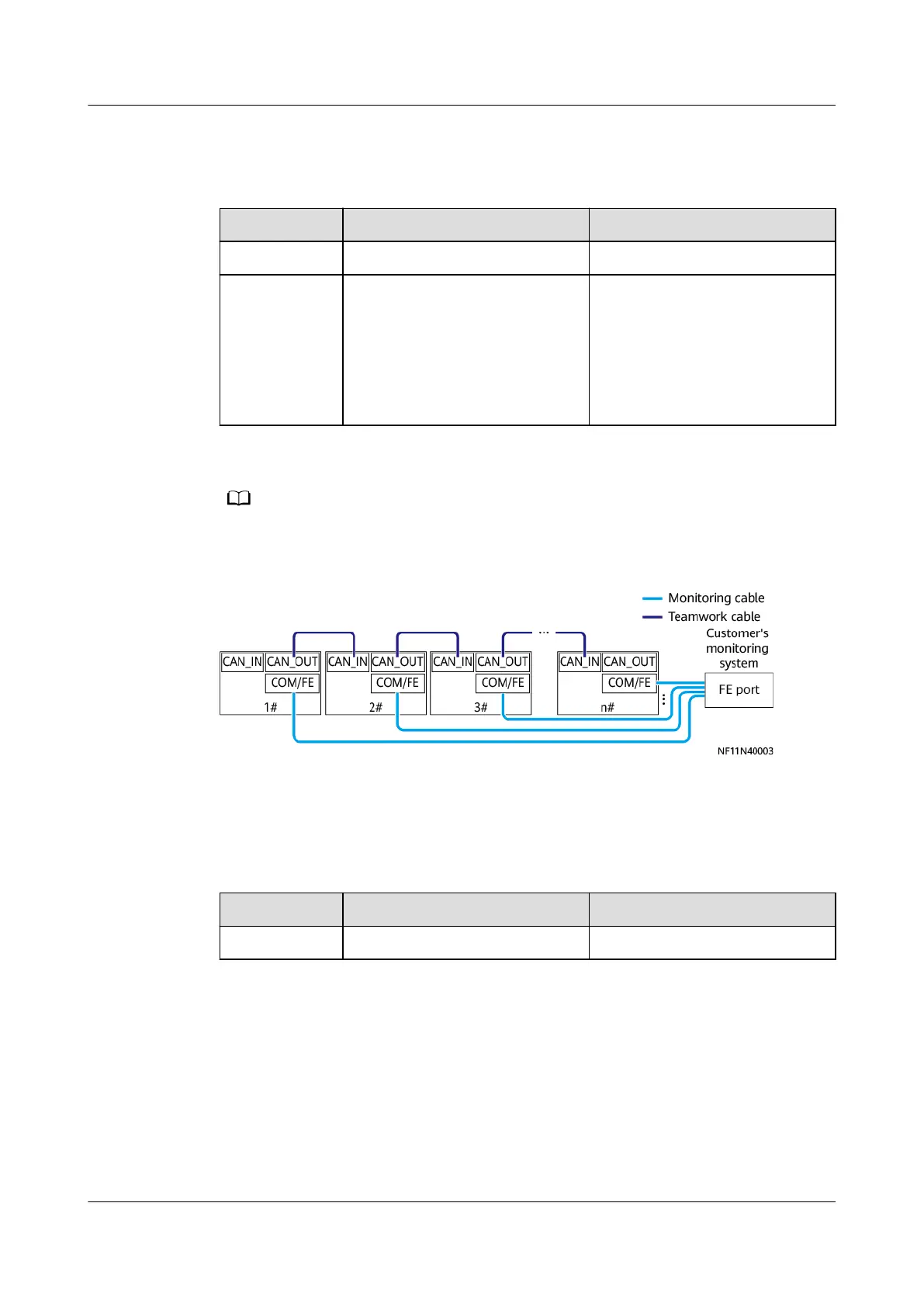
Customers can purchase a switch and NetEco as the monitoring system.
Figure 4-109 Connecting communications cables
----End
4.11.4.4 FE Teamwork + RS485 Monitoring
Step 1 Connect teamwork and monitoring communications cables.
Networking
FE Teamwork RS485 Monitoring
Protocol MAC_CAN Modbus-RTU
NetCol8000-A(045, 055, 060, 090, 120) In-room Air
Cooled Smart Cooling Product
User Manual 4 System Installation
Issue 05 (2020-10-10) Copyright © Huawei Technologies Co., Ltd. 141







 To Next Page