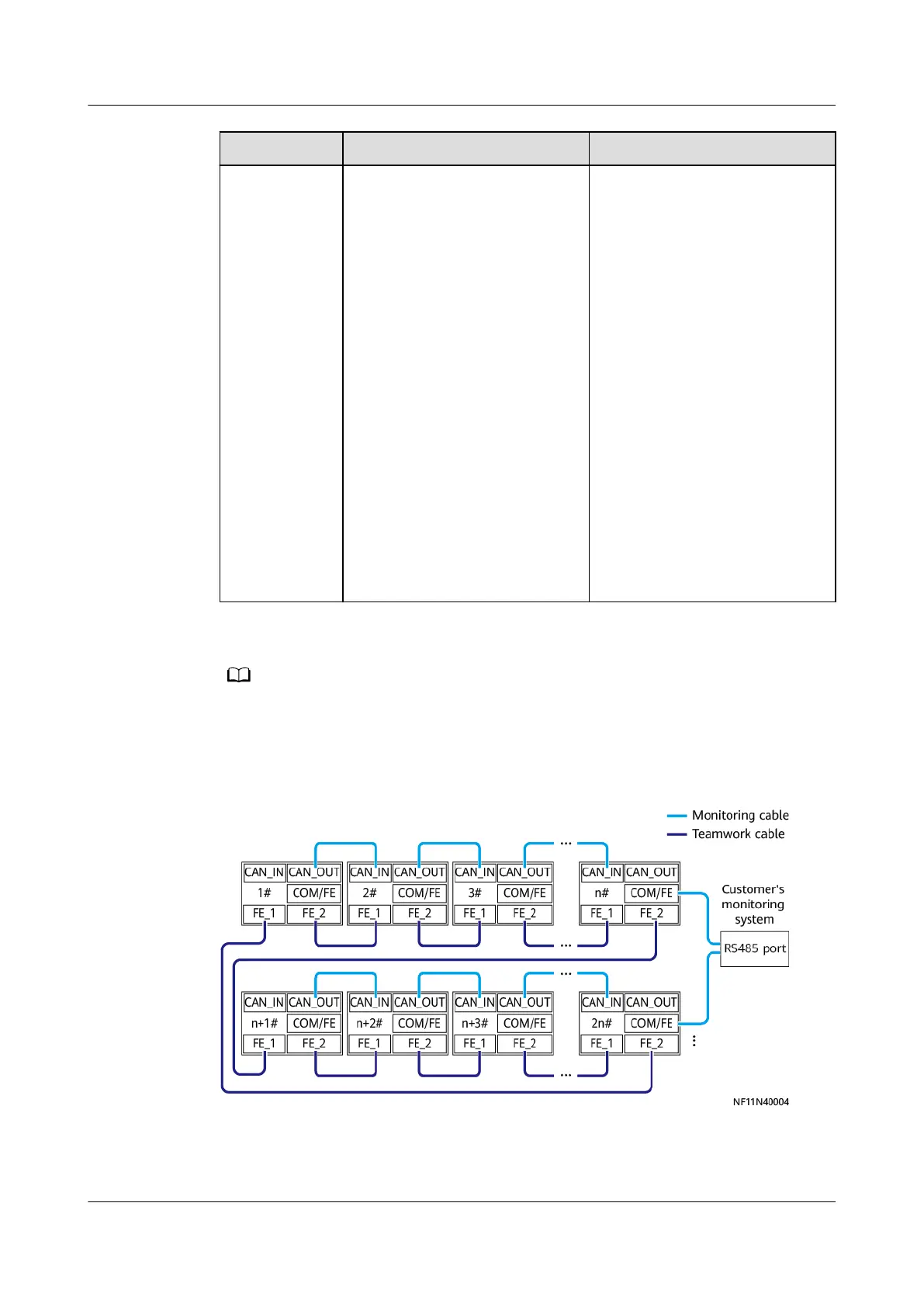
Networking FE Teamwork RS485 Monitoring
Note A teamwork network supports
a maximum of 16 units.
It takes 3 x
n
seconds to
collect data from
n
units. If
the time required for the host
to collect data from all units
does not meet the
performance requirements,
group the units.
● If units are not grouped (
n
= 1), set RS485 monitoring
grouping to Enable on the
Modbus Settings screen
for each unit.
● If units are grouped (
n
> 1;
recommended:
n
≤ 4), set
RS485 monitoring
grouping to Enable on the
Modbus Settings screen
for the unit with the
COM/FE port connected.
Retain the default setting
(Disable) for other units.
● Connect the COM/FE port on the main control module of the last unit in each group to
the RS485 port on the host.
● Customers can purchase an ECC and NetEco as the monitoring system.
Figure 4-110 Connecting communications cables
If the length of a network cable in the FE teamwork is greater than or equal to
100 m, use the group-based ring networking mode.
NetCol8000-A(045, 055, 060, 090, 120) In-room Air
Cooled Smart Cooling Product
User Manual 4 System Installation
Issue 05 (2020-10-10) Copyright © Huawei Technologies Co., Ltd. 142







 To Next Page