12.3.8 How Do I Check Teamwork Control Information?
Procedure
Step 1 On the home screen, choose
> to display the teamwork information of
the current group.
Master/Slave indicate the information of the current unit. Other information is about the
teamwork information of the group.
----End
12.3.9 How Do I Mute or Silence a Buzzer?
Context
After a buzzer is muted, it does not buzz when a new alarm is generated.
Procedure
Step 1 Tap the
icon in the status bar, tap O. The icon changes to .
----End
12.3.10 How Do I Handle Alarms?
Procedure
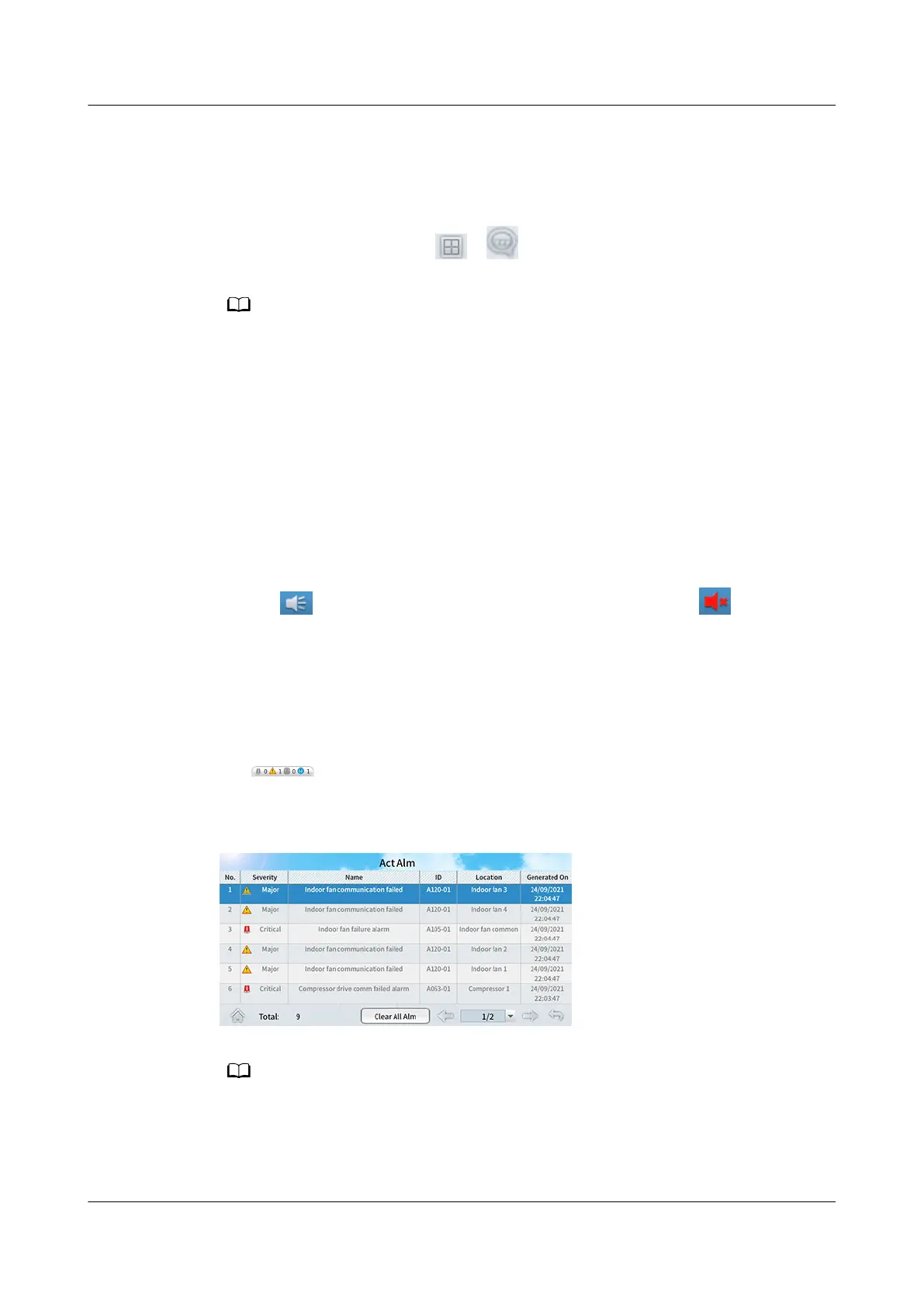
Step 1 Tap
(or choose Alarms > Query Act Alarms on the home screen) to
enter the active alarm screen.
Figure 12-14 Active alarms
● Active alarms are sorted by the generating time in descending order.
● If active alarms exist, they are displayed on the alarm bar in turn.
● You can query an alarm on the alarm list in "Alarm Reference" based on the alarm ID to
know causes of the alarm and methods to clear the alarm.
NetCol8000-A(045, 055, 060, 090, 120) In-room Air
Cooled Smart Cooling Product
User Manual 12 FAQ
Issue 05 (2020-10-10) Copyright © Huawei Technologies Co., Ltd. 295







 To Next Page