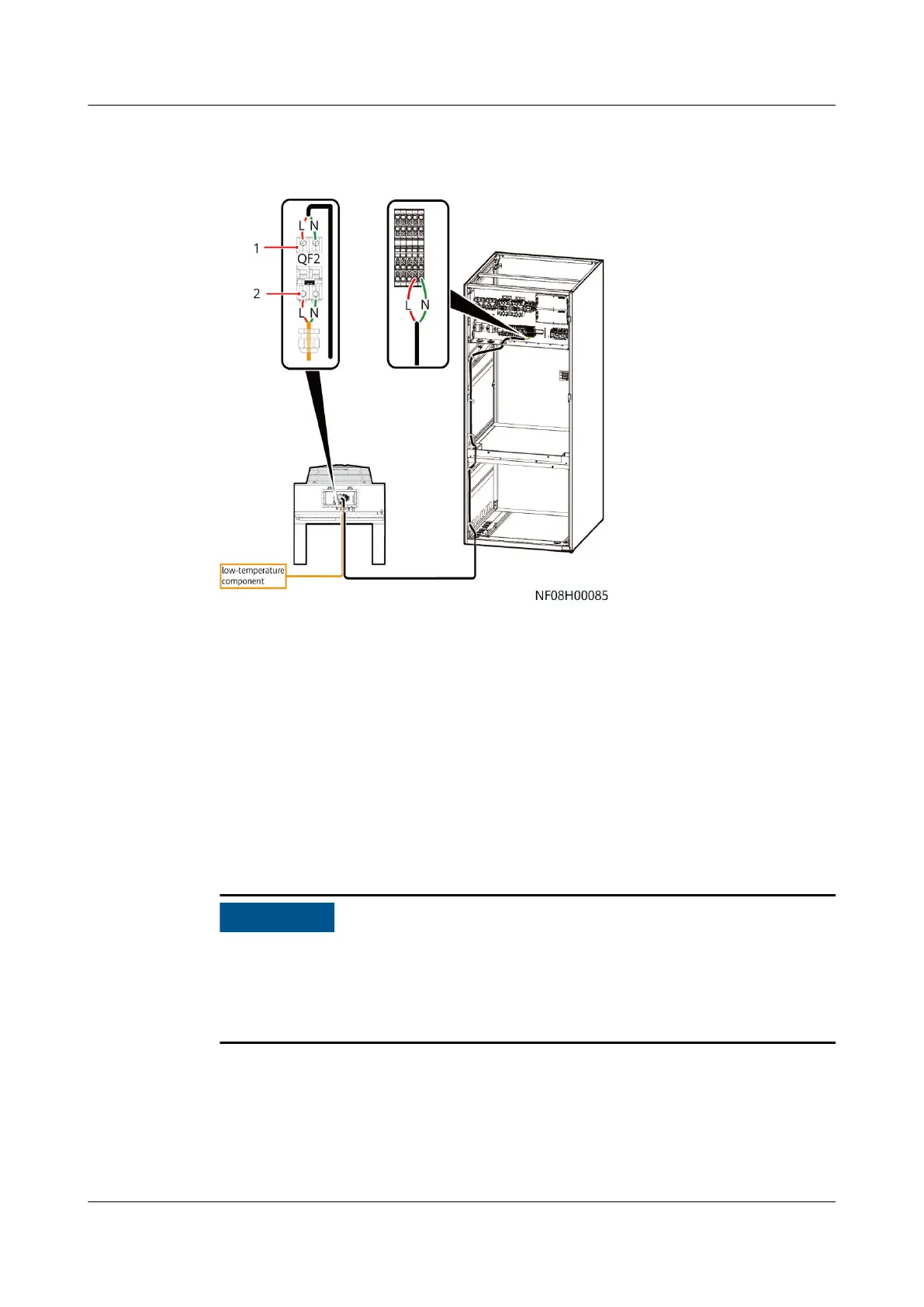
Figure 4-95 Connecting the power cable of the low temperature component
(using indoor unit NetCol8000-A045D and outdoor unit NetCol500-A060 as
examples)
(1) Power cable for the low temperature
component between the outdoor unit and the
indoor unit
(2) Power cable between the low temperature
component and the outdoor unit
Step 2 Connect one end of the additional 2 x 1.5 mm² power cable of the low
temperature component to L and N of the outdoor unit QF2. Connect the other
end to terminals L and N of the indoor unit.
Step 3 Secure the cables on the post of the cabinet with cable ties.
----End
4.11.3 Connecting Signal Cables
● Before connecting signal cables, take eective electrostatic discharge (ESD)
measures.
● The power cables and signal cables should be tied and cased separately.
● The shield layer of signal cable must be grounded.
4.11.3.1 Connecting the Signal Cable Between the Outdoor Unit and Indoor
Unit
This operation is required only when the outdoor unit is equipped with a
temperature control intelligent monitoring board.
NetCol8000-A(045, 055, 060, 090, 120) In-room Air
Cooled Smart Cooling Product
User Manual 4 System Installation
Issue 05 (2020-10-10) Copyright © Huawei Technologies Co., Ltd. 129



 To Next Page