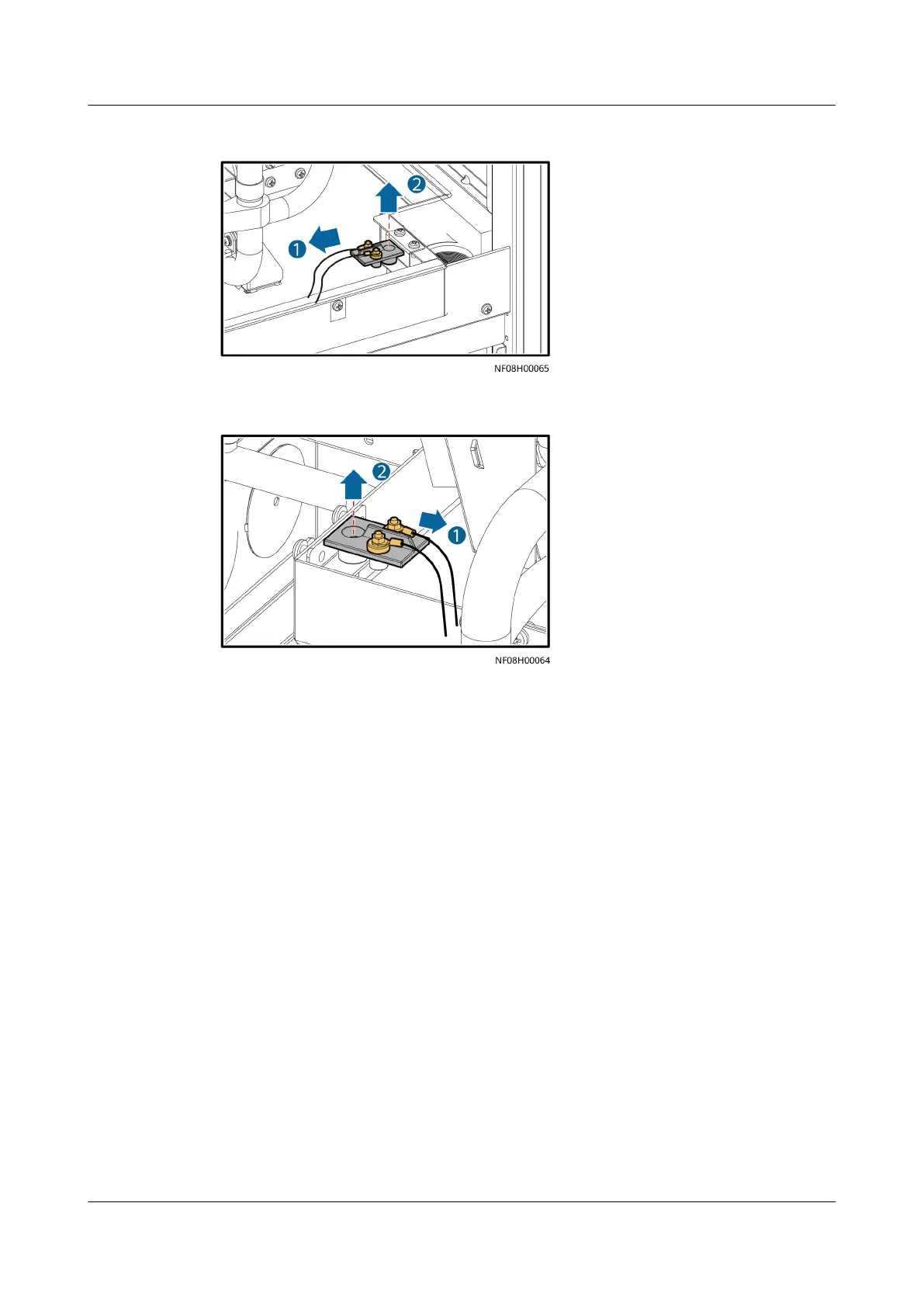
Figure 11-23 Removing a liquid level detector (downow)
Figure 11-24 Removing a liquid level detector (upow)
Step 4 Install a new liquid level detector and connect its cables.
Step 5 Close the front door.
Step 6 Power on the device and tap Start on the home screen. Ensure that the smart
cooling product is running normally without any alarms.
----End
11.11 Replacing an Outdoor Fan
Prerequisites
● Recommended tools and materials: torque wrench, hex key, Phillips
screwdriver, socket wrench, small
at-head screwdriver (2 mm), diagonal
pliers, cable ties, and new fan
● Preparations: Shut down the system and cut o external power supplies.
Procedure
Step 1 Tap Shutdown on the home screen, and turn o the active route switch QF1,
standby route switch QF2, and outdoor unit fan circuit breaker.
Step 2 Cut the cable ties that secure fan cables using diagonal pliers.
NetCol8000-A(045, 055, 060, 090, 120) In-room Air
Cooled Smart Cooling Product
User Manual 11 Parts Replacement
Issue 05 (2020-10-10) Copyright © Huawei Technologies Co., Ltd. 281







 To Next Page