Exercise caution because the device is still energized after it is shut down on the
screen of the display module.
Step 2 Open the front door and turn o the general switch. Then, remove the fan
maintenance cover using a Phillips screwdriver.
Step 3 Disconnect the fan cable from the plug-in terminals reserved in the cabinet.
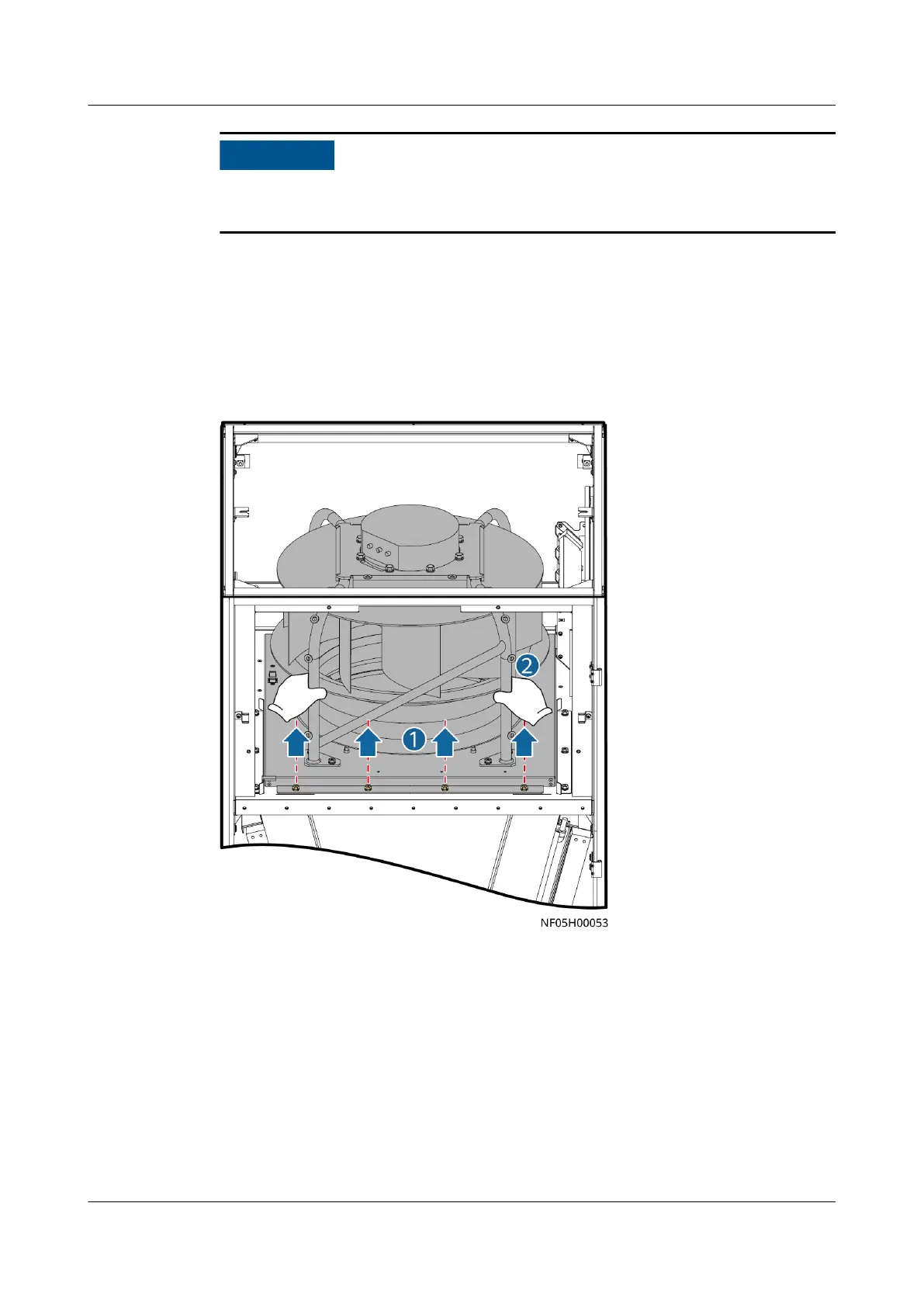
Step 4 Remove the screws from the beam under the fan using a 13# socket wrench, and
pull out the fan.
Figure 11-14 Removing the screws that secure the fan
Step 5 Remove the fan connection box cover using a security torx hex key.
Step 6 Open the fan connection box. Hold the area marked by gray in the following
gure using a small-sized at-head screwdriver, remove the signal cable and
power cable shown in the following gure, and then remove the screw in the area
marked by yellow (the PE cable) using a
at-head screwdriver.
NetCol8000-A(045, 055, 060, 090, 120) In-room Air
Cooled Smart Cooling Product
User Manual 11 Parts Replacement
Issue 05 (2020-10-10) Copyright © Huawei Technologies Co., Ltd. 273







 To Next Page