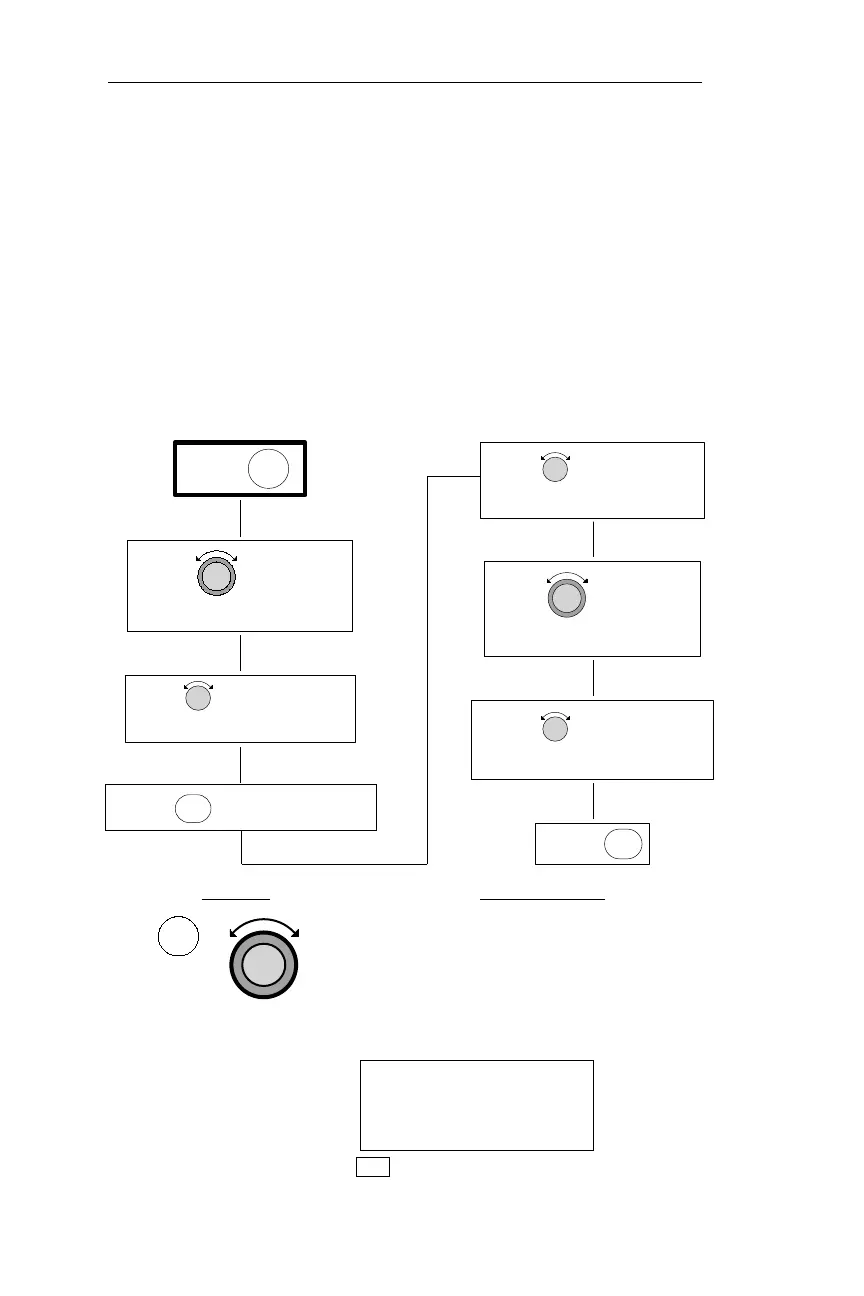
Setting/Editing Hold and Buffer Altitudes
Altitude Assist features require that the system include an altitude
input device. The NMC alerts you when you’ve ascended/descended
into the Hold Buffer, or have strayed outside of the buffer. The Buffer
Altitude is the altitude above and below your Hold altitude at which
you want to be alerted with a message. This procedure is used to set the
Hold Altitude and the Buffer Altitude.
Flow Chart
Action Explanation
1. In NAV mode, turn the Large knob to
display the Altitude Assist page. (If an
ARINC 429 Air/Data sensor is
installed, this page shows barometric
altitude, not the local altimeter setting.)
ALTITUDE ASSIST
LOCAL ALTIMETER
SETTING 29.92¯·
NAV
90
Nav Mode Procedures Operations
NAV
PRESS
TO ACTIVATE EDITING
THE ALTITUDE ASSIST PAGE
TURN TO DISPLAY
PRESS NAV
HOLD ALTITUDE PAGE
TURN TO DISPLAY THE
DESIRED HOLD ALTITUDE
TURN TO DISPLAY THE
BUFFER VALUE FLASH
TURN TO MAKE THE
DESIRED BUFFER VALUE
TURN TO DISPLAY THE
SEL
PRESS
ENT



 To Next Page