CAMERA SETTINGS and ADJUSTMENT
5
91
UHK-430/CCU-430 1710 VER2 (E)
5.3 Menu Configuration and content
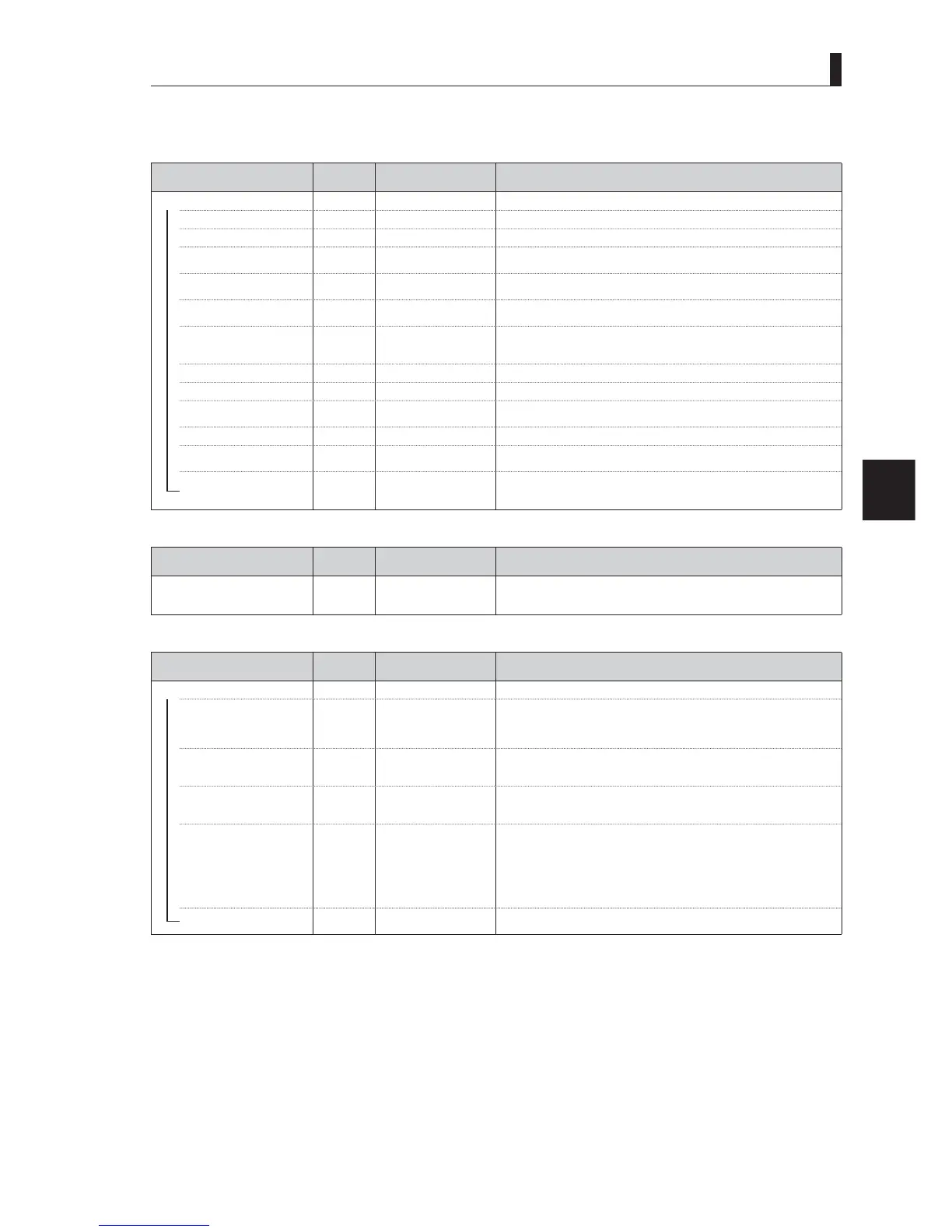
[INTERCOM SET UP (1/3)]
[HEADSET MIC]
Menu Item
Initial
setting
Setting value Description, Remarks
HEADSET SET MIC
―
INTERCOM1
―
MIC TYPE
'<1$0,& &$5%21'<1$0,& Selects carbon or dynamic for INTERCOM1 microphone.
―
POWER
ON ON, OFF
Sets the ON/OFF of power supply to the carbon microphone.
(Fixed to "OFF" when Dynamic MIC is selected.)
―
GAIN
-60dB
G%G%G%
20dB /-10dB / 0dB
Changes the microphone gain of INTERCOM1 by step.
―
FINE
0 -100 - 100
Fine adjustment of the INTERCOM1 gain. The gain decreases about -10 dB with
"-100", and increases about +10 dB with "+100".
―
UNBAL
OFF OFF / ON
Selects the balance/unbalance mode.
Can select ON/OFF for dynamic microphone setting, and fixed to ON for the
carbon microphone.
―
INTERCOM2
―
MIC TYPE
'<1$0,& &$5%21'<1$0,& Selects carbon or dynamic for INTERCOM2 microphone.
―
POWER
ON ON, OFF
Sets the ON/OFF of power supply to the carbon microphone.
(Fixed to "OFF" when Dynamic MIC is selected.)
―
GAIN
1250$/ 1250$/+, Changes the microphone gain of INTERCOM2 by step.
―
FINE
0 -100 to 100
Fine adjustment of the INTERCOM2 gain. The gain decreases about -10 dB with
"-100", and increases about +10 dB with "+100".
UNBAL
OFF OFF / ON
Selects the balance/unbalance mode.
Can select ON/OFF for dynamic microphone setting, and fixed to ON for the
carbon microphone.
[INTERCOM MODE]
Menu Item
Initial
setting
Setting value Description, Remarks
INTERCOM MODE
1250$/
1250$/&5266
/,1((1*86$
PRESET1 /PRESET2
3HUIRUPV'$7$/2$'RISUHVHWV$OVRGLVSOD\VWKHORDGHGVHWWLQJYDOXH
If the setting value is changed after being loaded, it becomes "USER".
[INTERCOM FUNCTION]
Menu Item
Initial
setting
Setting value Description, Remarks
INTERCOM FUNCTION
―
AFTER VR MIX
OFF ON / OFF
6ZLWFKHVEHWZHHQ212))RI$)7(59(0,;
:KHQWKH(1*DQG352'OLQHVDUHPL[HGDQGOLVWHQHGWKHYROXPHDGMXVWPHQWV
FDQEHDVVLJQHGWR,17(5&20DQGLQ(1*DQG352'(DFKRIWKHPFDQEH
adjusted individually.
―
INTERCOM1 VOL CTRL
BOTH (1*352'%27+
:KHQWKH$)7(5950,;LVWXUQHGRQWKH(1*352'OLQHVDUHDYDLODEOH
and are in an exclusive relationship with INTERCOM2 VOL CTRL. (Fixed to
%27+ZKHQ$)7(5950,;LVWXUQHGRII
―
INTERCOM2 VOL CTRL
BOTH (1*352'%27+
:KHQWKH$)7(5950,;LVWXUQHGRQWKH(1*352'OLQHVDUHDYDLODEOH
and are in an exclusive relationship with INTERCOM1 VOL CTRL. (Fixed to
%27+ZKHQ$)7(5950,;LVWXUQHGRII
―
FRONT MIC ON SEL
SW SEL SW SEL / INC1 / INC2
The control of INTERCOM MIC button on the right side of the camera is linked
to the MIC operation of INTEROCM.
6:6(/ 8VHWKH,17(5&200,&EXWWRQWRRSHUDWHWKHPLFURSKRQHRIWKH
lines selected by INTERCOM selector switch.
,1& 7KH,17(5&200,&EXWWRQRSHUDWHV,17(5&20
,1& 7KH,17(5&200,&EXWWRQRSHUDWHV,17(5&20
(Operable from the MIC switch on the rear panel in all modes.)
PGM FRONT VR
3*0 3*03*0
7KH3*0RIWKHOLQHVVHOHFWHGE\,17(5&20VHOHFWRUVZLWFKDUHFRQWUROOHG
ZLWKWKH,17(5&203*0FRQWURONQRERQWKHULJKWVLGHRIWKHFDPHUD
<< INTERCOM/AUDIO continues to the next page >>



 To Next Page