CAMERA SETTINGS and ADJUSTMENT
5
117
UHK-430/CCU-430 1710 VER2 (E)
5.5 Using the USB Memory
■
Saving the Setting Status of Camera to the USB Memory
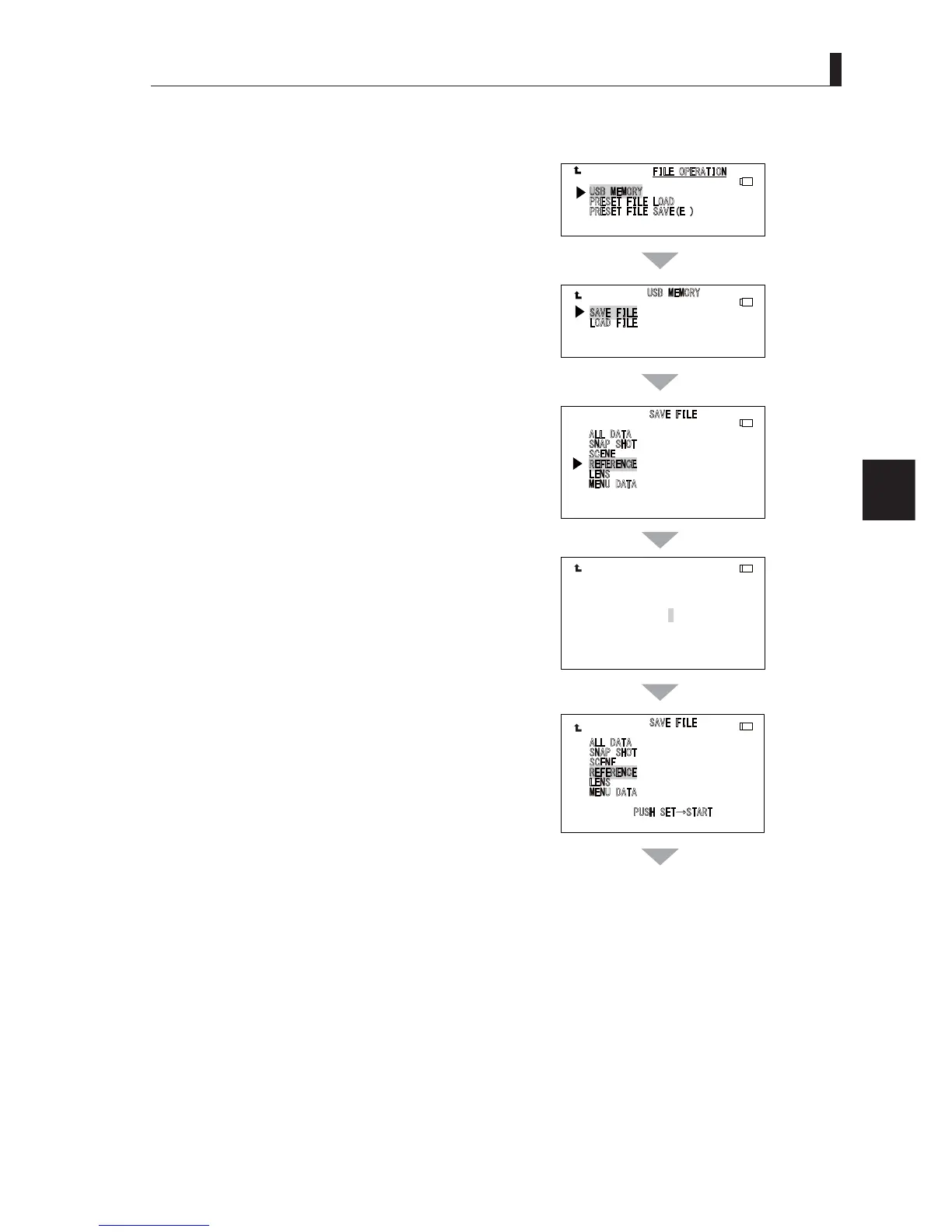
1 Use the menu select knob in the "MAIN MENU"
to move the cursor to "FILE OPERATION".
Then press the SET button to display the "FILE
OPERATION" sub menu.
2 Select "USB MEMORY" and press the SET button.
'LVSOD\WKHVXEPHQXRI86%0(025<
3 Select the item from the SAVE FILE submenu that
you wish to save.
,QWKH¿JXUH6$9(),/(LVVHOHFWHGWRVDYHWKH¿OH
4 Select the items you wish to save, and then press
the SET button
.
5 Use the menu select knob and the SET button to
set the file name with 8 characters.
7XUQWKH0HQXVHOHFWLRQNQREDWWKHÀDVKLQJFKDUDFWHU
position. Then, select the desired character and press
the SET button. When the SET button is pressed, it
moves to the next character.
6 When the file name is confirmed, the screen
returns to the "SAVE FILE" screen and "PUSH
SET → START" is displayed. Then, press the SET
button. If a file with the same name exists in the
USB memory, go to the Procedure "M1". To cancel
the saving process, turn the menu select knob
when "PUSHSET → START" is displayed. Then
select "CANCEL" and press the SET button.
$
//'$7$
6
1$36+27
6
&(1(
5()(5(1&( $%&'()&')
/
(16
0
(18'$7$
3
86+6(7Ѝ67$57
$//'$7$
61$36+27
6&(1(
5()(5(1&( $%&&')
/(16
0(18'$7$
6$9(),/(
/
2$'),/(
$
//'$7$
6
1$36+27
6
&(1(
5()(5(1&(
/
(16
0
(18'$7$
86%0(025<
3
5(6(7),/(/2$'
3
5(6(7),/(6$9((
㼁㻿㻮
㼁㻿㻮
㼁㻿㻮
㼁㻿㻮
㼁㻿㻮
continues to the next page



 To Next Page