124
UHK-430/CCU-430 1710 VER2 (E)
5.6 Setting the Items Controlled from OCP
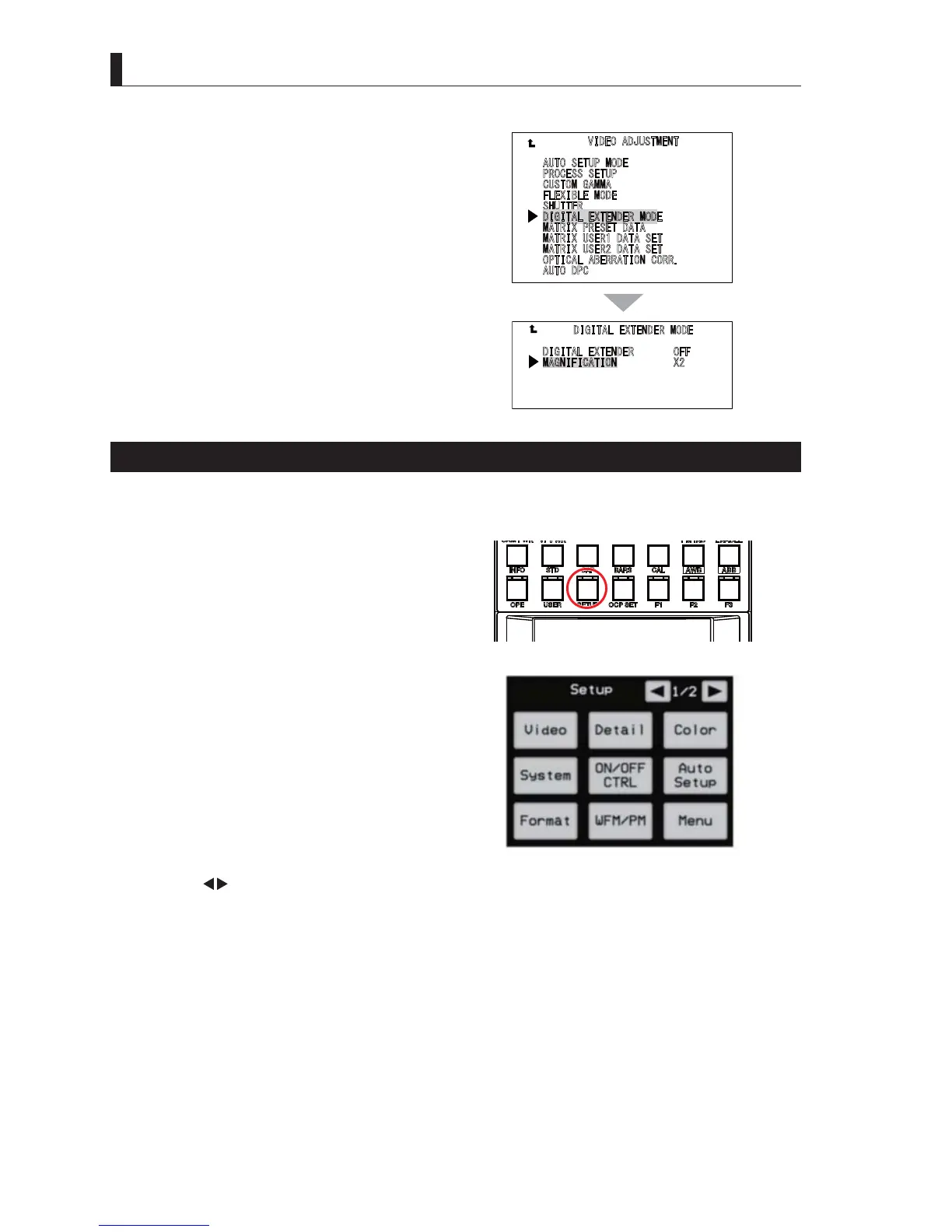
3 Select "DIGITAL EXTENDER MODE" from the
"VIDEO ADJUSTMENT" sub menu screen.
4 Select "MAGNIFICATION" from the "DIGITAL
EXTENDER MODE" sub menu to set the
magnification.
Switching the Video Gain (Step Gain)
,IVKRRWLQJLQWKHHYHQLQJRUQLJKWRULQWKHFRQGLWLRQVLQDURRPHWFZKHUHWKHOLJKWLVQRWVXI¿FLHQWVZLWFKWKHJDLQVHQVLWLYLW\
of the camera according to the brightness of the subject. It can be switched from OCP-300 (Operation Control Panel).
1 Press the "SETUP" switch among the FUNCTION
switches of OCP-300 to display the "SETUP"
screen (1/2) on the OCP-300 LCD screen.
2 Select "ON/OFF CTRL" from the "SETUP" screen
(1/2) to display Page 1/6.
3 Use the " " switch on the LCD screen to display Page 6/6.
4 Turn the rotary encoder knob under the "GAIN" display on the LCD screen to select the step gain.
7KHVWHSJDLQLVVHOHFWHGIURPWKHIROORZLQJG%G%G%G%G%G%G%
Caution
Setting the step gain exceeding "12dB" is an optional item. So, it may not be operable.
$
8726(78302'(
3
52&(666(783
&
86720*$00$
)
/(;,%/(02'(
6
+877(5
',*,7$/(;7(1'(502'(
0
$75,;35(6(7'$7$
0
$75,;86(5'$7$6(7
0
$75,;86(5'$7$6(7
2
37,&$/$%(55$7,21&255
$
872'3&
',*,7$/(;7(1'(52))
0
$*1,),&$7,21;



 To Next Page