50
UHK-430/CCU-430 1710 VER2 (E)
3.3 Connecting the CCU and Camera Head
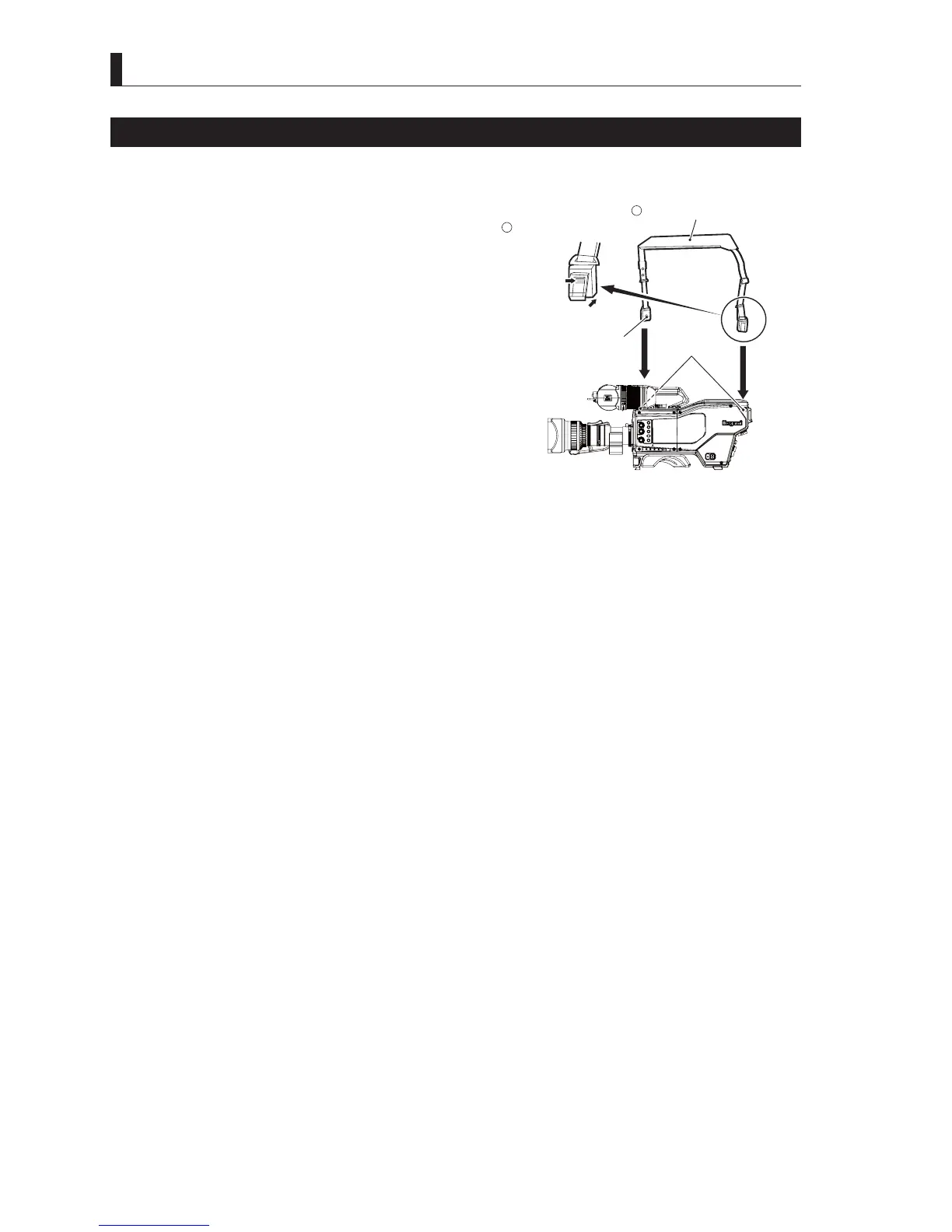
Attaching a Shoulder Belt
The camera includes hooks to attach a shoulder belt. Please use the shoulder belt depending on your operating conditions.
1 Press the upper part of the shoulder belt tab to
open the attachment.
2 With the attachment open, align the hole in the
attachment with the camera shoulder belt hook
(right side rear, left side front), and pull the
shoulder belt upwards.
Check the shoulder belt attachments are securely
attached to the shoulder belt hooks.
Caution:
If the shoulder belt attachments are not securely
attached to the shoulder belt hooks, the camera may
fall, resulting in damages or injury.
CCU
OFF
EXT
POWER
FILTER
HEAD
F2
F1
MIC
INCOM/ND
PGM/CC
MENU
VF
CHAR
Open the attachment.
Attach the shoulder belt.
The attachment opens.
Push
Shoulder belt
hook
Hole
Camera left view
1
2



 To Next Page