38
UHK-430/CCU-430 1710 VER2 (E)
3.2 Connecting the Power Cable and Camera Cable
3.2
Connecting the Power Cable and Camera Cable
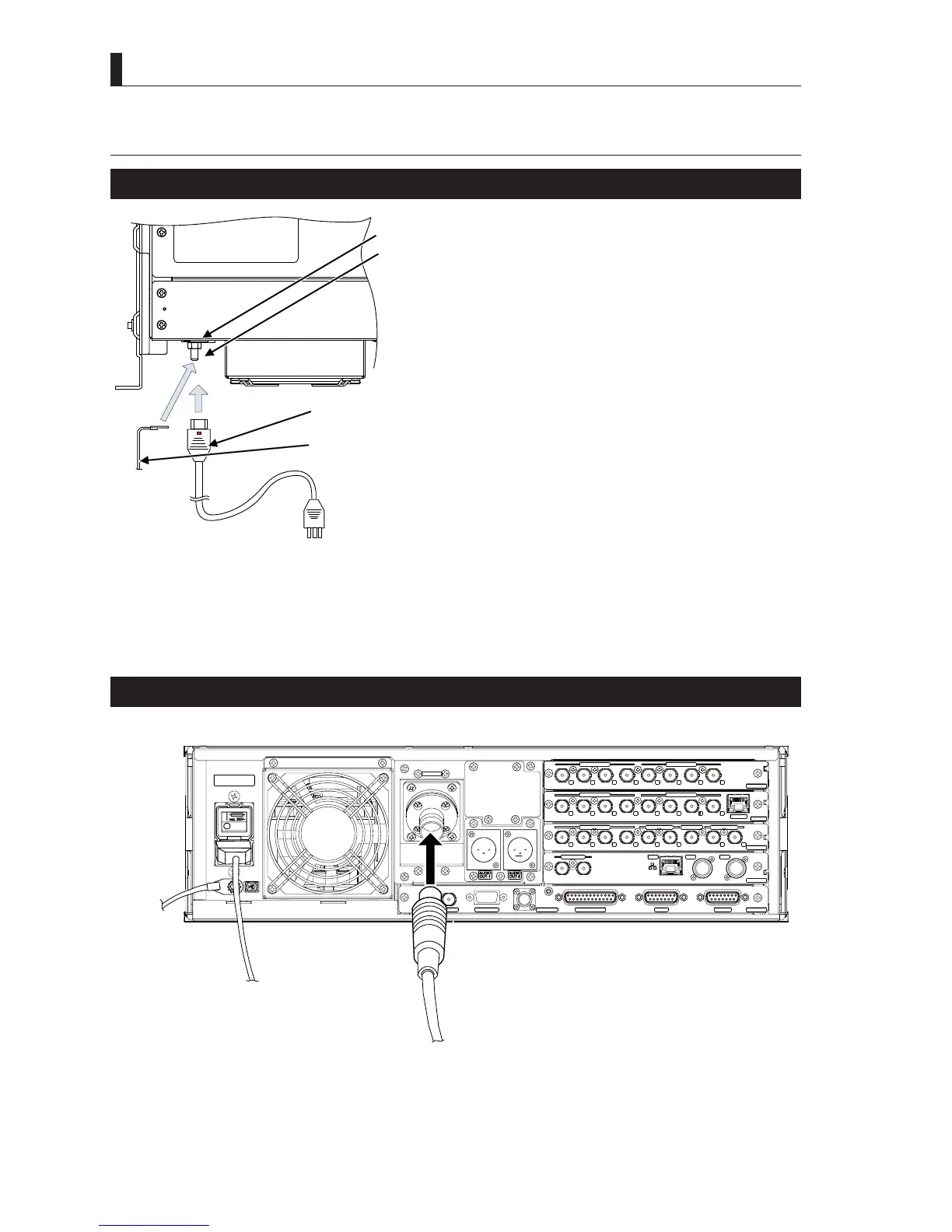
Connecting the AC Power Cable to the CCU
1 Connect the AC cable to the AC INPUT connector on the
rear of the CCU.
2 Insert the AC plug into the power outlet.
CAUTION
Do not turn on the main power switch.
3 Connect the grounding terminal on the housing rack
using a ground wire.
Note:
,IDJURXQGLQJOLQHLVSURYLGHGDWWKH$&RXWOHWWKHJURXQGLQJWHUPLQDOGRHVQRWQHHGWREHFRQQHFWHG
Caution:
Be sure the power supply voltage for the device operating region and the input power voltage settings of CCU are correct. For details,
UHIHUWR³6$)(7<35(&$87,216´
Connecting the Optical fiber Cable to the CCU
Refer to
"3.4 Connecting the CCU and Camera"
IRUKRZWRFRQQHFWWKH¿EHUFDEOHWRWKHFDPHUD
* * *
HD QTV IN
HD RETURN IN
SDI-OUTPUT-2
MON OUTPUT
HD TRK OUT
VP_OUT
AES OUT
SDI-OUTPUT-1
SYNC OUT
DATA TRK-1
TALLY OUT
COMMUNICATION
I/F
REMOTE
SYS_IF
REFERENCE
RET_MON
GbE TRK
LAN
OCP
CSU
MPU
1
2
1
2
4
1
2
1
1
2
2
3
4
4
3
CAMERA
HD_OUT
SDI-OUTPUT-4
SDI-OUTPUT-3
1
2
3
4
3
2
1
4
Fiber cable
AC cable
Ground
wire
AC cable
AC cable
Ground
terminal
Ground
terminal
To the ground
To the AC outlet



 To Next Page