122
UHK-430/CCU-430 1710 VER2 (E)
5.6 Setting the Items Controlled from OCP
■
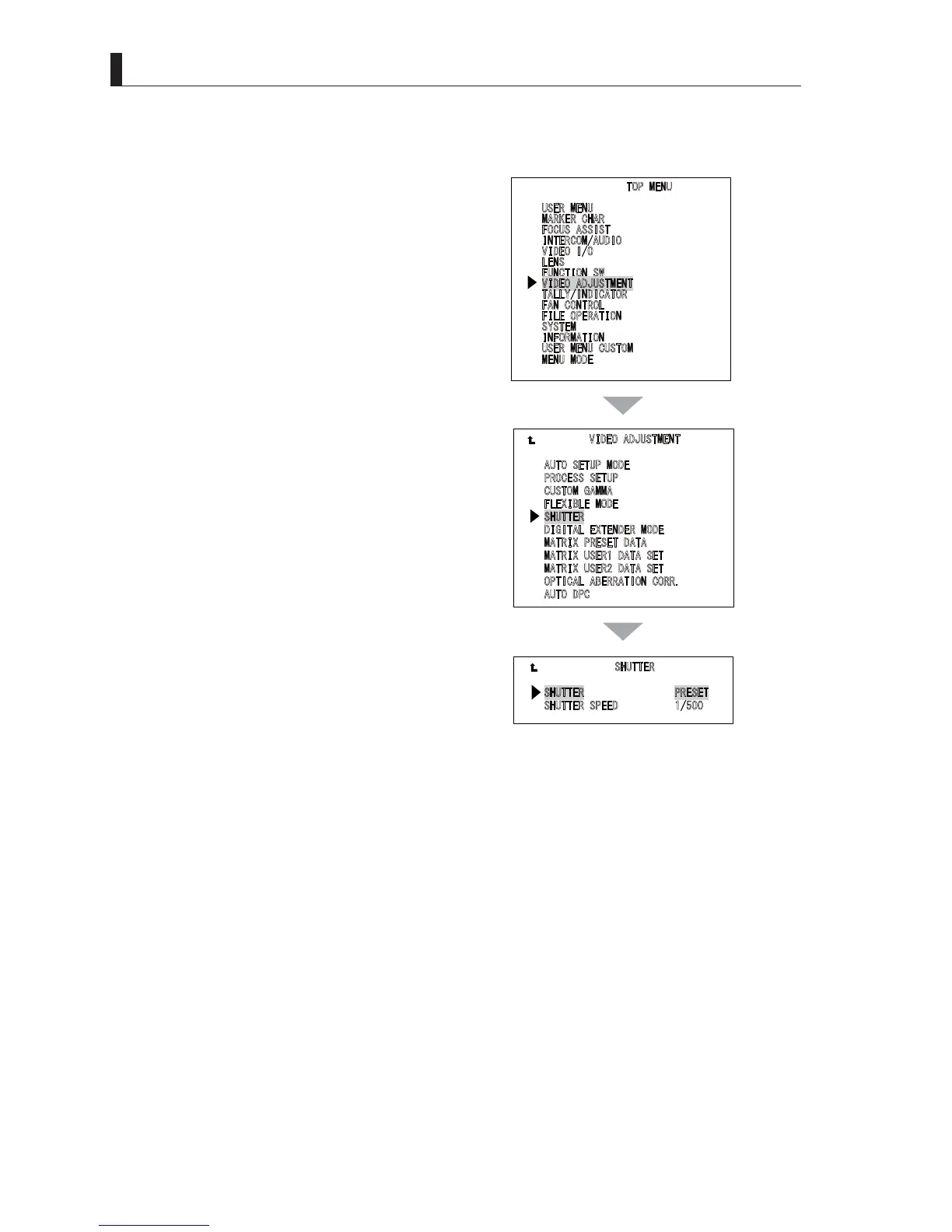
Setting from the Menu Screen
1 Press the "VF CHAR" button and ENTER button to
display "MAIN MENU".
2 Use the menu select knob to select "VIDEO
ADJUSTMENT", and then press the SET button.
3 Select SUHTTER" from the "VIDEO
ADJUSTMENT" menu screen.
4 Set the shutter operation.
8
6(50(18
0
$5.(5&+$5
)
2&86$66,67
,
17(5&20$8',2
9
,'(2,2
/
(16
)
81&7,216:
9,'(2$'-8670(17
7
$//<,1',&$725
)
$1&21752/
)
,/(23(5$7,21
6
<67(0
,
1)250$7,21
8
6(50(18&86720
0
(1802'(
9,'(2$'-8670(17
$
8726(78302'(
3
52&(666(783
&
86720*$00$
)
/(;,%/(02'(
6+877(5
'
,*,7$/(;7(1'(502'(
0
$75,;35(6(7'$7$
0
$75,;86(5'$7$6(7
0
$75,;86(5'$7$6(7
2
37,&$/$%(55$7,21&255
$
872'3&
6+877(5
6+877(535(6(7
6
+877(563(('



 To Next Page