204
UHK-430/CCU-430 1710 VER2 (E)
8.4 Initializing the Settings of this Product
8.4 Initializing the Settings of this Product
7KHIROORZLQJWZRFDVHVDUHDYDLODEOHIRULQLWLDOL]LQJWKHVHWWLQJRIWKLVSURGXFW
(1) Initializes the camera back to the user setting (ENGINEER SET FILE).
7KLVLQLWLDOL]HVWKHFDPHUDEDFNWRWKHVWDWHVHWE\XVHUHQJLQHHULQDGYDQFHLQUHVSRQVHWRWKHHQYLURQPHQWDQGWKHVKRRWLQJ
conditions.
,QLWLDOL]HVWKHFDPHUDEDFNWRWKHLQLWLDOIDFWRU\VHWWLQJ)$&725<6(7),/(
7KLVLQLWLDOL]HVWKHFDPHUDEDFNWRWKHLQLWLDOIDFWRU\VHWWLQJ
Use the Menu screen to change the settings. The setting method is described below.
Set Value Description
FILE SELECT
ENGINEER (default) Initializes the state back to the user setting.
FACTORY Initializes the state back to the initial factory setting.
LOAD START
READY (default) The state before initialization
START Starts initialization.
CANCEL Cancels initialization.
■
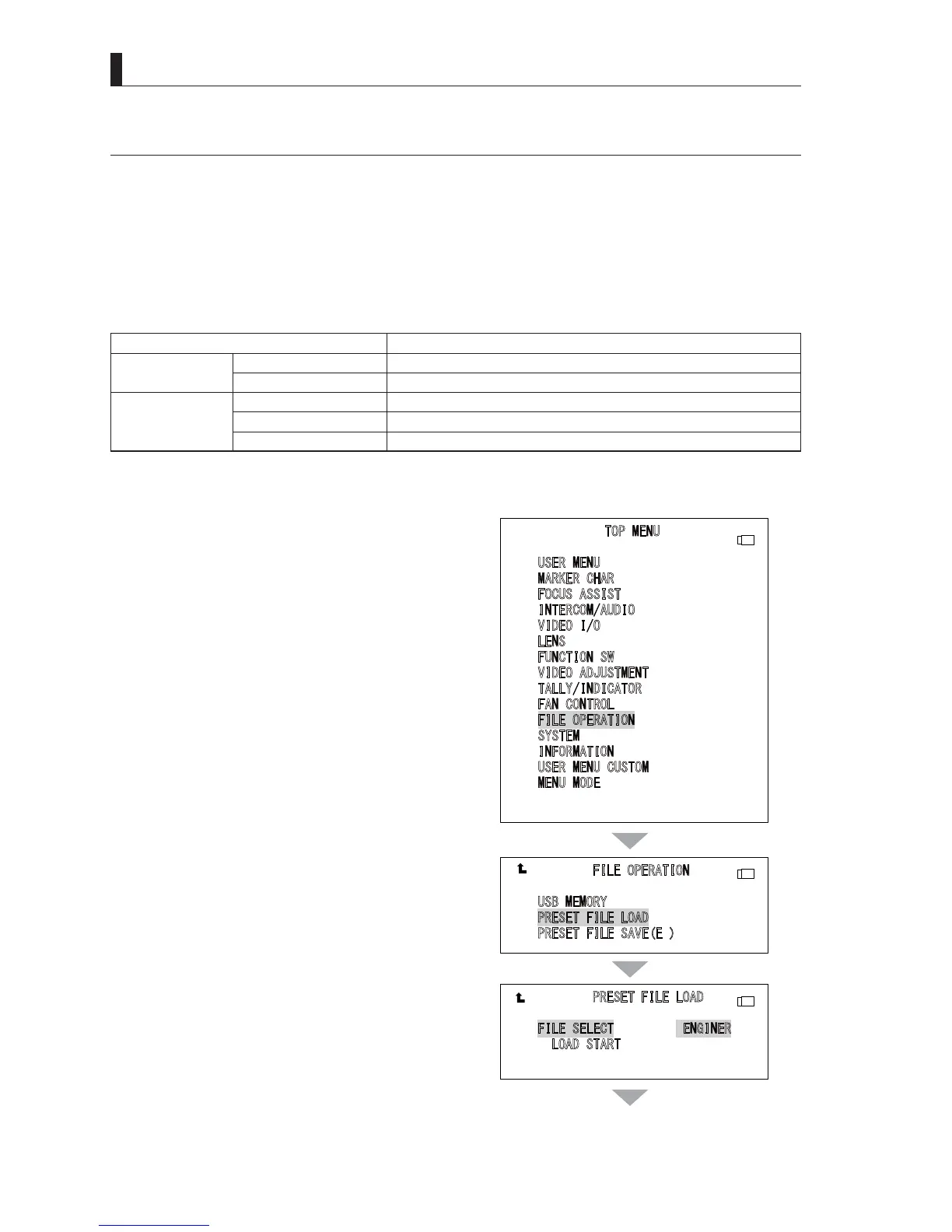
Initialization of the Camera
1 Turn the menu operation knob in the MAIN
MENU (TOP MENU) to move the cursor to "FILE
OPERATION". Then press the ENTER button to
display the sub menu.
2 Turn the menu operation knob to position the
cursor on “PRESET FILE LOAD”, and press the
ENTER button.
3 Turn the menu operation knob to position the
cursor on “FILE SELECT”, and press the ENTER
button.
The cursor moves to the mode selection column.
4 Turn the menu operation knob to select the value
(ENGINEER, FACTRY) to be set, and press the
ENTER button.
7KHYDOXHLVFRQ¿UPHG
35(6(7),/(/2$'
),/(6(/(&7(1*,1(5
/
2$'67$57
),/(23(5$7,21
8
6%0(025<
35(6(7),/(/2$'
3
5(6(7),/(6$9((
7230(18
8
6(50(18
0
$5.(5&+$5
)
2&86$66,67
,
17(5&20$8',2
9
,'(2,2
/
(16
)
81&7,216:
9
,'(2$'-8670(17
7
$//<,1',&$725
)
$1&21752/
),/(23(5$7,21
6
<67(0
,
1)250$7,21
8
6(50(18&86720
0
(1802'(
㼁㻿㻮
㼁㻿㻮
㼁㻿㻮
▲▲▲
continues to the next page



 To Next Page