210
UHK-430/CCU-430 1710 VER2 (E)
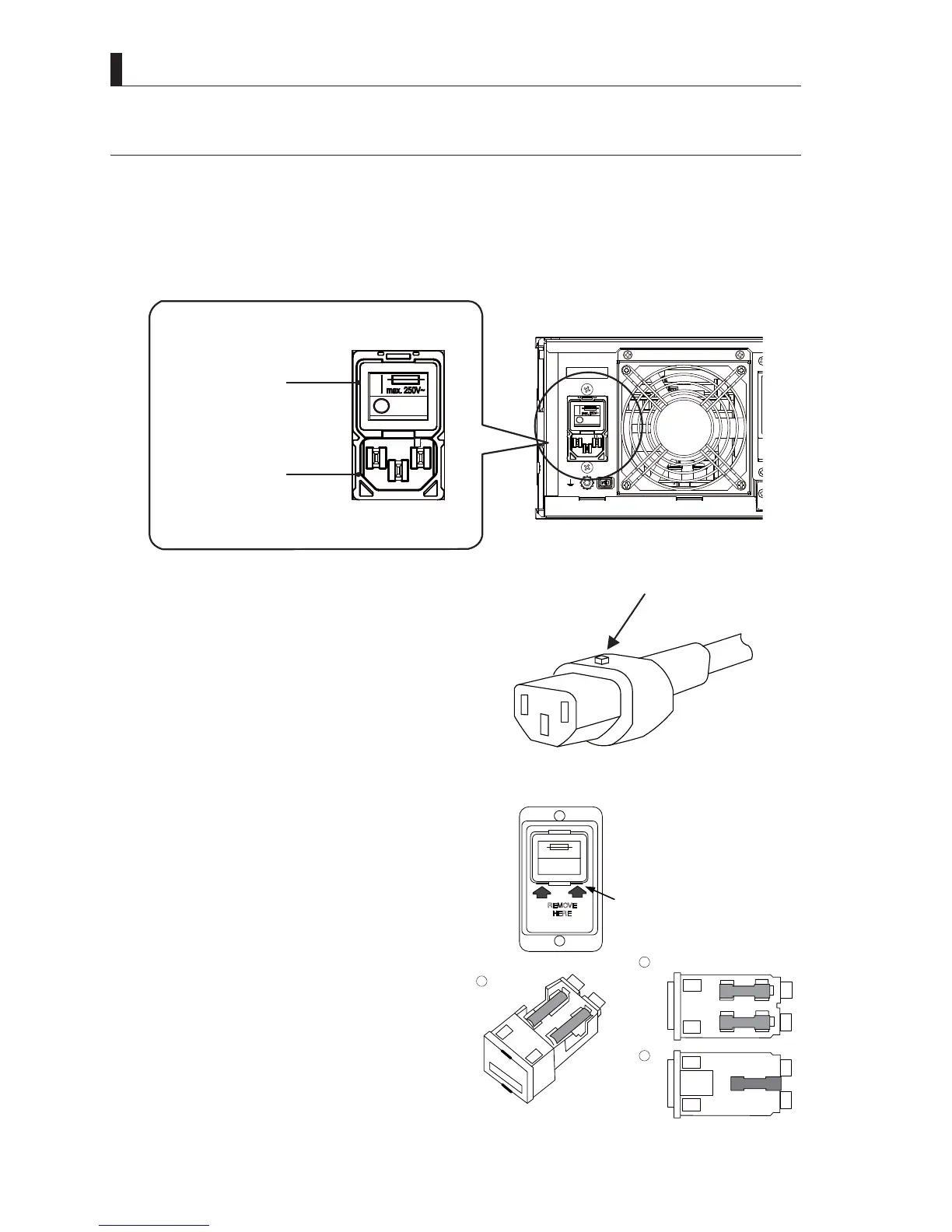
8.7 Replace the fuse in the AC inlet.
8.7 Replace the fuse in the AC inlet.
7KHSRZHUVZLWFKDQGIXVHDUHEXLOWLQWKH$&LQOHWRQWKHEDFNRI&&87KLVVHFWLRQH[SODLQVKRZWRUHSODFHWKHIXVHLQWKH$&
inlet.
1 Turn off the camera and the power switch of CCU.
2 Turn off the main power switch of the back side of CCU.
* * *
AC power input
connector
Main power switch
3 Remove the AC cable from the AC inlet.
7KH$&LQOHWRIWKLVSURGXFWXVHVWKH$&VRFNHWZLWK
retaining mechanism. Press this lock cancel button and
pull the socket toward the cable side to remove.
4 Removing the fuse
$IXVHV\PEROLVLQGLFDWHGRQWKHVZLWFKRIWKHSOXJLQ
unit. This symbol means that there is a fuse holder in
the unit. Since the frame color of the plug-in unit is red,
it is easy to distinguish the border from other parts (See
WKHULJKW¿JXUHV,QVHUWDWRROVXFKDVDUP\NQLIHDQG
driver into the bottom of the border, and lightly pull it
towards front to remove the plug-in unit (1). There are
two fuse holders, P and N, on the top of the unit (2), and
spare fuse hosing holder on the bottom of the unit (3).
5 After replacing the fuse, insert the plug-in unit into
the AC inlet.
6 Insert the socket of the AC cable into the AC inlet,
turn on the main power switch.
Lock cancel button
AC cable socket
REMOVE
HERE
AC inlet
Location to insert a driver, etc.
A plug in unit
2
3
1



 To Next Page