OPERATION
4
67
UHK-430/CCU-430 1710 VER2 (E)
4.5 Viewfinder Adjustment (VFL201D)
4.5 Viewfinder Adjustment (VFL201D)
7RPDNHWKHYLGHRTXDOLW\RIWKHYLHZ¿QGHUSLFWXUHFOHDUDGMXVWWKHYLHZ¿QGHUDFFRUGLQJWR\RXURSHUDWLQJHQYLURQPHQW7KLV
edition of the manual explains the case where the VFL201D is used.
Reference:
Please refer to
"Chapter 3 : INSTALLATION and CONNECTION" "Mounting and Removing the Viewfinder" (P. 44)
for
WKHDGMXVWPHQWRIWKHYLHZ¿QGHUSRVLWLRQVDQGDQJOHV
Visibility and Screen Adjustments of the Viewfinder
■
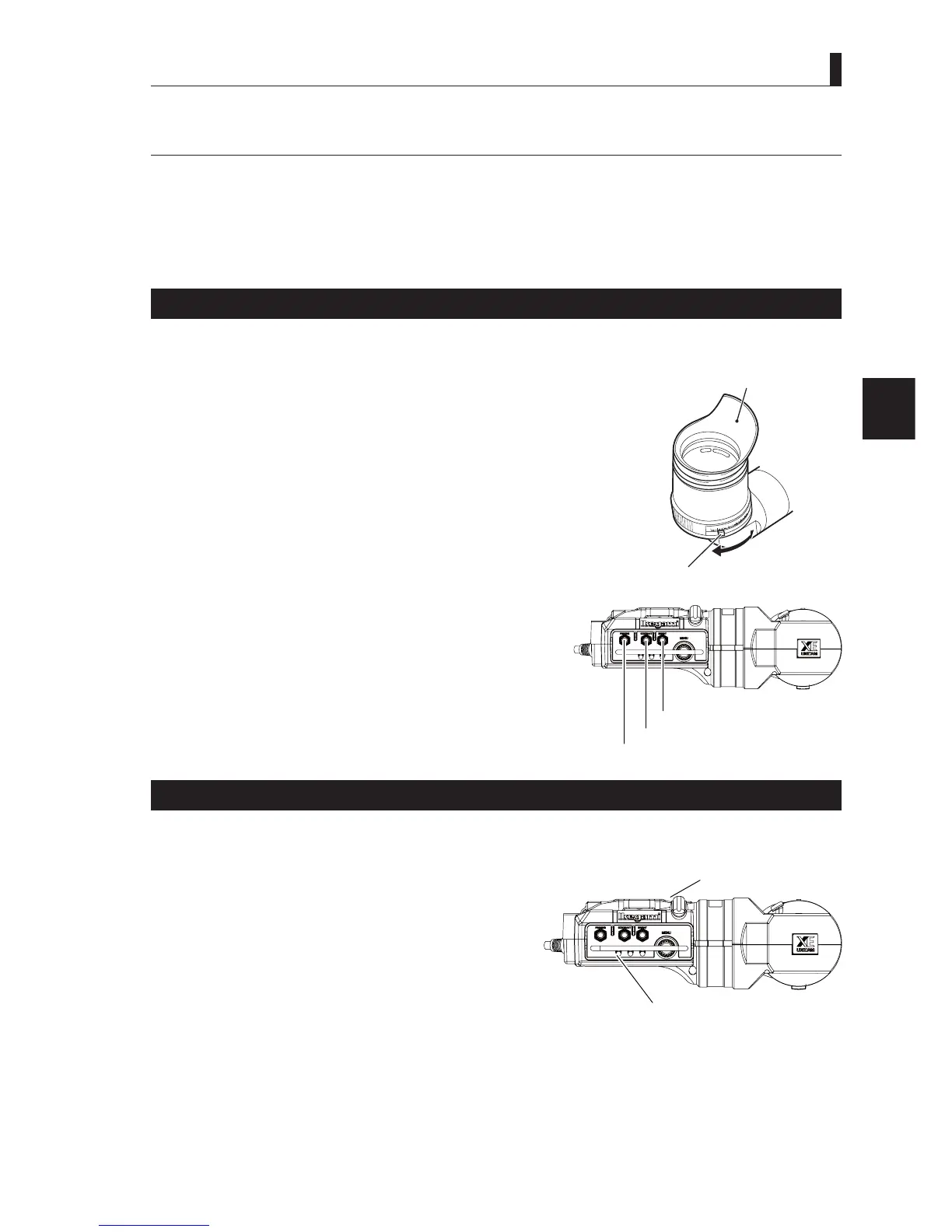
Visibility adjustment
7KHIRFXVRIWKHYLHZ¿QGHULVDGMXVWHGDFFRUGLQJWRWKHFDPHUDPDQVH\HVLJKW
1 While pressing the diopter adjustment lever of the viewfinder, slide it in the
direction of the arrow for best focus .
■
Screen adjustment
$GMXVWWKHSLFWXUHTXDOLW\RIWKHYLHZ¿QGHUVFUHHQ
1 Adjust each control knob on the viewfinder.
3($.,1*NQRE$GMXVWVWKHVKDUSQHVVRIWKHLPDJH
&2175$67NQRE $GMXVWVWKHFRQWUDVWRIWKHLPDJH
%5,*+71(66NQRE$GMXVWVWKHEULJKWQHVVRIWKHLPDJH
Checking the Display Mode of the Viewfinder
9DULRXVPDUNHUDQGFKDUDFWHUGLVSOD\VLQWKHYLHZ¿QGHUVFUHHQFDQEHVHW7KHGLVSOD\PRGHLVVHWDFFRUGLQJWRWKHXVDJHVLWXDWLRQ
■
Viewfinder (VFL201D) switch
The functions of the following items are assigned to the function switch (F1,
))RIWKHYLHZ¿QGHUIURPWKH0HQX
02126HWVWKH9)SLFWXUHWREODFNDQGZKLWHVFUHHQ
7$//< 7$//<GLVSOD\
8650$.(5 )RUFKHFNLQJIUDPLQJ
:)09LGHRZDYHIRUPGLVSOD\
96&9HFWRUVFUHHQGLVSOD\
=220,1' =RRPSRVLWLRQRIOHQV
=(%5$ 9LGHROHYHOLQGLFDWLRQ
3($.83 (QKDQFHWKHVKDUSQHVVRIWKHYLHZ¿QGHUSLFWXUH
Reference:
The settings of Display mode is performed on the Menu screen. Please refer to
"Chapter 5 : CAMERA SETTINGS and
ADJUSTMENT" "5.3 Menu Configuration and content" (P. 86)
for more information.
Eyepiece
Visibility adjustment lever
BRIGHTNESS knob
PEAKING knob
CONTRAST knob
TALLY display
Function switch (F1, F2, F3)



 To Next Page