CAMERA SETTINGS and ADJUSTMENT
5
121
UHK-430/CCU-430 1710 VER2 (E)
5.6 Setting the Items Controlled from OCP
5.6 Setting the Items Controlled from OCP
Selecting the Shutter Speed
7KHUHDUHWZRW\SHVRIVKXWWHUIXQFWLRQV2QHLV3UHVHW6KXWWHULQZKLFKWKHVKXWWHUVSHHGLVVHWLQDGYDQFHDQGWKHRWKHULV
"Variable Shutter" in which the shutter speed is arbitrarily set.
①
3UHVHW6KXWWHU 7KHVKXWWHUVSHHGFDQEHVHW
②
9DULDEOH6KXWWHU7KHVKXWWHUVSHHGFDQEHDUELWUDULO\VHWZLWKLQWKHIROORZLQJUDQJH
VHFRQGV6FDQQLQJV\VWHP+]
VHFRQGV6FDQQLQJV\VWHP+]
7KHYDULDEOHVKXWWHULVVXLWDEOHLQWKHVLWXDWLRQVZKHQVKRRWLQJD3&VFUHHQHWFWKDWLVQRWV\QFKURQL]HGZLWK79RUZKHQ
shooting a subject moving at high speed such as golfer swinging and later playing the video in slow motion. By setting the shutter
speed at high speed, you can shoot quick-moving subjects at high resolution in sport coverage and broadcasting, etc. However, as
the shutter speed increases, the interval you can set will be longer.
■
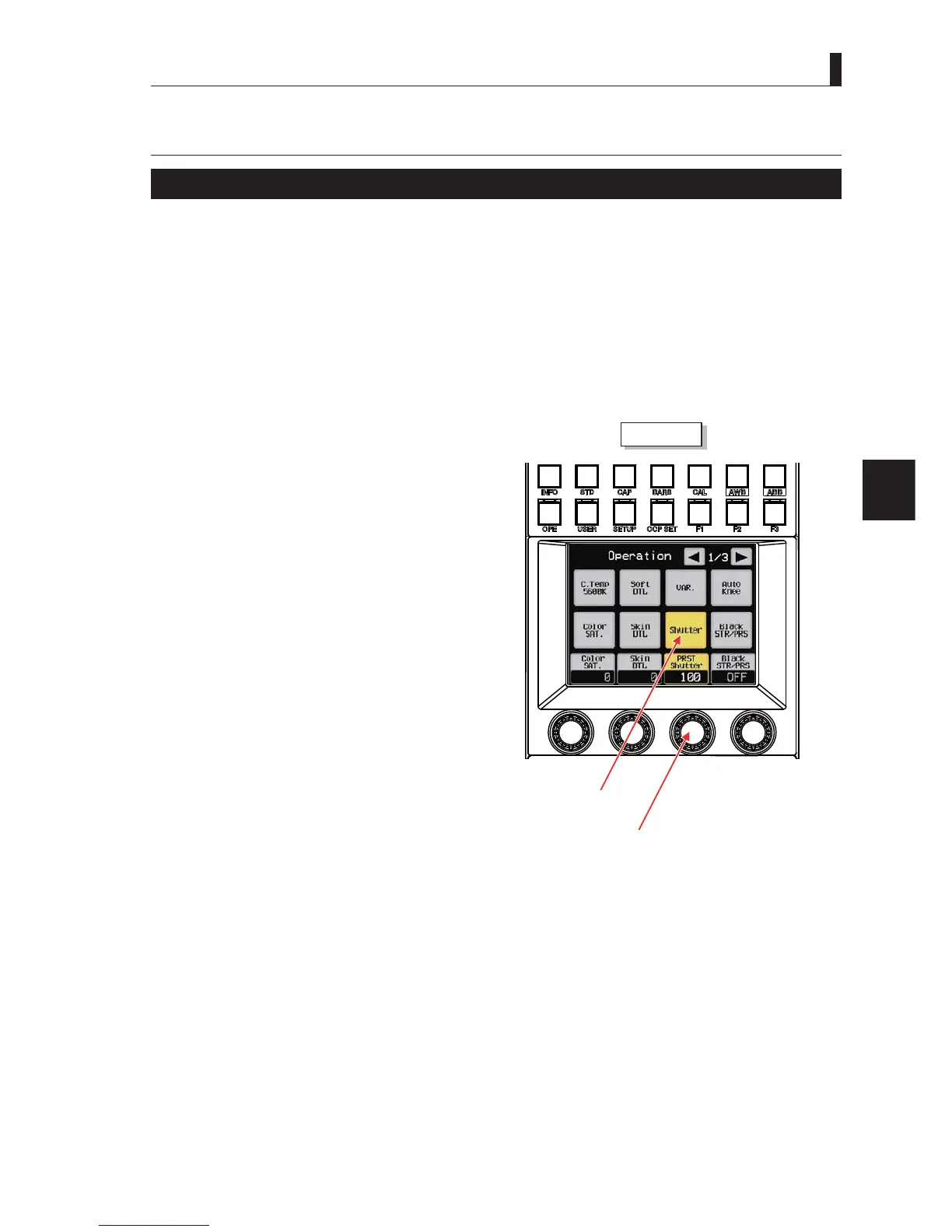
Setting from the OCP-300
This section describes the setting method of shutter speed for
OCP-300.
1 Press the "OPE" switch of OCP-300.
2 "Operation" appears on the OCP LCD screen, and
the items related to "Shutter" appears in the Page
"1/3".
3 Select "VAR." (Variable Shutter), "SUTTER" or
"PRST Shutter" (Preset Shutter).
Note
$VWKHVKXWWHUVSHHGLQFUHDVHVWKHVHQVLWLYLW\GHFUHDVHVVRLWLV
QHFHVVDU\WRHQVXUHVXI¿FLHQWOLJKWLQJFRQGLWLRQV
ON/OFF switch
Rotary encorder knob 3
OCP-300



 To Next Page