CAMERA SETTINGS and ADJUSTMENT
5
119
UHK-430/CCU-430 1710 VER2 (E)
5.5 Using the USB Memory
■
The setting status of the camera loaded from the USB memory.
Read the camera setting condition from the USB memory.
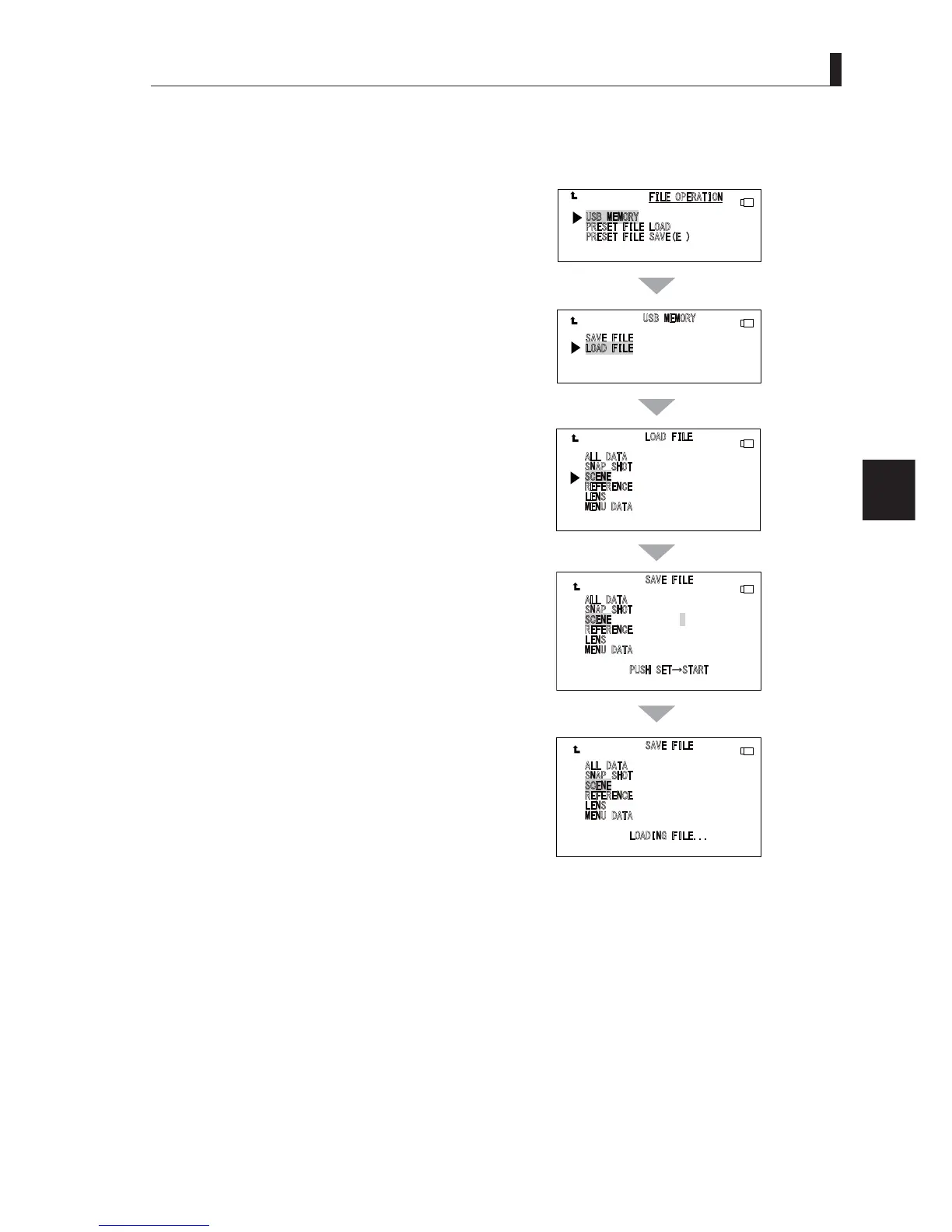
1 Use the menu select knob in the "MAIN MENU"
to move the cursor to "FILE OPERATION".
Then press the SET button to display the "FILE
OPERATION" sub menu.
.
2 Select "USB MEMORY" and press the SET button.
'LVSOD\WKHVXEPHQXRI86%0(025<
3 Select the operation items performed from the sub
menu of "USB MEMORY".
6HOHFW/2$'),/(WRORDGWKH¿OH
4 Select the items you wish to load from the sub
menu of LOADFILE.
,QWKH¿JXUHVHOHFW6&(1(DQGSUHVVWKH6(7EXWWRQ
5 After selecting the item to be read to the camera,
press the SET button.
Then select whether to read all files or individual
files from No. 1 to No. 8. In the example in the
figure, No. 8 is selected. Then select a file stored
on the USB memory.
After the contents are determined, [PUSH SET ->
START] is displayed. Press the SET button.
If you wish to cancel, turn the menu select knob
when [PUSH SET -> START] is displayed.
Note:
6&(1(),/(/(16),/(0(18'$7$LVDERXWLW
LVSRVVLEOHWRVHOHFWLQGLYLGXDOGDWD$//RUDOOGDWD
6&(1( $//1212
/(16),/( $//12
0(18'$7$ $//9)
6 When the file is being saved, [LOADING
FILE] is displayed. If the file is saved normally,
[COMPLETE] is displayed.If ALL FILE and MENU
DATA have been read, the camera is automatically
restarted after display of [COMPLETE].
Caution:
1HYHUUHPRYHWKH86%PHPRU\IURPWKHVORWGXULQJGLVSOD\RI>/2$',1*),/(@RUZKLOHWKHDFFHVVLQGLFDWRULVOLJKWHGDVGDWDLV
being written to the USB memory. Removing it at this time could damage the USB memory data or the USB memory itself.
Caution:
,IFKDQJHVDVWKRVHOLVWHGEHORZKDYHEHHQPDGHLQWKH¿OHQDPHVWRUHGWRD3&HWFLWLVQRWSRVVLEOHWRGLVSOD\WKH¿OHQDPHQRUPDOO\
,ID¿OHQDPHZLWKPRUHWKDQFKDUDFWHUVKDVEHHQVHW
8VLQJ¿OHQDPHVNDQMLNDQDHWFFRPSRVHGRIFKDUDFWHUVRWKHUWKDQKDOIVL]HOHWWHUVRIWKHDOSKDEHW
$
//'$7$
6
1$36+27
6&(1( $%&'()&')
5
()(5(1&(
/
(16
0
(18'$7$
/
2$',1*),/(
$
//'$7$
6
1$36+27
6&(1( $%&'()&')
5
()(5(1&(
/
(16
0
(18'$7$
3
86+6(7Ѝ67$57
$
//'$7$
6
1$36+27
6&(1(
5
()(5(1&(
/
(16
0
(18'$7$
6
$9(),/(
/2$'),/(
86%0(025<
3
5(6(7),/(/2$'
3
5(6(7),/(6$9((
㼁㻿㻮
㼁㻿㻮
㼁㻿㻮
㼁㻿㻮
㼁㻿㻮



 To Next Page