OPERATION
4
65
UHK-430/CCU-430 1710 VER2 (E)
4.4 Output Signal Check
4.4 Output Signal Check
$IWHUWXUQLQJ21WKHSRZHUHQVXUHWKDWVLJQDOVDUHFRUUHFWO\RXWSXWRQWKH30DQG:)0,IWKHYLGHRVLJQDOVDUHQRWRXWSXWUHIHU
to Chapter 8 and check the following points before determining that it is a device failure.
$UHWKHFDEOHVSURSHUO\FRQQHFWHG"
$UHWKHVZLWFKHVFRUUHFWO\VHW"
,VWKHEUHDNHUWKURZQ"
,VWKH32:(5VZLWFKVHWWR21"
Reference:
See
"Chapter 3 : INSTALLATION and CONNECTION" (P. 35)
for connection of peripheral equipment.
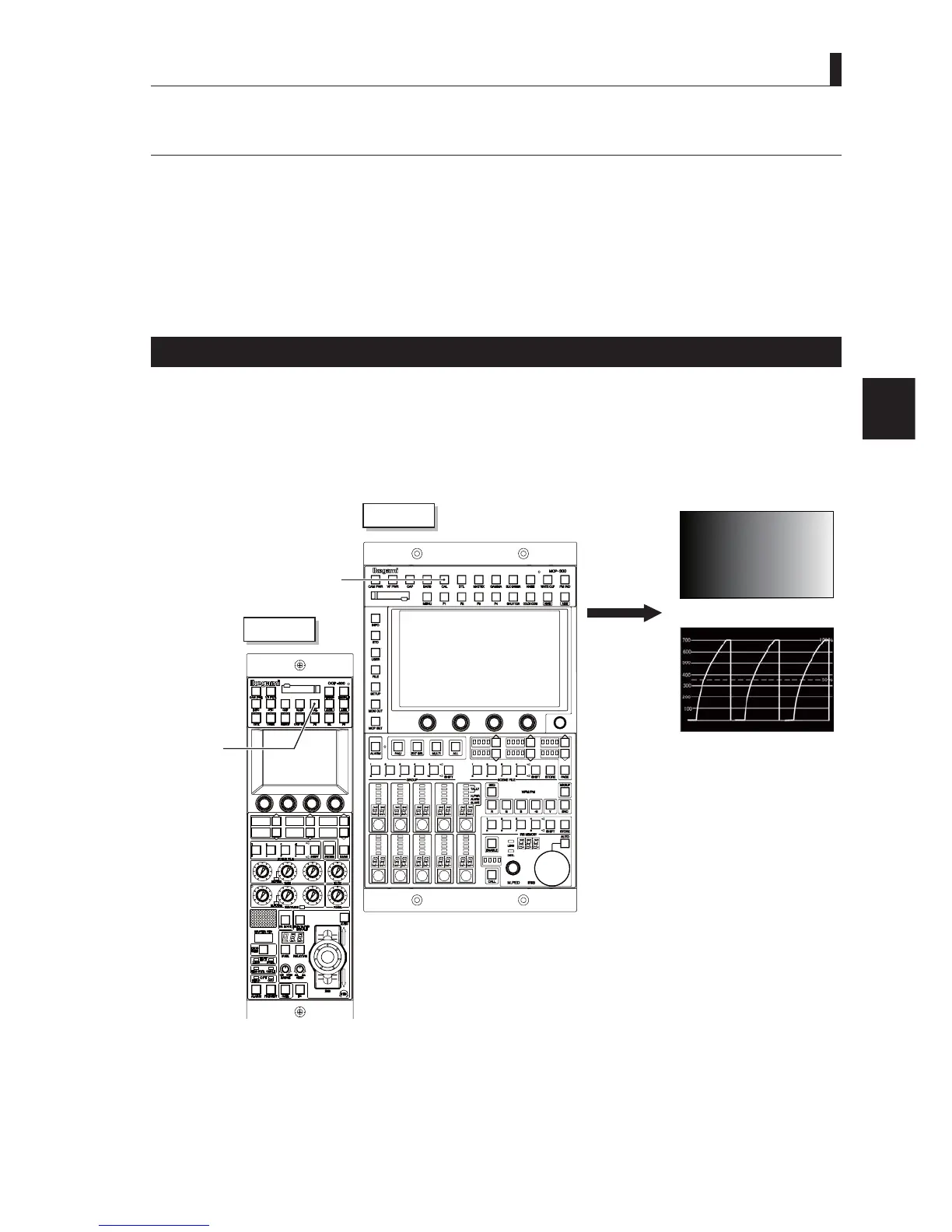
Test Pulse (CAL Signal) Check
Check if the level of the video system is normal.
1 Set the CAL button on the OCP or MCP to ON.
2 Check if a test signal with 100% level is output to the R, G, and B channels on the waveform monitor.
MCP-300
OCP-300
CAL button
"ON"
CAL button
"ON"
PM
WFM
(R.G.B)



 To Next Page