126
UHK-430/CCU-430 1710 VER2 (E)
5.7 Controlling from the Camera Head
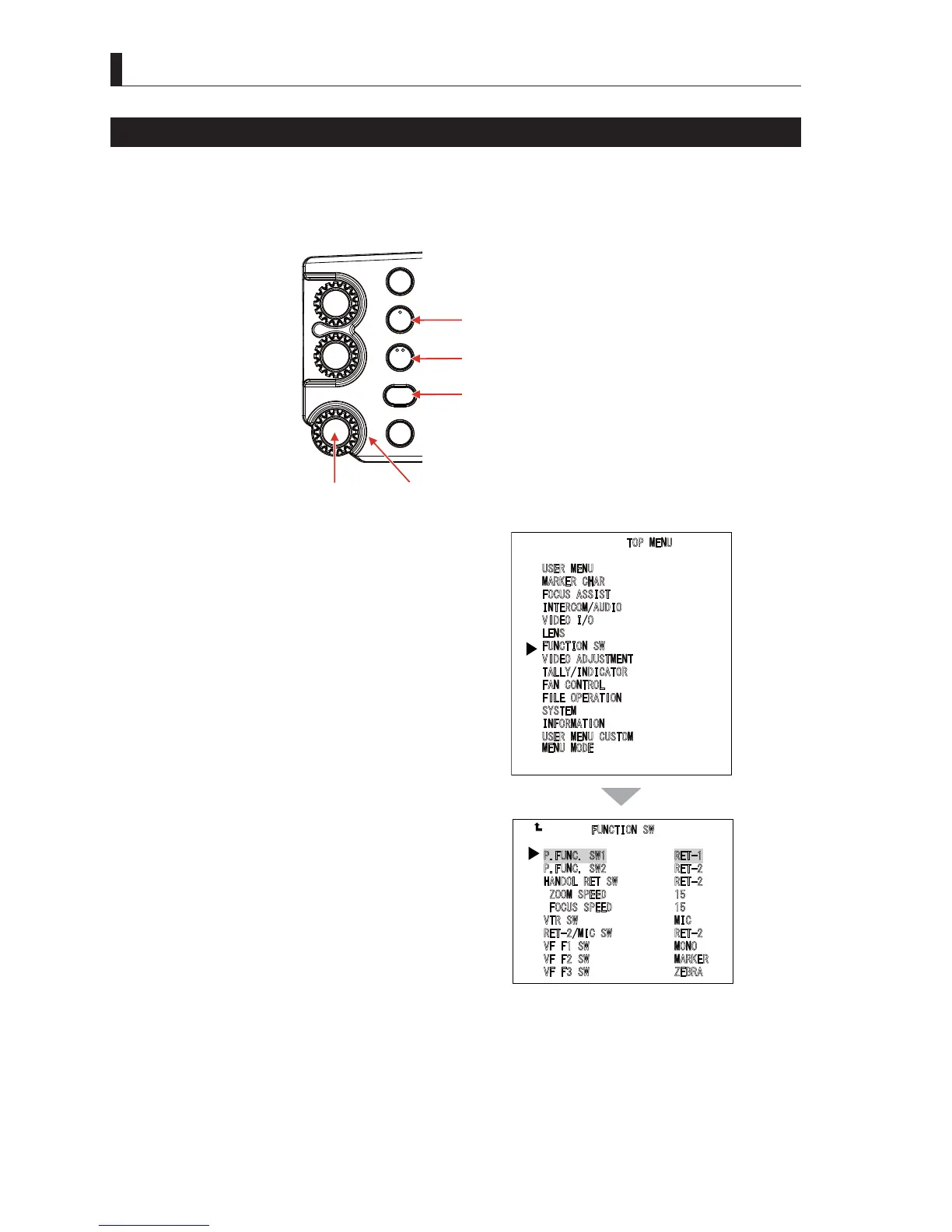
Assigning Functions to FUNTION Buttons
8VHUVFDQVHWEXWWRQVIRUWKHLUSUHIHUHQFH$VVLJQLQJWKHIXQFWLRQVWKDWDUHIUHTXHQWO\XVHGWRWKHVHEXWWRQVFDQLQFUHDVHWKH
usability of user interface.
■
Assigning the FUNTION Switch on the Right Side of the Camera
FILTER
HEAD
F2
F1
MIC
INCOM/ND
PGM/CC
MENU
VF
CHAR
F1 switch (FUNCTION1 button)
SET button Menu select knob
F2 switch (FUNCTION2 button)
VF CHAR button
1 Press the "VF CHAR" button and ENTER button to
display MAIN MENU (TOP MENU).
2 Use the menu select knob to select "FUNCTION
SW", and then press the SET button.
3 Use the menu select knob to temporarily select
"P.FUNC SW1" from "FUNCTION" sub menu
screen, and then press the SET button.
4 The blinks of characters are moved to the field of
setting values.
5 Use the menu select knob to select the setting
values, and then press the SET button.
6 Set "P.FUNC SW2", "HANDOL RET SW" and
"VTR SW" in the same way.
7230(18
8
6(50(18
0
$5.(5&+$5
)
2&86$66,67
,
17(5&20$8',2
9
,'(2,2
/
(16
)
81&7,216:
9
,'(2$'-8670(17
7
$//<,1',&$725
)
$1&21752/
)
,/(23(5$7,21
6
<67(0
,
1)250$7,21
8
6(50(18&86720
0
(1802'(
)81&7,216:
3)81&6:5(7
3
)81&6:5(7
+
$1'2/5(76:5(7
=
22063(('
)
2&8663(('
9
756:0,&
5
(70,&6:5(7
9
))6:0212
9
))6:0$5.(5
9
))6:=(%5$



 To Next Page