OPERATION
4
63
UHK-430/CCU-430 1710 VER2 (E)
4.3 Turning ON Power
■
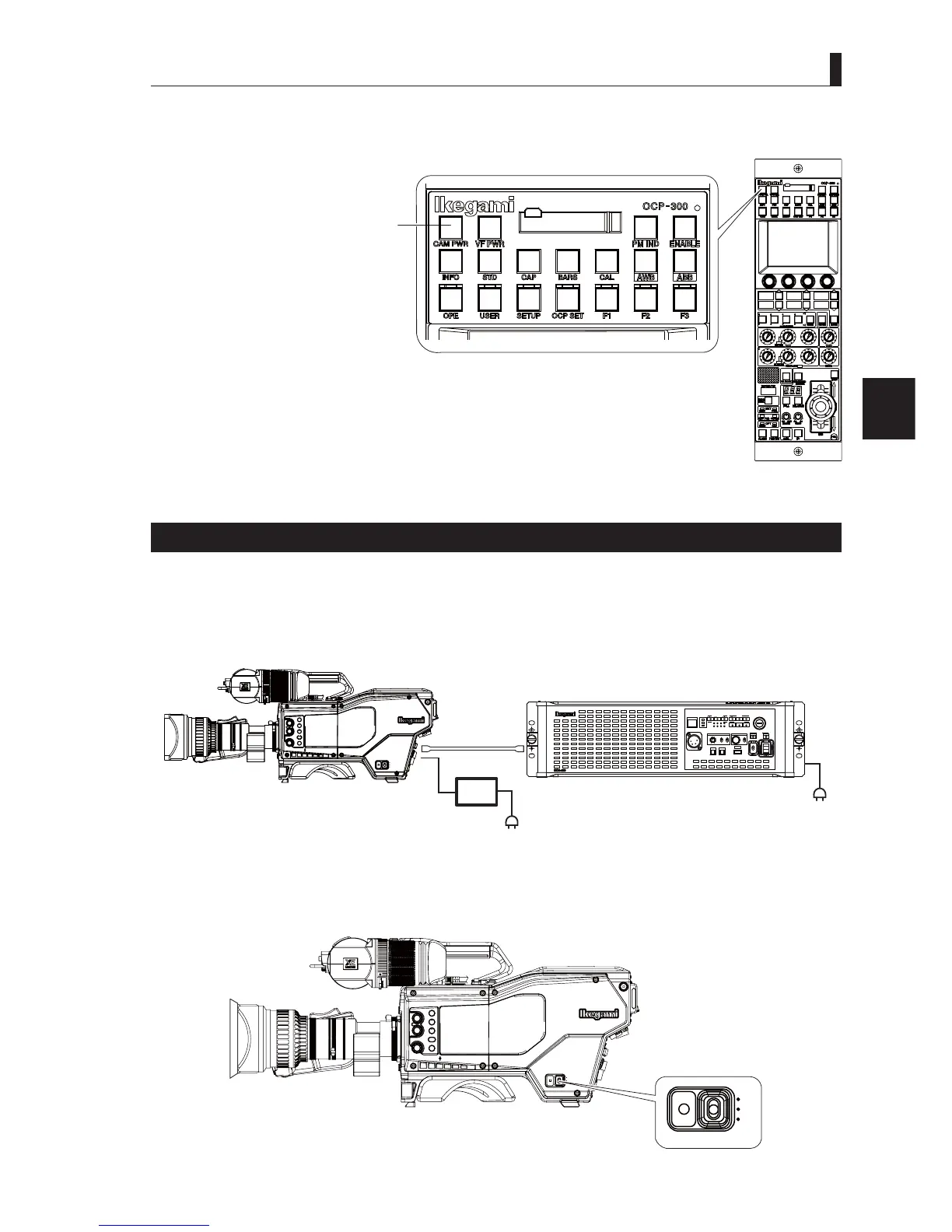
To Control Power ON/OFF from OCP (Remote control)
1 To change the status of power supply to the camera from "ON" (switch light on) to "OFF",
press and hold the [CAM PWR] switch of the OCP for 2 seconds.
2 To change the status of power supply to the camera from "OFF" (switch light off) to "ON",
press the [CAM PWR] switch of OCP.
Note:
Function will change according to the control panel to be used.
Activating the FIBER SINGLE MODE
7KH),%(56,1*/(02'(LVXVHGWRH[WHQGWKHWUDQVPLVVLRQGLVWDQFHEHWZHHQWKHFDPHUDDQG&&8RULQDSSOLFDWLRQVZKHUH
VLQJOHPRGH¿EHUVDUHDYDLODEOH7KHWUDQVPLVVLRQGLVWDQFHLVGHWHUPLQHGE\WKHSRZHUORVVDQGWKHDWWHQXDWLRQRIWKHOLJKW,IWKH
SRZHUORVVLVWRRJUHDWSRZHUQHHGVWREHVXSSOLHGWRWKHFDPHUDZLWKDVHSDUDWHSRZHUVRXUFH:KHQWKH),%(56,1*/(02'(
is set to ON, the power will not be supplied from CCU, but two-way optical transmission is operable as usual.
7KHFDPHUDDQG&&8QHHGVWREHVHWLQGLYLGXDOO\WRRSHUDWHLQ),%(56,1*/(02'(7KHIROORZLQJGHVFULEHVWKHVHWWLQJ
PHWKRG7KLVSURGXFWFDQEHH[WHQGHGRQXSWRNPRI60¿EHU
CCU
OFF
EXT
POWER
FILTER
HEAD
F2
F1
MIC
INCOM/ND
PGM/CC
MENU
VF
CHAR
CAM:400V T5A
POWER
CCU
CAM
TEMP
FAN
ALARM
COMM
SDI
APC
GENLOCK
CCU STATUS
SHORT
OPEN
NORMAL
CABLE STATUS
OPT RX LEVEL
CAM
CCU
TALLY
ID
INTERCOM
PHONE
INIT/PM
CALL
COM
PRV
MIC
ON
OFF
PTT
MENU
USB
OPE
OFF
Fiber Cable
DC Power
AC
AC
1 Set the output voltage of the external power supply to +12V (Supply voltage range: +11 to 17V).
2 Turn the POWER switch to the "OFF" position.
CCU
OFF
EXT
POWER
FILTER
HEAD
F2
F1
MIC
INCOM/ND
PGM/CC
MENU
VF
CHAR
CCU
OFF
EXIT
POWER
OCP-300
CAM POWER switch



 To Next Page