62
UHK-430/CCU-430 1710 VER2 (E)
4.3 Turning ON Power
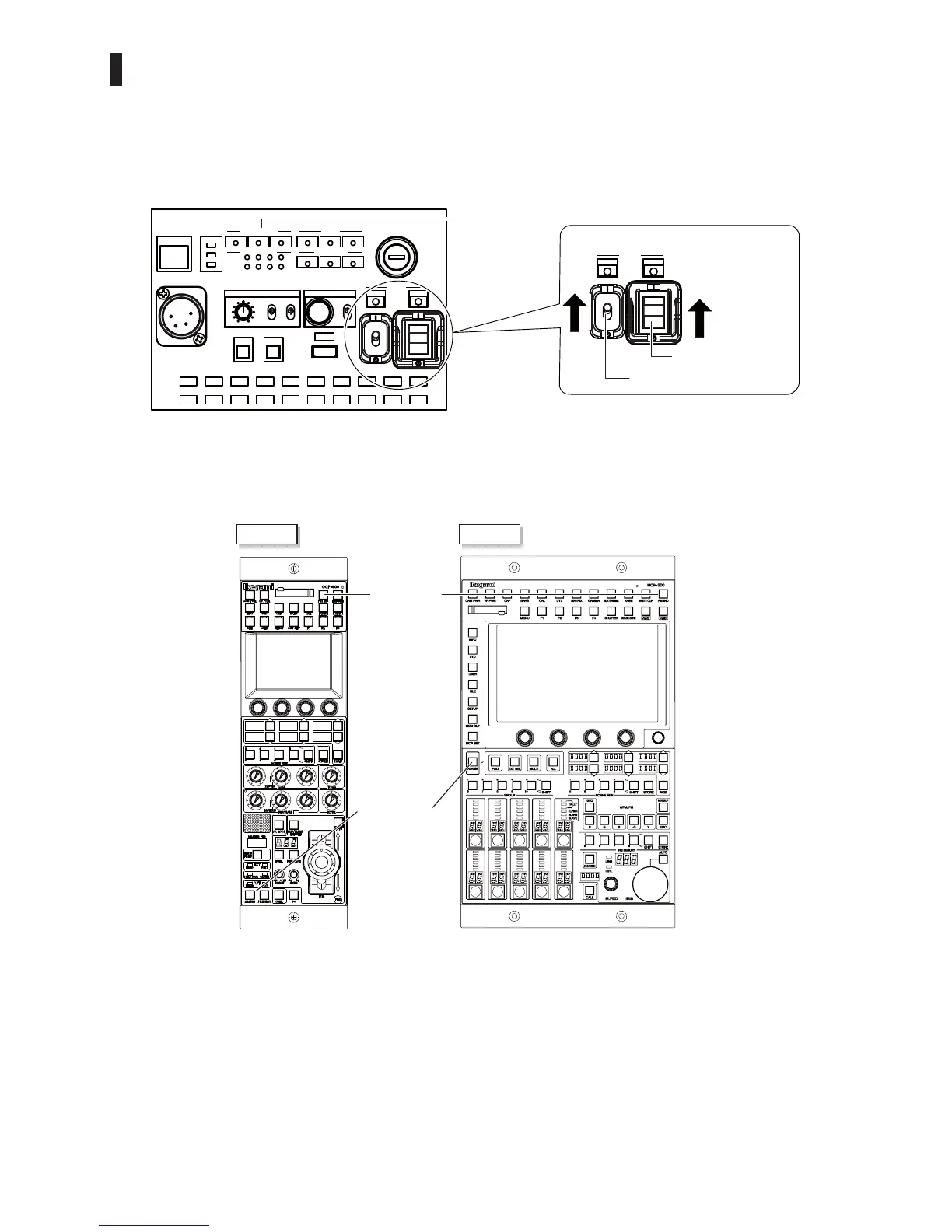
4 To turn off the power of the camera from the CCU side, set the [Camera POWER] switch of the front of CCU to
"OFF".
CCU front panel
CAM:400V T5A
POWER
CCU
CAM
TEMP
FAN
ALARM
COMM
SDI
APC
GENLOCK
CCU STATUS
SHORT
OPEN
NORMAL
CABLE STATUS
OPT RX LEVEL
CAM
CCU
TALLY
ID
INTERCOM
PHONE
INIT/PM
CALL
COM
PRV
MIC
ON
OFF
PTT
MENU
USB
OPE
OFF
POWER
CCU
CAM
Camera POWER switch
CABLE indicator
CCU POWER switch
5 Make sure that the ALARM indicator on the OCP or MCP is not flashing.
:KHQWKHFDPHUDVHOIGLDJQRVWLFIXQFWLRQGHWHFWVHUURUVWKH$/$50LQGLFDWRUÀDVKHVDQGWKHVHOIGLDJQRVLVLQIRUPDWLRQ
will be displayed for 20 seconds on the MON output.
OCP-300 MCP-300
PM IND button
ALARM indicator
Caution:
The self diagnostic information is not displayed on the PM unless the PM IND of the OCP is set to "ON".



 To Next Page