CAMERA SETTINGS and ADJUSTMENT
5
5.1 Adjusting INCOM
79
UHK-430/CCU-430 1710 VER2 (E)
5.1 Adjusting INTERCOM
Adjusting Headset Volume
This section explains how to adjust the headsets volume.
Caution:
'RQRWVHWWKH,17(5&20FRQWURONQRE,17(5&20FRQWURONQRE,17(5&203*0FRQWURONQREDQG,17(5&20
3*0FRQWURONQREWRQHDUPD[LPXPOHYHOIURPWKHEHJLQQLQJ6HWWLQJWKHYROXPHOHYHOWRRKLJKZLWKWKHLQWHUFRPKHDGVHWRQ
your ears may damage your eardrums. If you suddenly set the volume level too high, it may also damage the headset. Excessive sound
pressure from the headset may cause a hearing loss.
LIGHT
RET 1 RET 2 TALLY
CALL
ON
OFF
DIM
1
2
3
4
4
3
2
1
DIM
OFF
ON
ON
OFF
PTT
PROD
BOTH
ENG
ENG
BOTH
PROD
PTT
OFF
ON
INCOM 1
FRONT
REAR
INCOM SEL
FRONT
INCOM 2
INCOM
PGM 1 PGM 2 PGM 2PGM 1
INCOM
INTERCOM 1 INTERCOM 2
DC OUT
GL IN/SYNC OUT
MIC 2MIC 1
GbE TRK
11~17V
DC-IN
TRACKER
+12V
OFF
SDI OUT 1
+48V
+12V
OFF
+48V
SDI OUT 2
USB
REMOTE
SDI OUT 3
SDI I/O 4
12V 1A
LIGHT
RET 1 RET 2 TALLY
CALL
ON
OFF
DIM
1
2
3
4
4
3
2
1
DIM
OFF
ON
ON
OFF
PTT
PROD
BOTH
ENG
ENG
BOTH
PROD
PTT
OFF
ON
INCOM 1
FRONT
REAR
INCOM SEL
FRONT
INCOM 2
INCOM
PGM 1 PGM 2 PGM 2PGM 1
INCOM
INTERCOM 1 INTERCOM 2
FILTER
HEAD
F2
F1
MIC
INCOM/ND
PGM/CC
MENU
VF
CHAR
Camera Rear Side View Camera Right Side View
INTERCOM select switch
INTERCOM PHONE
control knob
INTERCOM PGM
control knob
INTERCOM-2
control knob
INTERCOM-1
control knob
INTERCOM-2 PGM
control knob
INTERCOM-1 PGM
control knob
■
Adjusting Intercom Receiver Volume
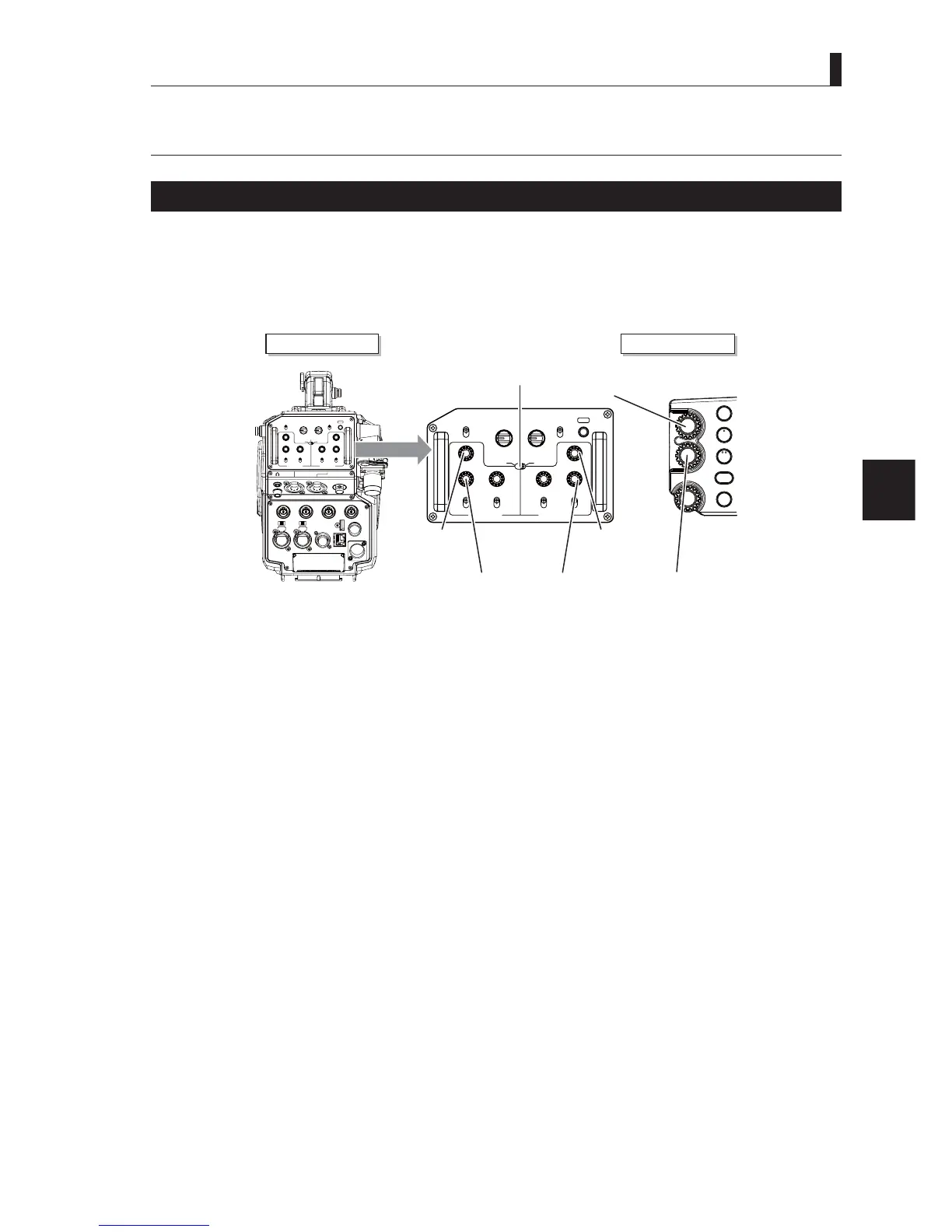
The volume of intercom receiver is adjusted using knobs on the back side and the right side of the camera.
If using the knob on the back side of the camera, follow Procedure 2, or if using the knob on the right side of the camera, follow
3URFHGXUHDQG
- Adjust the INTERCOM volume on the back side of the camera.
1 Set the INTERCOM FRONT VR selector switch to "REAR".
2 Turn the INTERCOM-1 control knob and the INTERCOM-2 control knob on the back side of the camera to adjust
the volume.
- Adjust the INTERCOM volume on the side of the camera.
3 Set the INTERCOM switch to "INTERCOM1 FRONT" or "INTERCOM2 FRONT".
4 Cancel the operation right on the ND and the camera of the color filter. (The "*" mark is not displayed on the VF
screen.).
5 Turn the INTERCOM PHONE control knob on the right side of the camera to adjust the volume.
Caution:
Be sure to adjust the volume to the appropriate level while listening to sound through the headset.



 To Next Page