Helpful Technical Information
7
173
UHK-430/CCU-430 1710 VER2 (E)
7.9 Simultaneous option
■
Operation from the operation control panel (OCP-300)
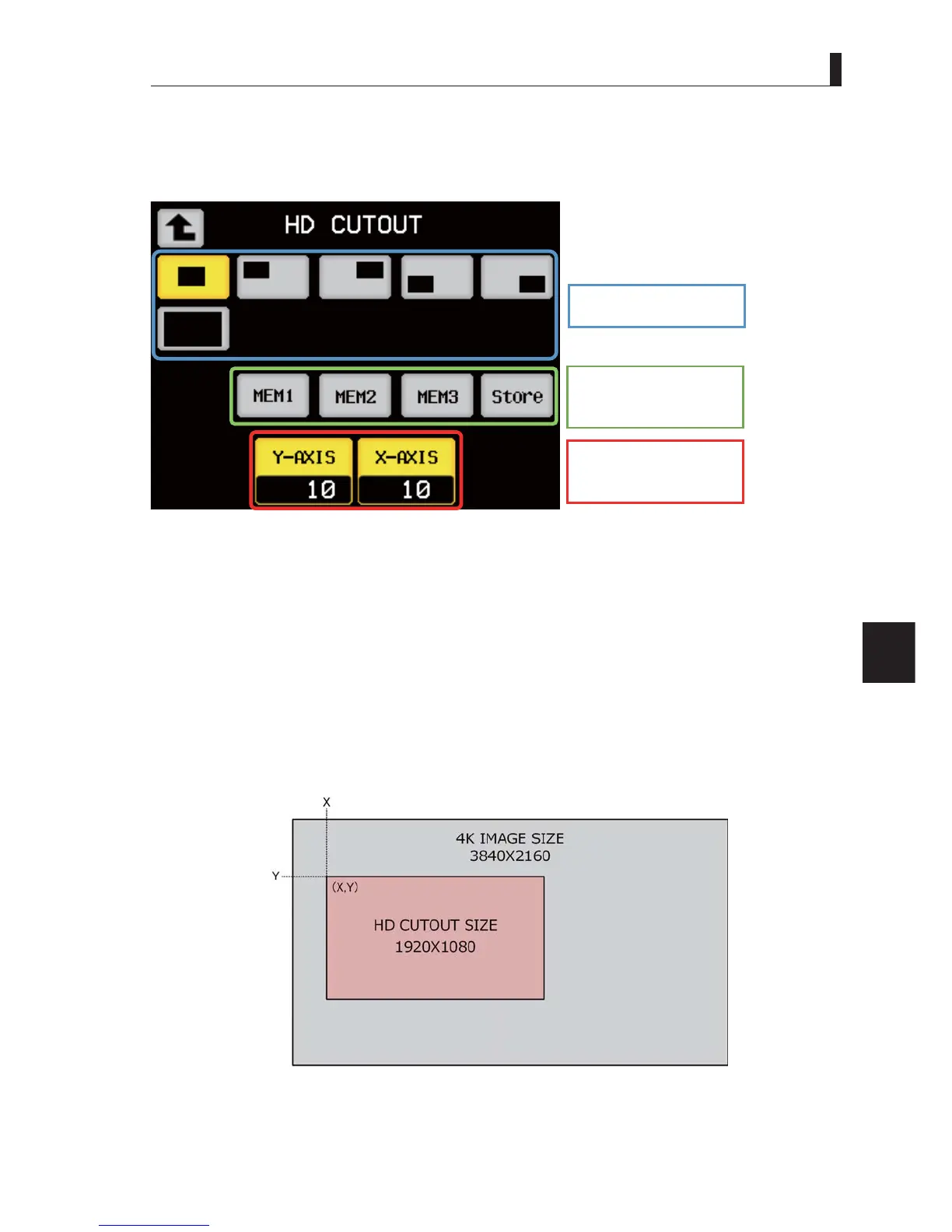
The position of the cutout video is set from the OCP-300.
3UHVVWKH>6(783@EXWWRQRI2&3DQGVHOHFW6HWXSRQWKH/&'ĺ+'&87287
Selection of preset position
Saving and recalling the
user memories
Setting the x-axis and y-axis
of the cutout position
- Corresponding remote controller
Select a preset cutout position. The switch for the currently selected cutout position turns yellow. Five cut-out positions (center,
upper left, upper right, lower left, and lower right sections of the screen) and the entire screen (CUTOUT OFF = Down-converting
output) can be selected.
$IWHUWKHVHOHFWLRQRIWKHSUHVHWSRVLWLRQDGMXVWLQJWKHSRVLWLRQLVSRVVLEOHE\XVLQJ;$;,6DQG<$;,6
- Saving and recalling the user memories
8SWRWKUHHFXWRXWSRVLWLRQVWKDWZHUHVHWE\WKHXVHUFDQEHPHPRUL]HG
$IWHUVHWWLQJWKHSRVLWLRQE\XVLQJ;$;,6DQG<$;,6SUHVVWKH6WRUHVZLWFKWXUQVWKHVZLWFKFRORUIURPJUD\WR\HOORZ
3UHVVLQJHLWKHU0(00(0RU0(0WXUQVWKHVZLWFKFRORUWR\HOORZ7KHQWKHVHWXSLVPHPRUL]HG
When recalling a memory, press either MEM1, MEM2, or MEM3.
$IWHUUHFDOOLQJDXVHUPHPRU\DGMXVWLQJWKHFXWRXWSRVLWLRQLVSRVVLEOHXVLQJ;$;,6DQG<$;,6
:KHQXSGDWLQJWKHGDWDRIDVHWXSDOUHDG\PHPRUL]HGRYHUZULWLQJLVFRQGXFWHG
7KHYDOXHVRI;$;,6DQG<$;,6LQGLFDWHWKHVWDUWLQJSRLQWOHIWWRSRIWKHFXWRXWYLGHR
;$;,6VHWWLQJUDQJH WR
<$;,6VHWWLQJUDQJH WR



 To Next Page