Helpful Technical Information
7
189
UHK-430/CCU-430 1710 VER2 (E)
7.10 12G SDI option
Caution
Insertion/removal method of the rear-side module
When installing an option module, consult with our engineer or the sales agency's engineer. If the customer installs a module on his
own, please fully understand that there is a risk of module damage and take the following procedure.
Do not touch the printed board and individual components of the module.
[Preparation] Discharge any static electricity in your body and wear a grounding wrist band.
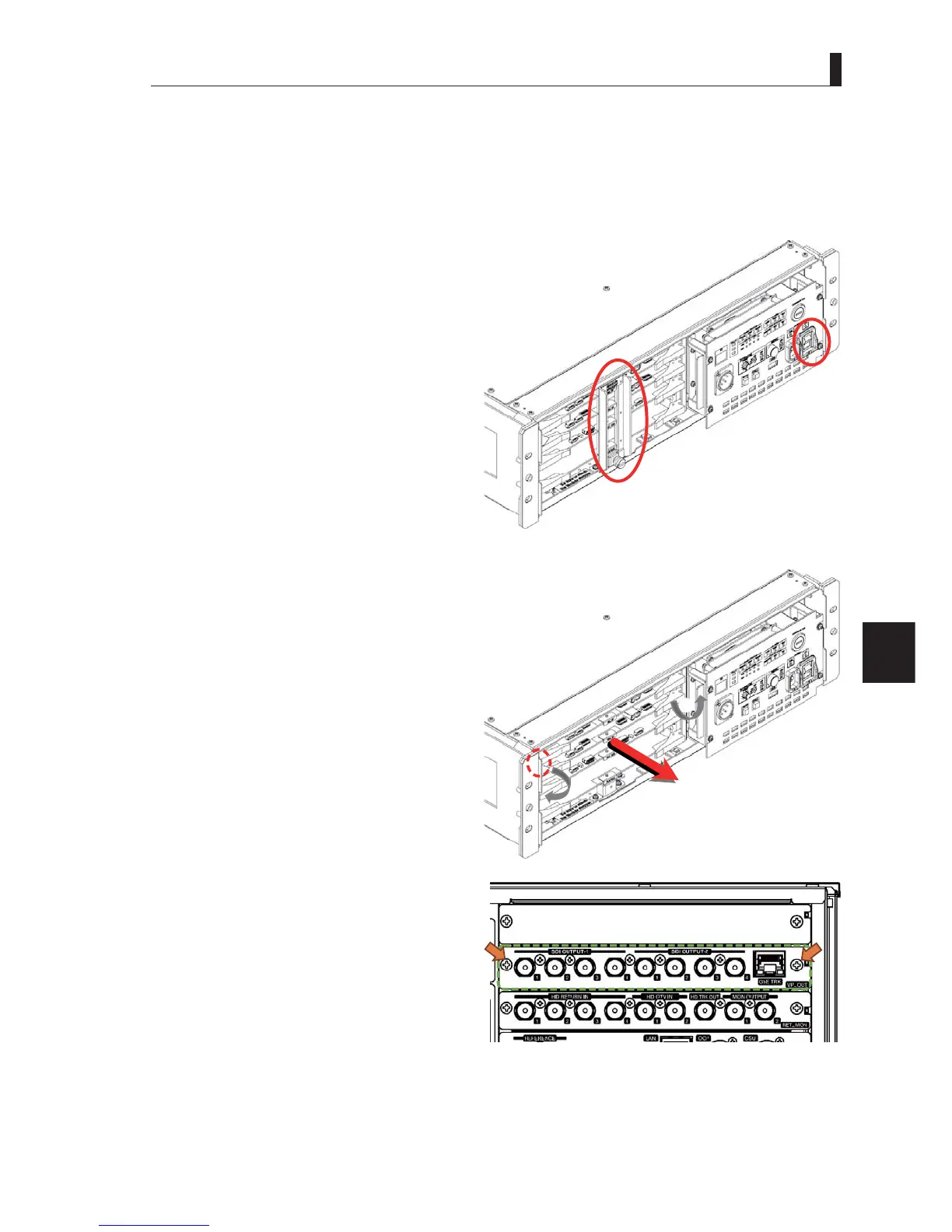
1 Turn off the main power of the CCU.
2 Remove the cover on the front side of the CCU.
3 Remove the module retainer from the CCU.
4 Pull the card puller of the TRX_VP module toward
you and release the locks at the same time. Be
sure not to pinch the yellow optical fibers on the
left side.
5 Pull the TRX_VP module about 5cm toward you.
6 Remove the screws fixing the VP_OUT module on
the back side of the CCU to take the module away
from CCU.
①
③
①④
①
④
①
⑤



 To Next Page