TROUBLE SHOOTING and MAINTENANCE
8
207
UHK-430/CCU-430 1710 VER2 (E)
8.5 Cleaning Camera Connectors
■
OPS Series Connectors
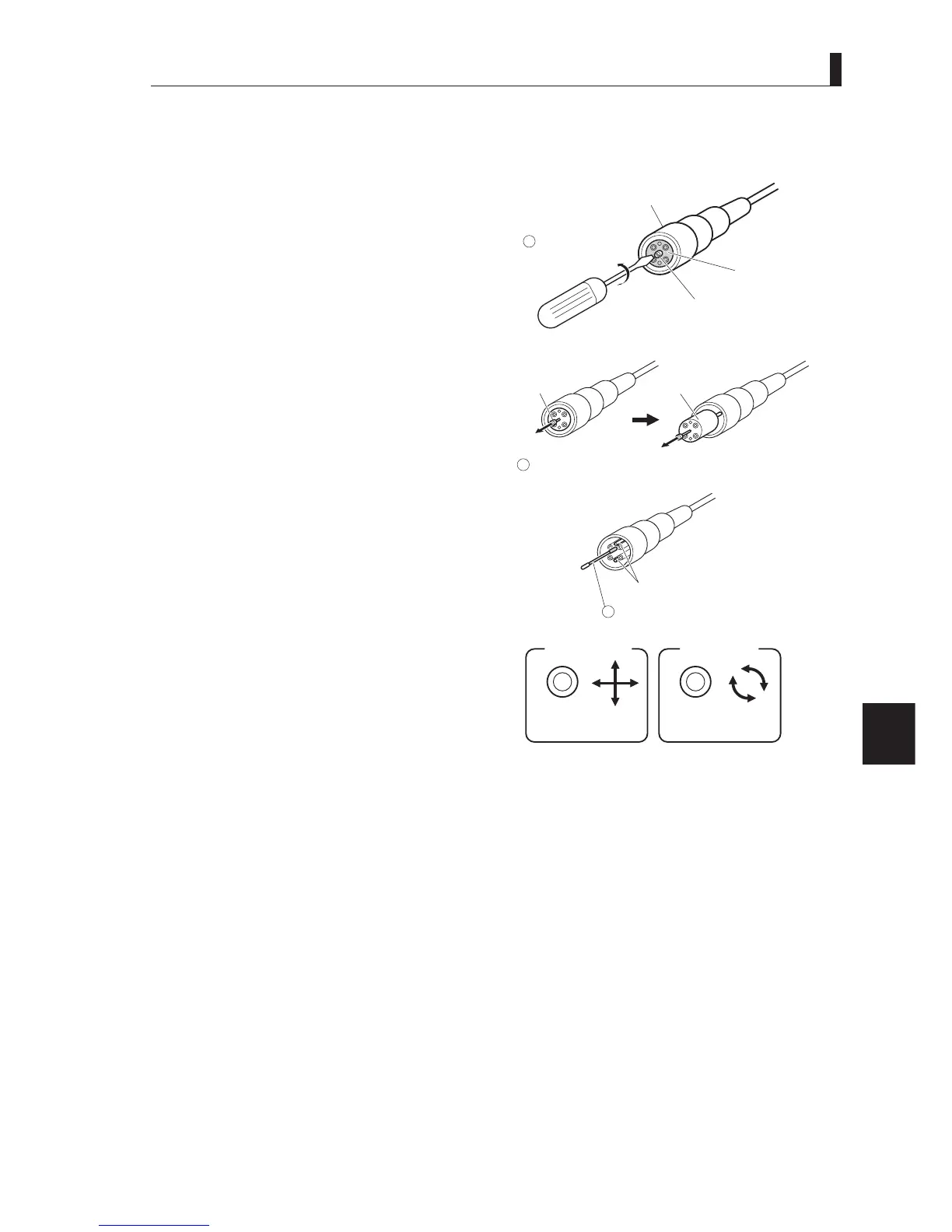
7KHIROORZLQJH[SODLQVKRZWRFOHDQ)HUUXOHVXVLQJD7DMLPL236VHULHV¿EHUFDEOHSOXJIHPDOHDVDQH[DPSOH
1 Loosen the screw at the center of the connector
with a flat-blade screwdriver or a coin.
$IWHUWXUQHGRUWXUQVFRXQWHUFORFNZLVHWKHVFUHZ
will come out. The screw is not removed because it is
attached to the top.
2 Pull the screw and remove the top from the
connector.
3 Wipe the Ferrule with a cotton swab dampened
with alcohol.
Caution:
- When you wipe the Ferrule, move the cotton swab
straight in a way in which you brush the dust off the
Ferrule. Do not wipe back and forth or in a circle.
Doing so may spread the dirt instead of removing it.
- Do not carelessly blow your breath on the Ferrule.
4 After wiping the Ferrule with alcohol, wipe the
Ferrule with a dry cotton swab.
5 Make sure that the dirt is removed.
Use a loupe to examine the Ferrule.
6 If the Ferrule is free from dirt, align the top with the connector guide and put it back in the connector.
Be sure to push the top securely into the connector.
7 Tighten the screw with a flat-blade screwdriver or a coin.
Since the male connector does not have frame, the steps 1, 2 and 6 the above are not necessary.
Turn the screw
counterclockwise.
Camera connector plug
(female)
Fiber cable
Top
Screw
Flat-blade
screwdriver
1
Pull the screw to remove the top from the connector.
Screw
Top
2
Wipe with a cotton swab dampened
with alcohol.
Ferrule
Good example
Cross section
of Ferrule
Bad example
Cross section
of Ferrule
3



 To Next Page