INSTALLATION and CONNECTION
3
43
UHK-430/CCU-430 1710 VER2 (E)
3.3 Connecting the CCU and Camera Head
■
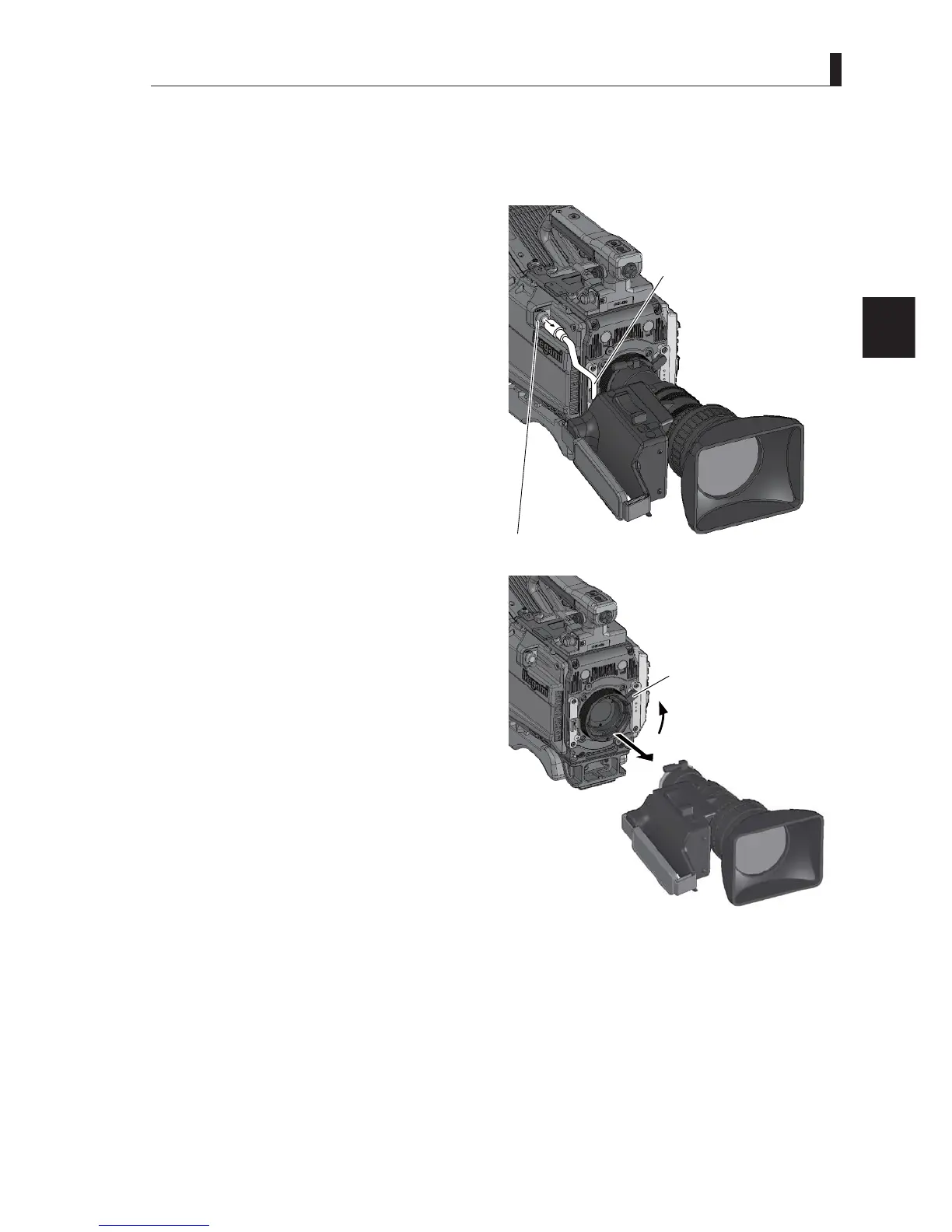
Removing the Lens
This section explains how to remove the lens from the camera.
3ODFHWKHFDPHUDRQWKHWULSRGRULQDVWDEOHDQGKRUL]RQWDOSRVLWLRQZKHQUHPRYLQJWKHOHQV
1 Remove the pigtail cable from the lens connector.
Pull on the connector ring of the pigtail cable to release
the lock and remove the connector.
2 Remove the lens from the camera.
Push down the Lens lock lever and remove the lens
IURPWKHOHQVPRXQWRIWKHFDPHUDLQDKRUL]RQWDO
direction.
Put a hand on the lens to prevent it from falling.
3 Remove the pigtail cable from the cable clamp.
4 Attach the lens cap at the lens opening when no
lens is mounted.
4 R
emove the pigtail cable.
5
Remove the pigtail cable
from the cable clamp.
3 Push up the Lens lock lever
to remove the lens.



 To Next Page