Measuring Functions
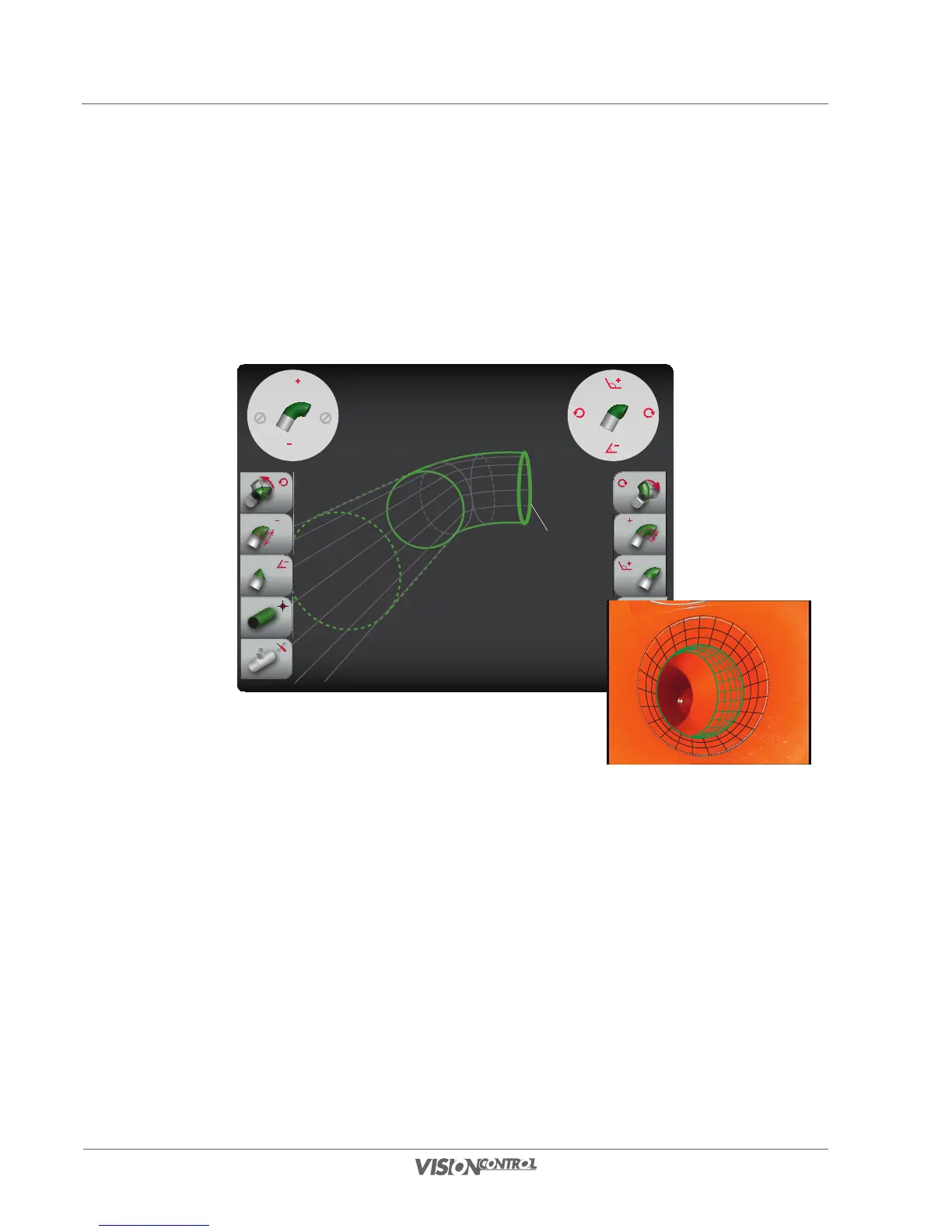
Measure bend
130
Measure bend
This function allows you to define and measure a bend of the pipe to be inspected. To be able to use this function, you must be able to see a
visible edge/coupling in the bend over the course of pipe via the camera view. All settings influence the visible location and position of measuring
line 1 in this view. It is helpful to show the virtual 3D grid for this measurement. As a further aid, half the pipe diameter is preset as the arc radius
of the bend as standard.
R
R
R
R
PIPE BEND:
Radius: 51.00mm
Angle: 45.00°
Rotation: 90.00°
Measuring line 1
REAL PIPE:
Diameter: 150.00mm
Length: 105.50mm
Rotation: 2.80°
• Define the arc radius of the bend using the left joystick or the L2/R2 buttons.
• Define the bend angle or the rotation using the right joystick or the L1/R1 buttons.
• Define the bend angle of the coupling line/measuring line 1 using the right joystick or the L3/R3 buttons.
Carry out the work steps alternately iterating in order to position the measuring line precisely congruently.
REAL PIPE:
Diameter: 150.00mm
Length: 105.50mm
Rotation: 2.80°
PIPE BEND:
Radius: 51.00mm
Angle: 45.00°
Rotation: 90.00°



 To Next Page