User interface
System Settings
45
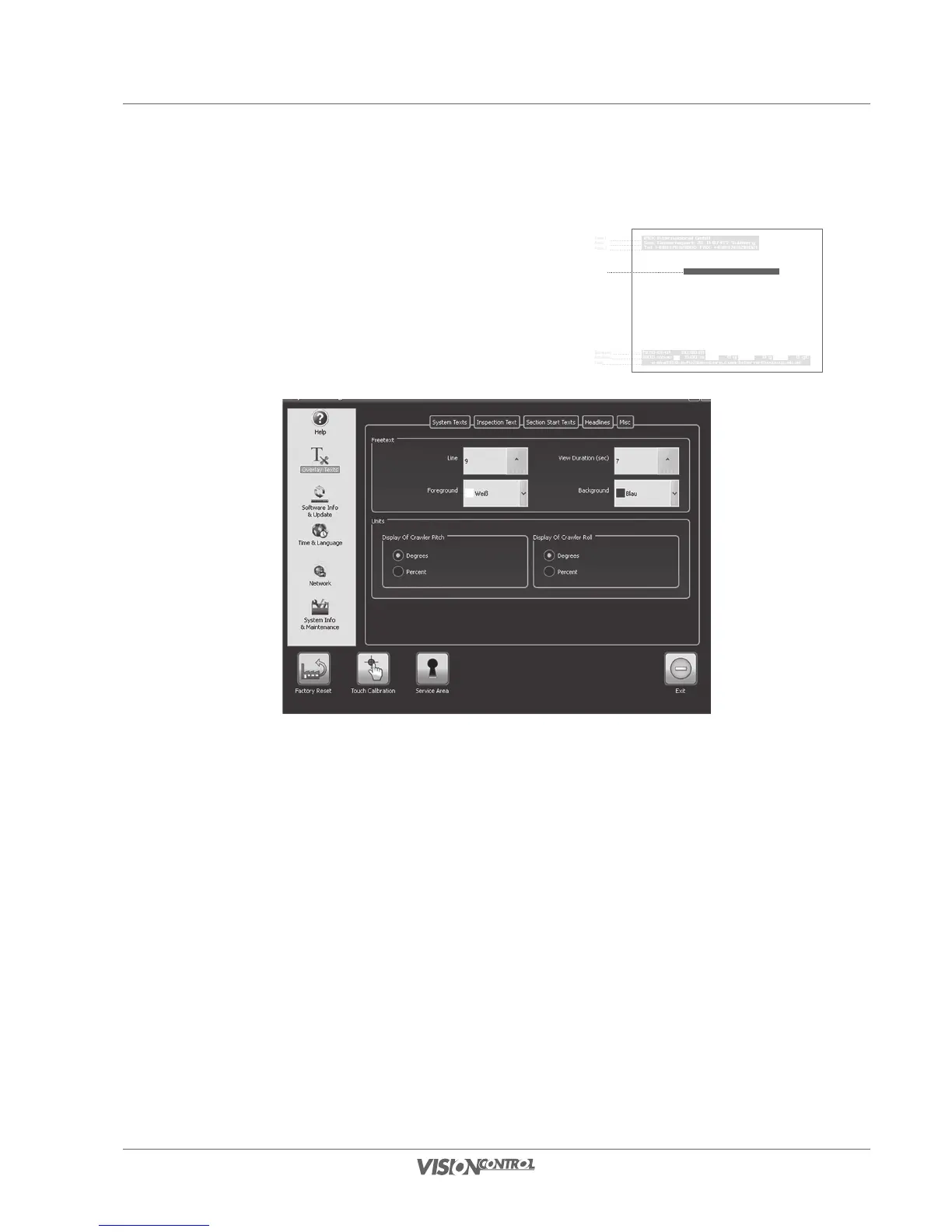
Miscellaneous
Overlay of freetexts is only available if you are working with a simple project or Direct
Control. Use the selection boxes to specify the position on the monitor at which the
freetext will be displayed, and how long it will be displayed. In the Units section you can
change the roll and pitch displays.
Freetext:
- In the “Line” selection field set the vertical position at which the text is displayed.
- The selection box, “Duration”, defines how long the inspection text will be displayed in the video image before it is automatically
cleared.
- “Foreground” defines the font color.
- “Background” defines the color that surrounds the text.
Units:
- You can choose how roll and pitch of the crawler are displayed.
iPEK International GmbH
See, Gewerbepark 22, D-87477 Sulzberg
Tel. +498376921800, FAX: +4983769218021
Freetext
e-mail:ISG_info@idexcorp.com Internet:www.ipek.at
1970-01-01 00:00:01
1000 mbar 0.00 m 0 g 0 g 0 gC
Header 1
Header 2
Header 3
Freetexts
Data displays
Data displays
Footer



 To Next Page