User interface
System Settings
46
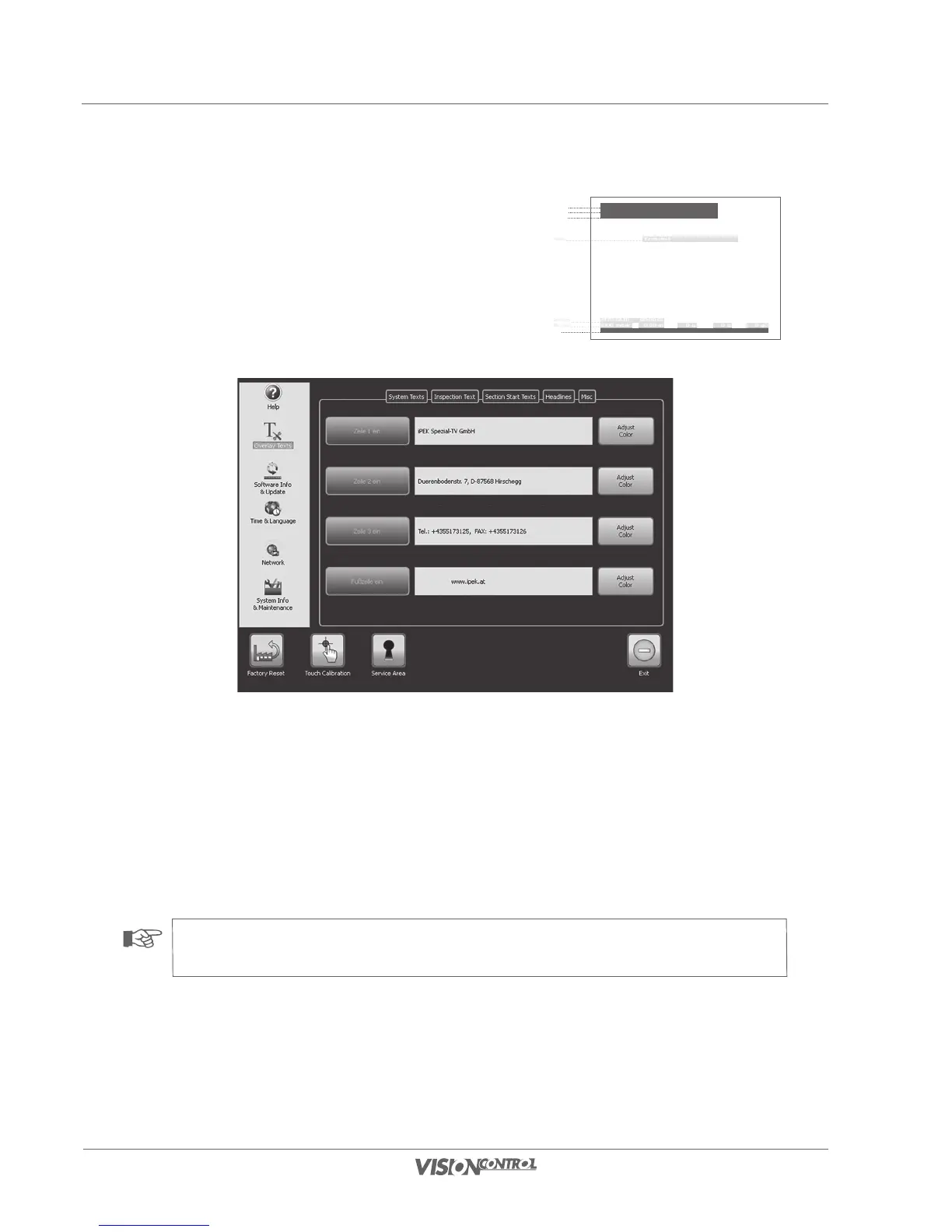
Overlay Texts – Headlines
The standard situation is to enter the company data of the inspecting company in the
bottom line and top line. The headline texts enable you to overlay three top lines and
one bottom line.
Headlines:
- The button preceding the text box is used to show or hide the respective line.
- In the text box you can enter your individual text.
- Use the button “Adjust Text Format” to define the font color and the background color.
• Click the text box of the respective line. The screen keyboard will open.
• Enter your individual text and confirm the input with OK.
• Adjust the font color and the text background via the Adjust color button.
NOTE!
Read the instructions for using the screen keyboard on Seite 30.
Software Info & Update
In the area Software Info & Update you will find all the information about currently installed updates on your control panel. The installed file name
(package name) as well as the installed version will be displayed. This information is primarily required for service cases, so that iPEK technicians
can quickly perform an error analysis. Furthermore you can perform an update of the software of your control panel here.
iPEK International GmbH
See, Gewerbepark 22, D-87477 Sulzberg
Tel. +498376921800, FAX: +4983769218021
Freetext
e-mail:ISG_info@idexcorp.com Internet:www.ipek.at
1970-01-01 00:00:01
1000 mbar 0.00 m 0 g 0 g 0 gC
Header 1
Header 2
Header 3
Freetexts
Data displays
Data displays
Footer



 To Next Page