User interface
System Settings
44
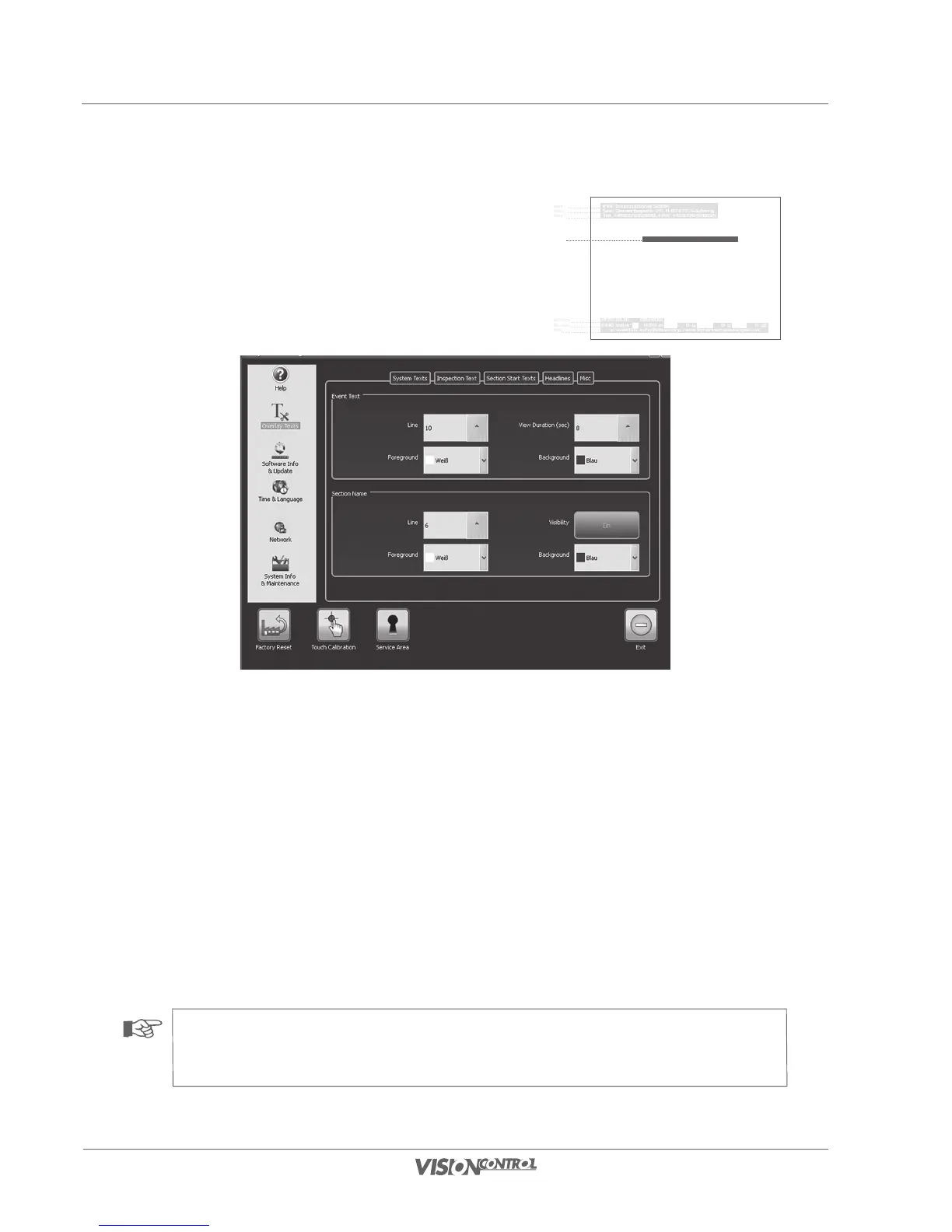
Overlay Texts – Event Text
The position and the presentation of the damage texts can be set for the overlay of
inspection texts. You can also determine where and how long a new section will be
overlaid in the video image.
Event Text:
- In the “Line” selection field set the vertical position at which the text is displayed.
- The “Duration” selection box defines how long the inspection text will be displayed in the video image before it is automatically cleared.
- “Foreground” defines the font color.
- “Background” defines the color that surrounds the text.
Section Name:
- Use the button next to the item, “Display”, to switch the display of the name of the current section on or off.
- In the “Line” selection field set the vertical position at which the text is displayed.
- “Foreground” defines the font color.
- “Background” defines the color that surrounds the text.
NOTE!
The inspection text cannot be positioned in horizontal alignment. It is always overlaid at the beginning of the line. The “Line”
selection field defines the line from the upper border in which the text overlay appears.
iPEK International GmbH
See, Gewerbepark 22, D-87477 Sulzberg
Tel. +498376921800, FAX: +4983769218021
Freetext
e-mail:ISG_info@idexcorp.com Internet:www.ipek.at
1970-01-01 00:00:01
1000 mbar 0.00 m 0 g 0 g 0 gC
Header 1
Header 2
Header 3
Freetexts
Data displays
Data displays
Footer



 To Next Page