–
126
–
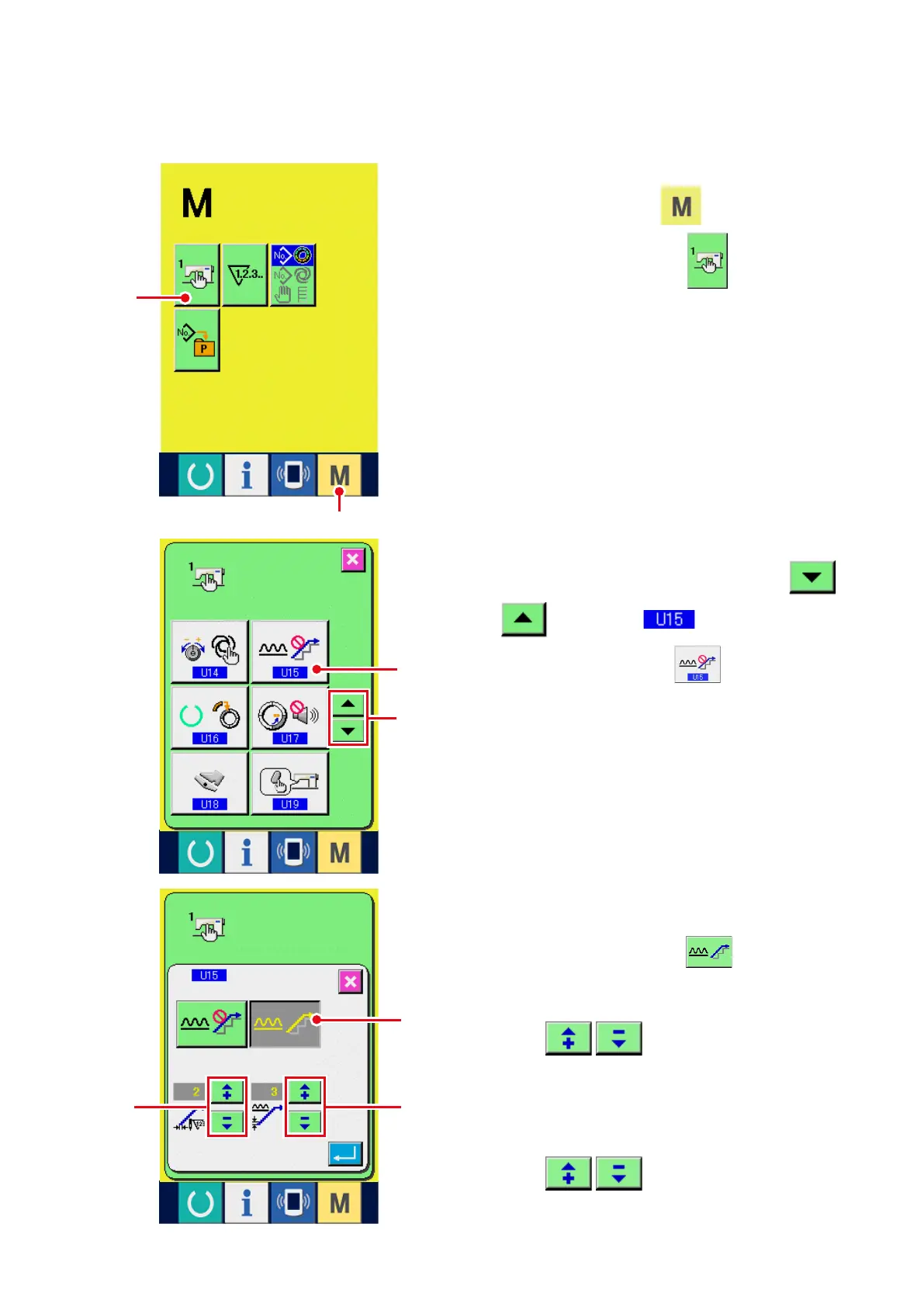
Setting procedure of the shirring smoothing function is explained.
(2) Setting of the shirring smoothing function
3) Make the shirring smoothing function
effective.
Select EFFECTIVE button
5
.
4) Set the number of stitches of shirring
smoothing function.
Press
6
buttons to input the
number of stitches of shirring smoothing
function.
5) Set the shirring amount of shirring
smoothing function.
Press
7
buttons to input the
shirring amount of shirring smoothing function.
2) Select the shirring smoothing function.
Pr e s s UP /D O W N SC R O L L b ut to n
3
to select
Shirring smoothing
function selection button
4
. The shirring
smoothing function selection screen is displayed.
2
1
3
4
7
5
6
1) Display the memory switch list screen.
W h e n M O D E k e y
1
i s p r e s s e d ,
MEMORY SWITCH button
2
is displayed
on the screen. When this button is pressed, the
memory switch list screen is displayed.



 To Next Page