–
49
–
6-4 Using the other functions
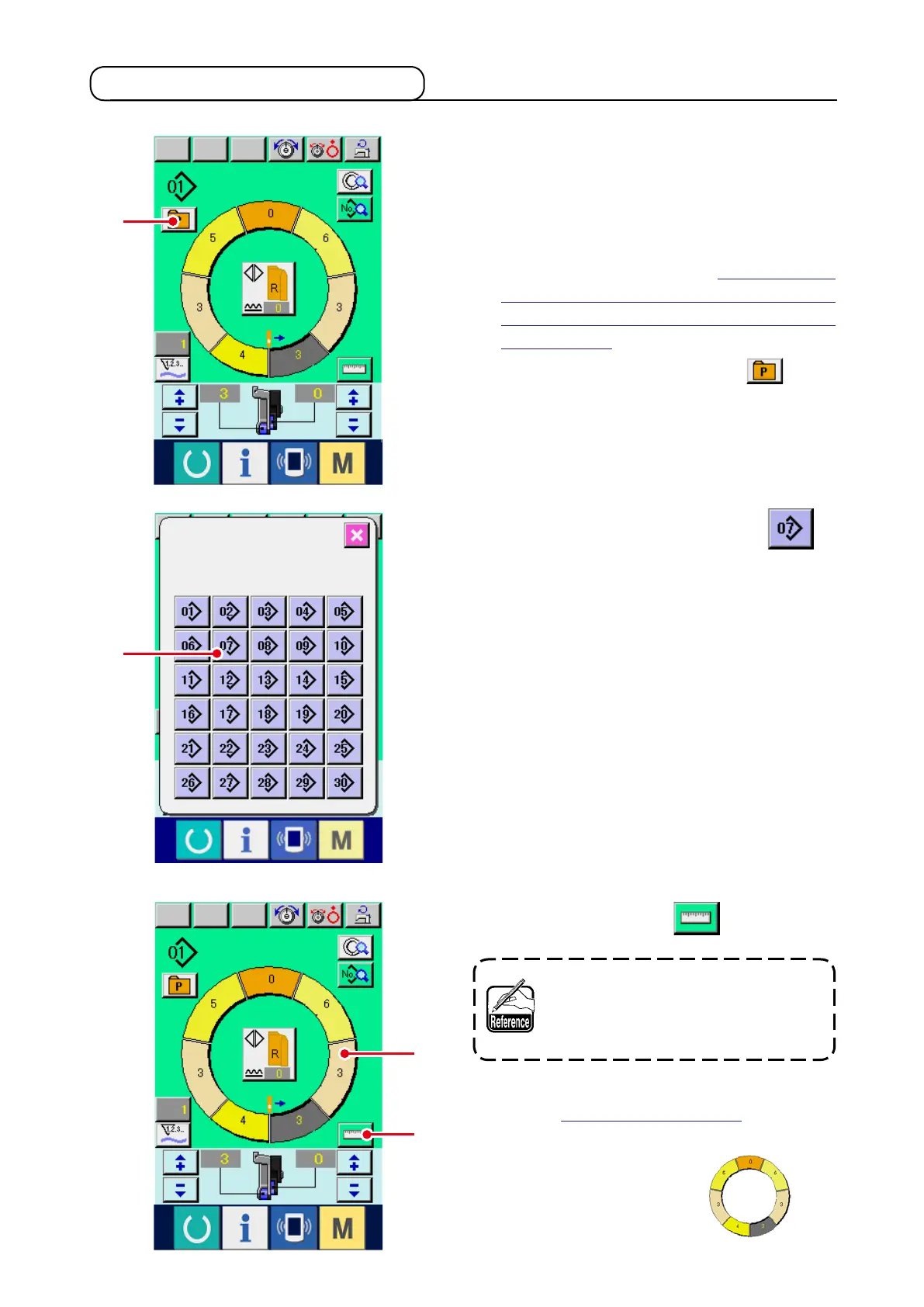
(1) Directly calling the pattern from the sewing screen <Direct pattern selection>
When registering the patterns which are frequently
used to the DIRECT SELECTION button, pattern se-
lection can be simply performed from the operating
screen by only pressing the button.
* For the way of registering the pattern to DIRECT
SELECTION button, refer to
12. REGISTER-
ING AND THE PATTERN TO DIRECT BUTTON
AND RELEASING THE PATTERN FROM DI-
RECT BUTTON
.
1) Press DIRECT SELECTION button
1
.
2) Press PATTERN SELECTION button
2
of the pattern to be called.
(2) Adjust the STEP SELECTION button to the shape of sleeve <Measure function>
1) Press MEASURE button
1
.
When you desire to release the mea-
sure after pressing MEASURE button,
change over from the sewing screen
to the edit screen once.
2) Perform sewing.
Refer to
"5-5 (5) Perform sewing"
.
3) Data of the length of measured step is reected
to STEP SELECTION button
2
.
1
1
2
2



 To Next Page