–
71
–
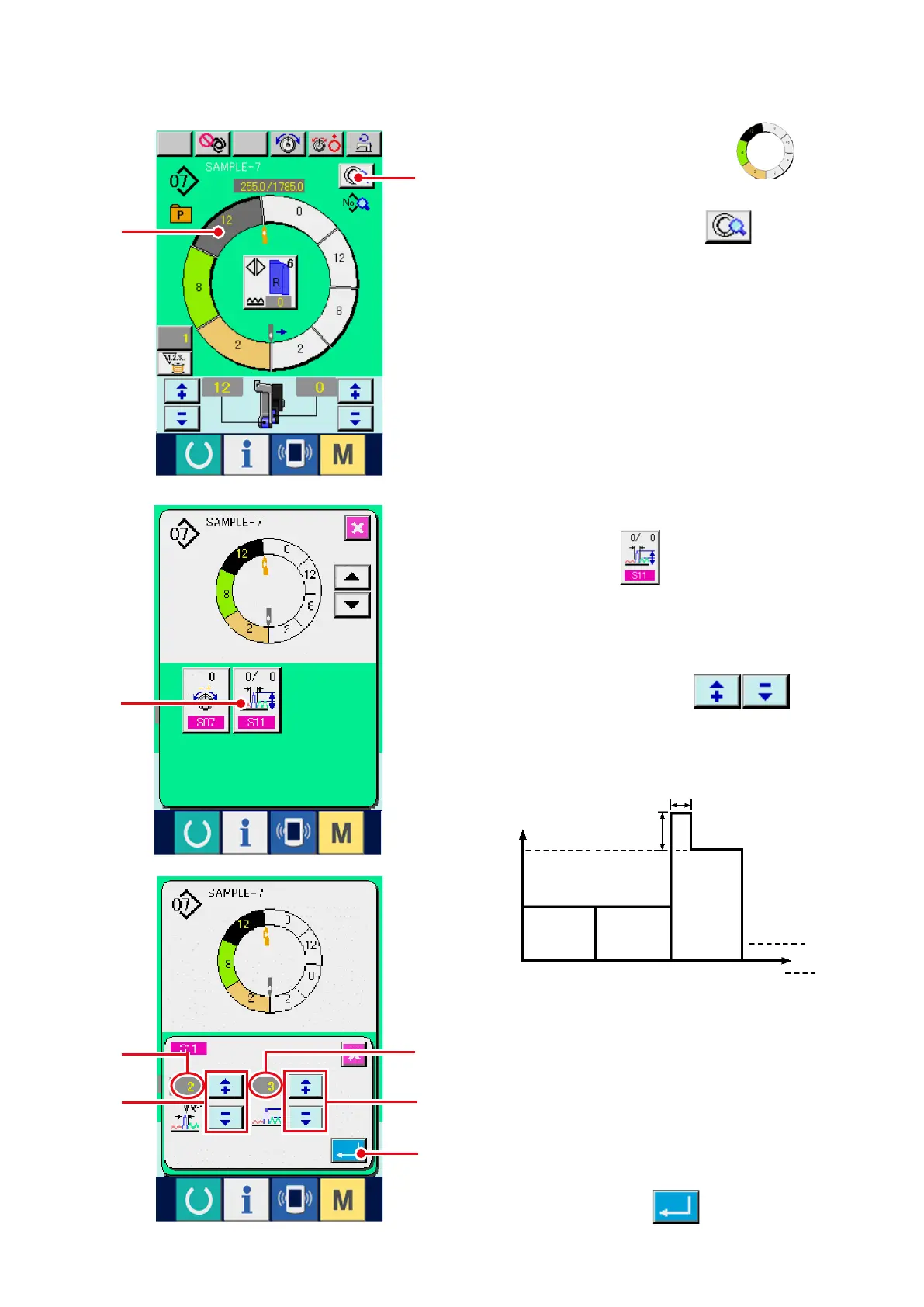
4) Pr e s s "+ " / " –" b u t to ns
4
t o
change compensation shirring amount set value
A
and number of stitches of compensation
shirring amount
B.
3) Press COMPENSATION SHIRRING AMOUNT
SETTING button
3
.
(5) Increasing/decreasing the shirring amount immediately after changeover of step
<Compensation shirring amount setting>
1) Press STEP SELECTION button
1
to
select the step.
2) Press STEP DETAILS button
2
.
Shirring amount
6
3
1
2
3
4
A
B
Step
¡
Compensation shirring amount is the shirring
amount to add to the shirring amount of the step
after changeover at the time of step changeover.
¡
N u m b er o f s t i t c h e s o f s h i r r i n g a m o u n t
compensation is the number of stitches of
the section of number of stitches to add the
compensation shirring amount from the step
changeover.
5) Press ENTER button
5
.
1
2
4
A
B
4
3
5



 To Next Page