–
168
–
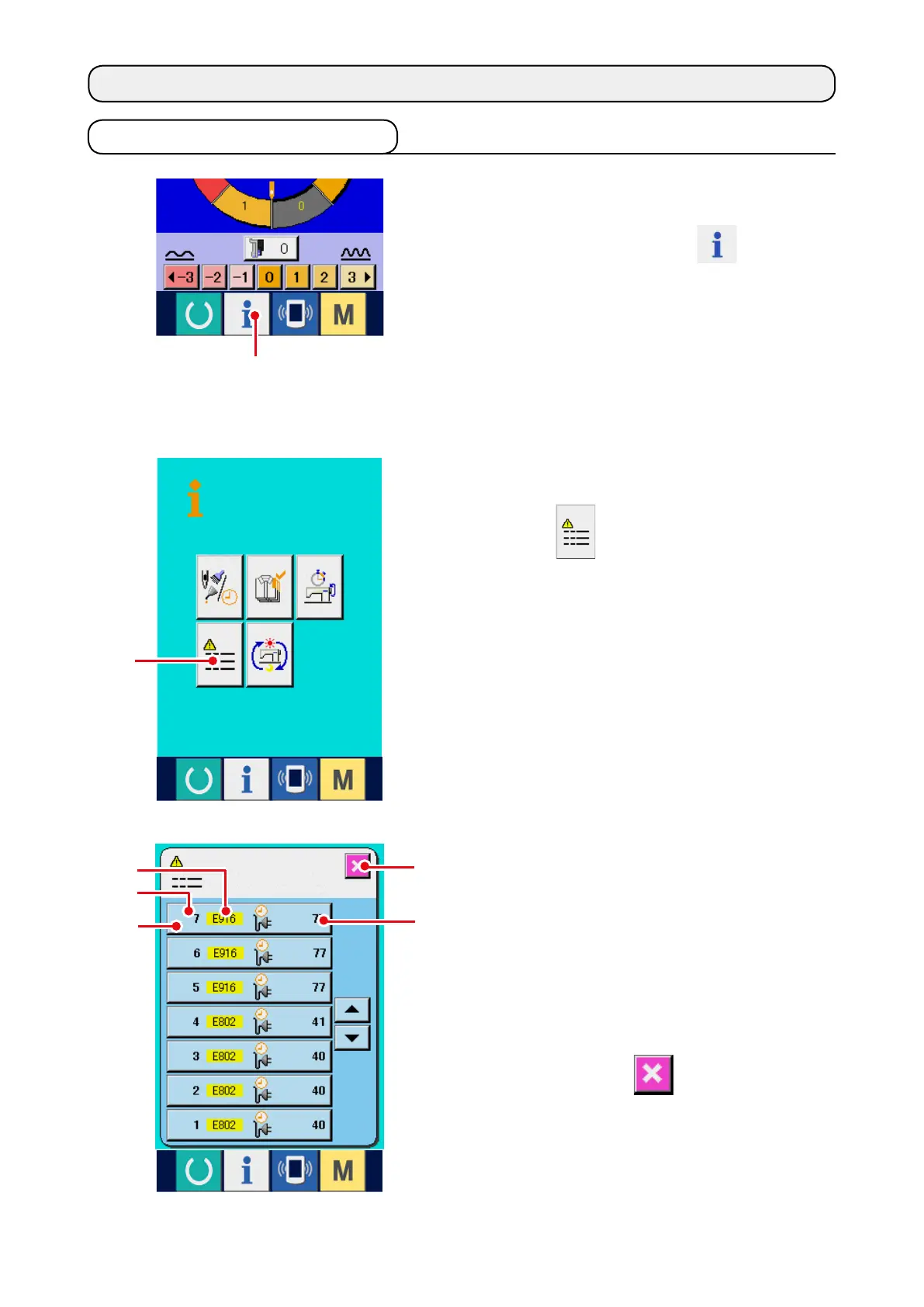
Error record of the sewing machine you use is
displayed in the error record screen, and you
can check the error.
3
: Order that error has occurred.
4
: Error code
5
: Cumulative current-carrying time (hour) at the
time of occurrence of error
When CANCEL button
7
is pressed, the error
record screen is closed and the information screen
is displayed.
23. INFORMATION SCREEN OF THE MAINTENANCE PERSONNEL LEVEL
23-1 Display of error record
1) Display the information screen of the
maintenance personnel level.
When INFORMATION key
1
of switch
seat section is pressed for approximately three
seconds in the data input screen, the information
screen of the maintenance personnel level is
displayed. In case of the maintenance personnel
level, the pictograph located at the upper left
position changes from blue color to orange color,
and 5 buttons are displayed.
2) Display the error record screen.
Press ERROR RECORD SCREEN DISPLAY
button
2
in the information screen. The
error record screen is displayed.
2
4
3
6
7
5
1



 To Next Page