–
128
–
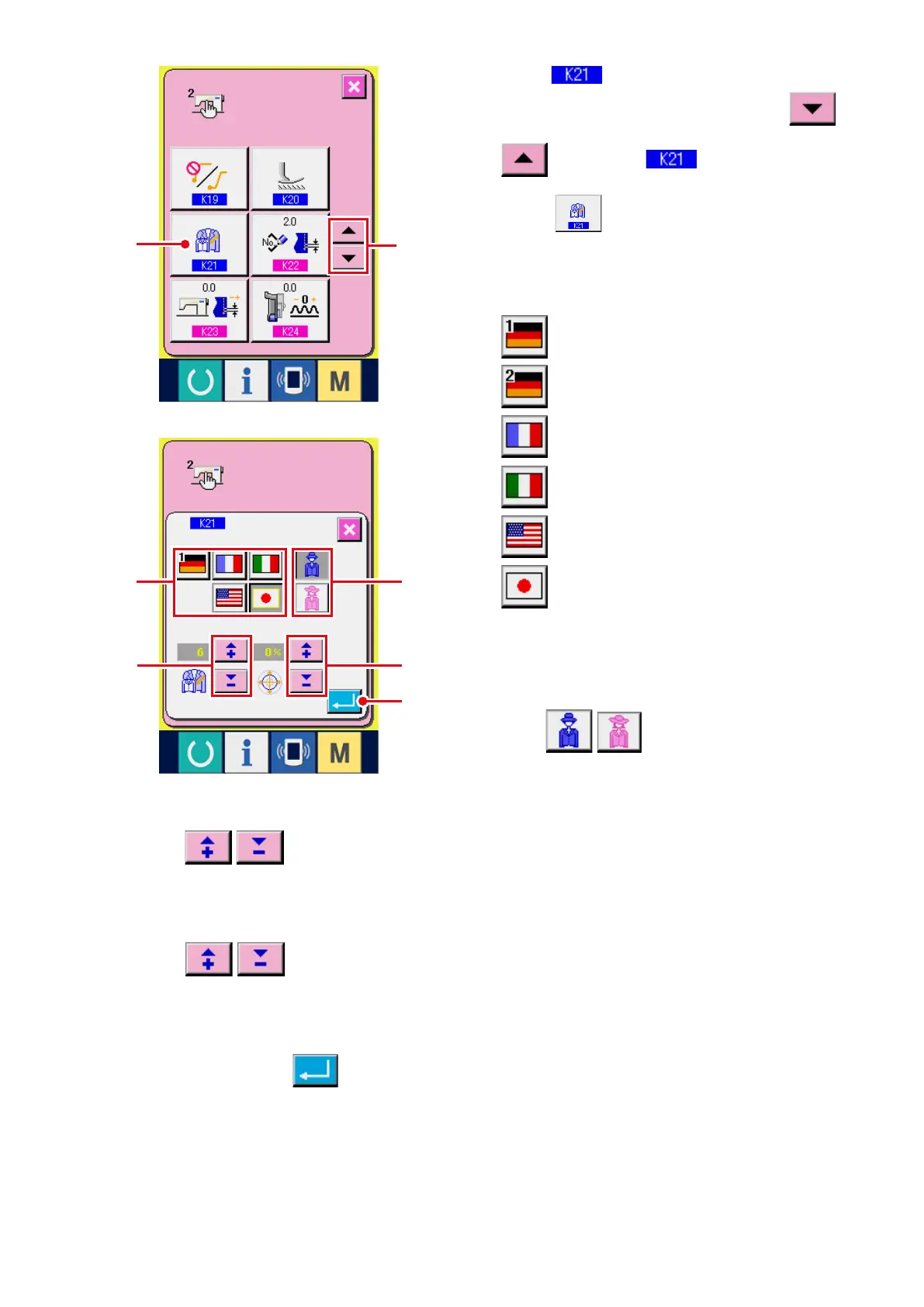
2) Select
Size class.
Press UP/D OWN SCROL L buttons
3
to select
Size class setting
button
4
. The size class setting screen
is displayed.
3) Select the size of country class.
(Germany) Ladies
(Germany) Girls
(France)
(Italy)
(America)
(Japan)
Select the size from buttons
5
.
4) Select gents'/ladies' wear.
Press
buttons
6
to select gents'/
ladies' wear.
5) Set the basic size.
Press
buttons
7
to input the basic size. For the size of country class, refer to the size
development.
6) Set the grading ratio (%).
Press buttons
8
to input the grading ratio. The inputted ratio (%) becomes the offset
value of the grading for each step when a new pattern is created.
7) Determine the size class setting.
When ENTER button
9
is pressed, the size class setting screen is closed and the setting is
determined. And, the screen returns to the memory switch screen.
3
8
6
5
7
9
4



 To Next Page