–
19
–
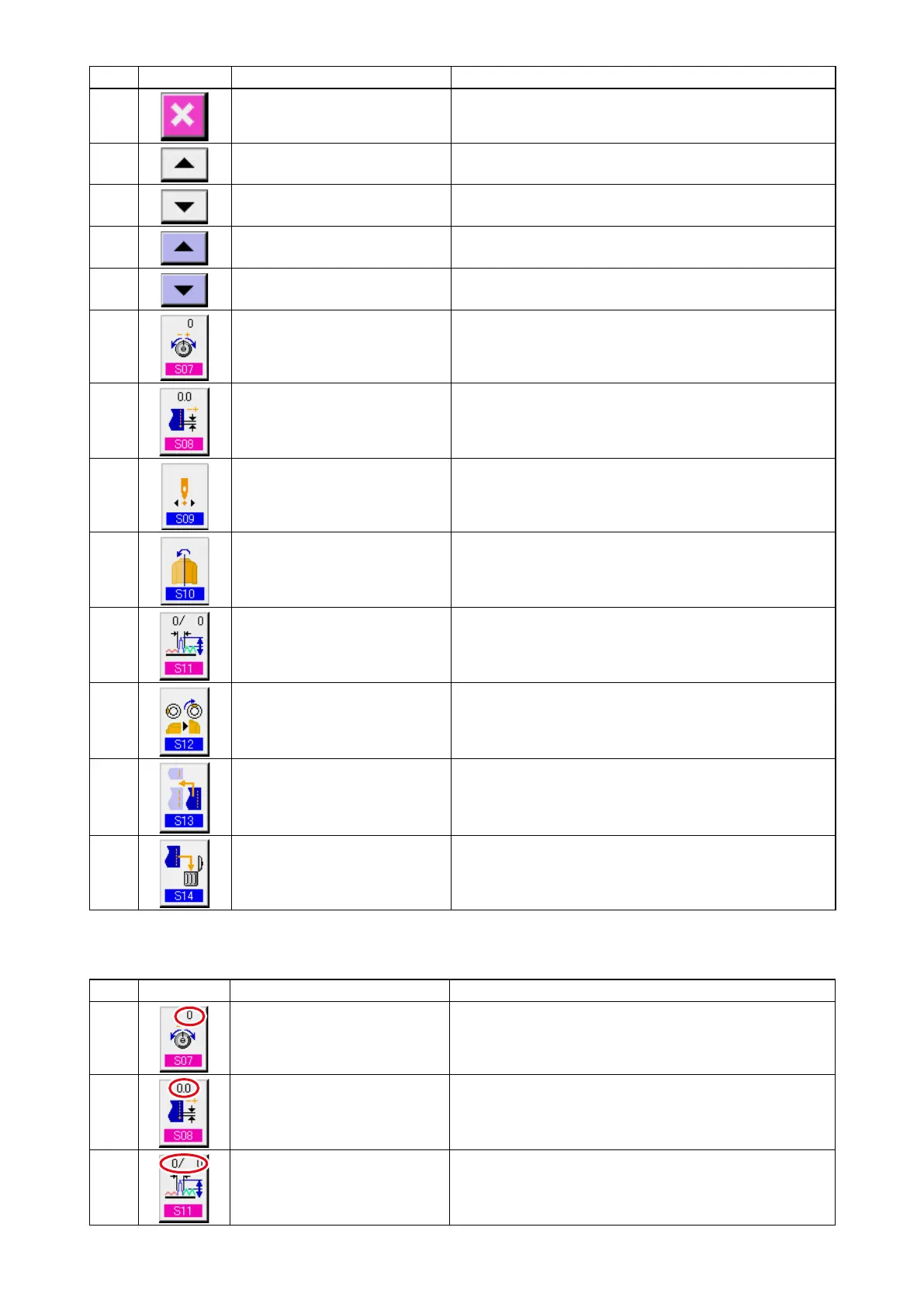
No. Button Name of button Description
@2
CANCEL button
When the button is pressed, the step details button is
closed.
@3
STEP FEED button
When the button is pressed, the selected step advances
by one.
@4
STEP RETURN button
When the button is pressed, the selected step returns by
one.
@5
D E T A I L S S E L E C T I O N
SCREEN FEED button
When the button is pressed, the details selection screen
scrolls forward.
@6
D E T A I L S S E L E C T I O N
SCREEN RETURN button
When the button is pressed, the details selection screen
scrolls backward
@7
COMPENSATIO N THREAD
TENSION SETTING button
When the button is pressed, pattern deletion screen is
displayed.
@8
C O M P E N S AT I O N P I T C H
SETTING button
When the button is pressed, compensation thread tension
setting screen is displayed.
@9
START POSITION CHANGE
button
When the button is pressed, mirroring screen is displayed.
is displayed.
#0
MIRRORING button AMOUNT When the button is pressed, mirroring screen is displayed.
#1
COMPENSATION SHIRRING
AMOUNT button
When the button is pressed, compensation shirring
amount setting screen is displayed.
#2
TOP NOTCH POSITION
CHANGE button
When the button is pressed, top notch position change
screen is displayed.
#3
STEP ADDITION button When the button is pressed, step addition setting screen
is displayed.
#4
STEP DELETION button When the button is pressed, step deletion screen is
displayed.
Symbo
l
Display Name of display Description
L
COMPENSATION THREAD
TENSION display
Set value of compensation thread tension is displayed.
M
COMPENSATION PITCH
display
Set value of compensation pitch is displayed.
N
COMPENSATION AMOUNT
display
Set value of compensation shirring amount is displayed.



 To Next Page