MULTICAL®603
138
KamstrupA/S∙Technicaldescription∙5512‐2029
A1_GB
06.2017
11.2 Markingofcommunicationmodules
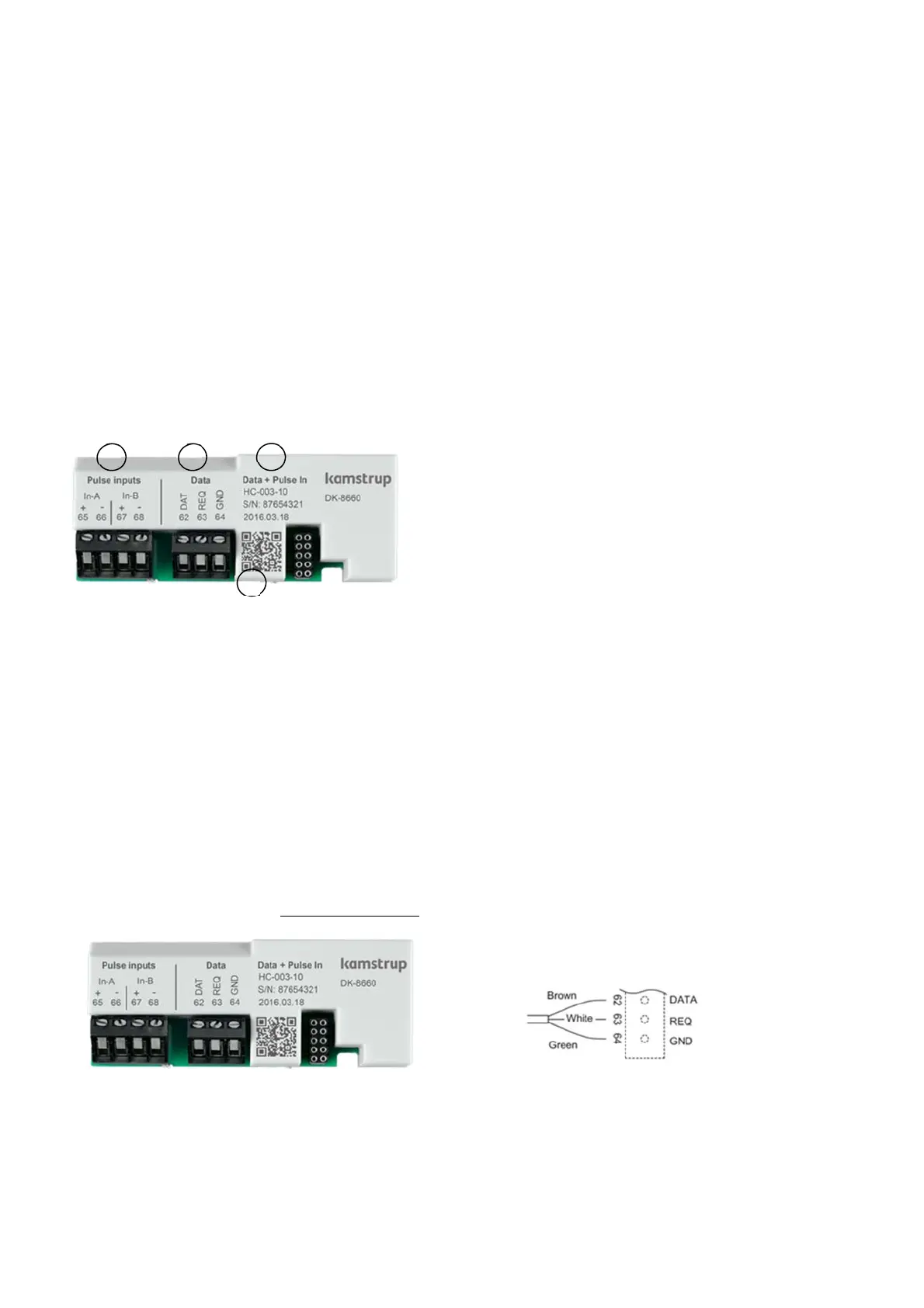
Allrelevantmarkingsappearfromeachmodule’sprotectionplate.
A. Connectionterminalsforconnecting externalequipm ent
Theterminalsareclearlymarkedwiththeirfunctions,whicharedescribedlaterinthisparagraph.
B. Connectionterminalsforconnecting readingequipm en t
Theterminalsareclearlymarkedwiththeirfunctions,whicharedescribedlaterin
thisparagraph.Modulesforradio
communicationarenotequippedwithterminalsforreadingequipment,buthaveantennaconnections.
Paragraph3.2.6describesthepulseinputsIn‐AandIn‐B,andpar agraph3.2.9describesthepulseoutputsOut‐Cand
Out‐D.
C. Moduleidentification:
Statesthemodule’sfunction,typenumber
andproductiondate.
D. QRcode
Containsthemodule’sorderandproductionnumber,whichisusedinconnectionwithserviceandreordering.
11.3 Modules
11.3.1 Data+pulseinputs(typeno.:HC‐003‐10)
Themodulehasagalvanicallyseparateddataport,whichinteroperateswiththeKMPprotocol(seeparagraph12.3).
Thedataoutputcanforexamplebeusedforconnectingexternalcommunicationunitsorother hard‐wireddata
communicationwhichitisnotexpedient
tocarryoutviatheopticalcommunicationonthemeter’sfront.
Thedataconnectionisgalvanicallyisolatedwithoptocouplers,whichmakesitnecessarytousedatacabletype6699‐
102inordertoadaptthesignaltoRS232level,whichissuitableforPCsandotherRS‐232‐based
equipment.
Seeparagraph12forinformationondatasequencesand protocols.IfthecomputerdoesnothaveaCOM‐port,data
cablewithUSBtype6699‐099isused.
IfadatacablewithUSBisused, aUSBdrivermustbeinstalledoncomputerswithWindowsoperatingsystem.The
drive
canbedownloadedfromwww.kamstrup.com>Downloads>DriverforKamstrupUSB.
A
C
B
D






 To Next Page