08 GM and Drum Restyle | 87
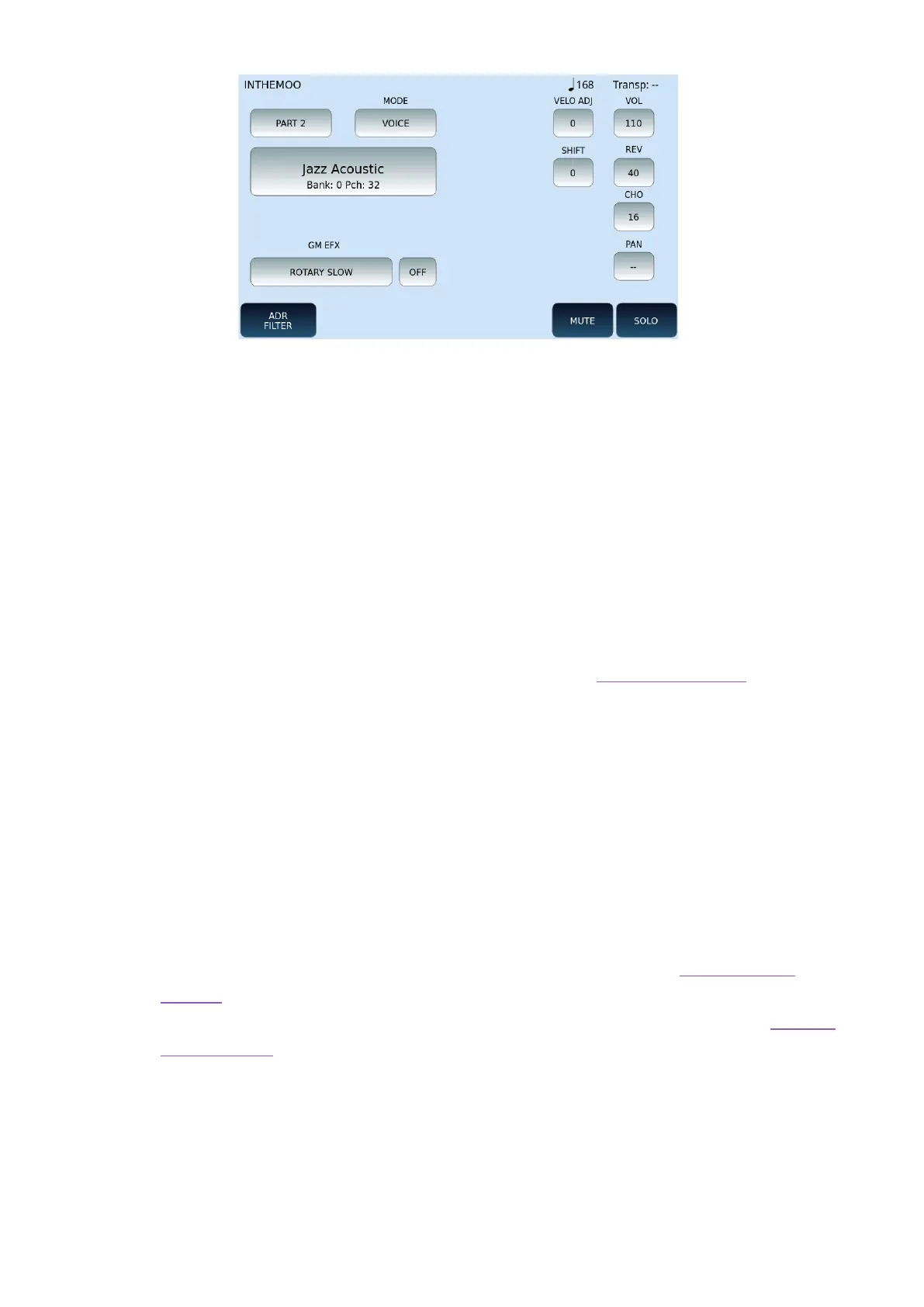
This page appears after selecting one of the 16 tracks and pressing the PART VIEW button:
• PART 1, PART 2, up to PART 16: Select this button and touch UP/DOWN to switch
between MIDI tracks.
• MODE: Assigns a category to the track among the following values
o VOICE: normal instrument track.
o DRUM: rhythm track.
o GROOVE: groove track (rhythm track in KETRON proprietary format)
o VOICETRON: voice harmonization track.
• GM Voice Select: The button displays the name of the assigned GM voice, its
bench and the Program Change. Press it to open the GM VOICE SELECT page and
change the associated sound.
• EFX2 INSERT: Lower down you can see any INSERT effect associated with the track.
Press this button to open a list of all effects available to the system and select a
different one. Don't forget to press ON/OFF to activate it.
• ADJ VEIL: This value controls the sensitivity of the dynamics (positive values make
the track stronger, negative values make the track softer). Values range from -127
to +127.
• VOL: Set the volume level from 0 to 127.
• SHIFT: This parameter is available only on tracks of VOICE category and controls
the transposition of the tone. Values range from -24 to +24.
• REV: Set the reverb send level. Values range from 0 to 127. See the DSP Effect
Control paragraph to change the reverb type.
• CHO: Set the delivery level of the Chorus. Values range from 0 to 127. See the DSP
Effect Control paragraph to change the Chorus type.
• PAN: Controls the position on the stereo panorama of the track. Values range from
-64 (all left) to 64 (all right) with the value "--" as the centre position (>|<).
At the bottom of the screen, there are the MUTE, SOLO and ADR filter buttons that open the
GM VOICE EDIT page where you can adjust the attack, decay and release of the amplitude
envelope (ADR), the cut and resonance of the filter (VCF) and the frequency, depth and delay
of the low frequency oscillator (LFO) used for modulation effects.



 To Next Page