Parameters
64 Operating manual for INVEOR α | DOC01539818 - 0004 | 2017-01 | V2.0 EN
5.2.2 Structure of the parameter tables
1.100 Operating mode Unit: integer
Relationship to
parameter:
1.131
1.130
2.051 to 2.057
Parameter manual
S. xy
Transfer status:
2
min:
0 own value
(to be
entered!)
max: 4
def.: 0
Selection of operating mode, see page ??? (reference to explanation in
advance)
Following successful software enabling (1.131) and
hardware enabling, the drive controller runs as follows
0 = frequency setting mode, with the target value of the selected target value
source (1.130),
1 = PID process controller, with the target value of the PID process controller,
2 = fixed frequencies, with the frequencies defined in parameters
2.051 – 2.057
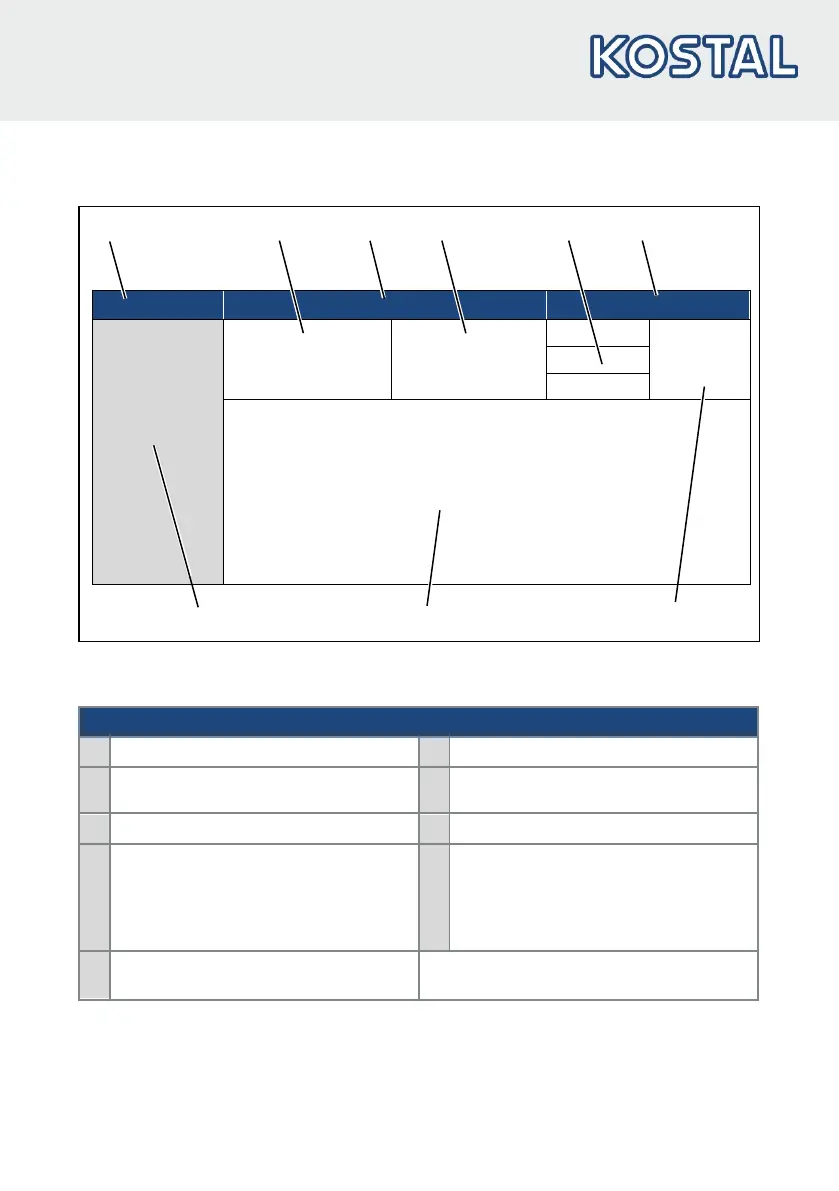
Fig.: 31 Example of a parameter table
Key
1 Parameter number 6 Unit
2
Description in the parameter manual
7 Field for entering an own value
3 Parameter name 8 Explanation of the parameter
4
Transfer status
0 = switch drive controller off and
on for transfer
1 = at speed of 0
9
Other parameters related
to this parameter.
5
Value range (from – to factory setting)



 To Next Page