Installation
36 Operating manual for INVEOR α | DOC01539818 - 0004 | 2017-01 | V2.0 EN
3.3.6 Preventing electromagnetic interferences
Where possible use shielded lines for control circuits.
The shielding should be applied to the line end with special care and without laying the leads
across longer stretches without shielding.
Ensure that no parasitic currents (compensating currents etc.) can flow via the analogue cable's
shielding.
Route the control lines as far away as possible from the power lines. Under certain circumstances,
separate power ducts should be used.
If lines do cross, an angle of 90° should be observed.
Upstream circuit elements, such as protector switches and brake coils, or circuit elements that are
operated via the outputs of the drive controller have to be interference-suppressed.
RC circuits are suitable as AC voltage protector switches, while free-wheeling diodes or varistors
are usually used as DC voltage protector switches. These interference suppression devices are
attached directly to the protector switch coils.
Where possible, the power for a mechanical brake should be supplied in a separate cable.
Power connections between the drive controller and motor should always be shielded or
reinforced, and the shielding must have large-scale grounding at both ends! The use of EMC cable
screw connections is recommended. These are not part of the scope of delivery.
Wiring suitable for EMC must be ensured.
3.4 Installing the drive controller integrated in the motor
3.4.1 Mechanical installation
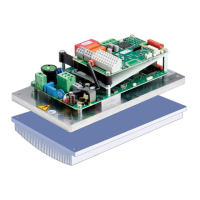
Mechanical installation of size α
Proceed as follows to mechanically install the drive controller:
1. Open the standard motor connection box.
2. Disconnect the wires from the connection terminals. Memorise or write down the connection
sequence.
3. Remove the motor terminal block if necessary.
4. Remove the connection housing's retaining bolts and take the housing off. Be careful not to
damage the seal.



 To Next Page