Adjust Steering Console
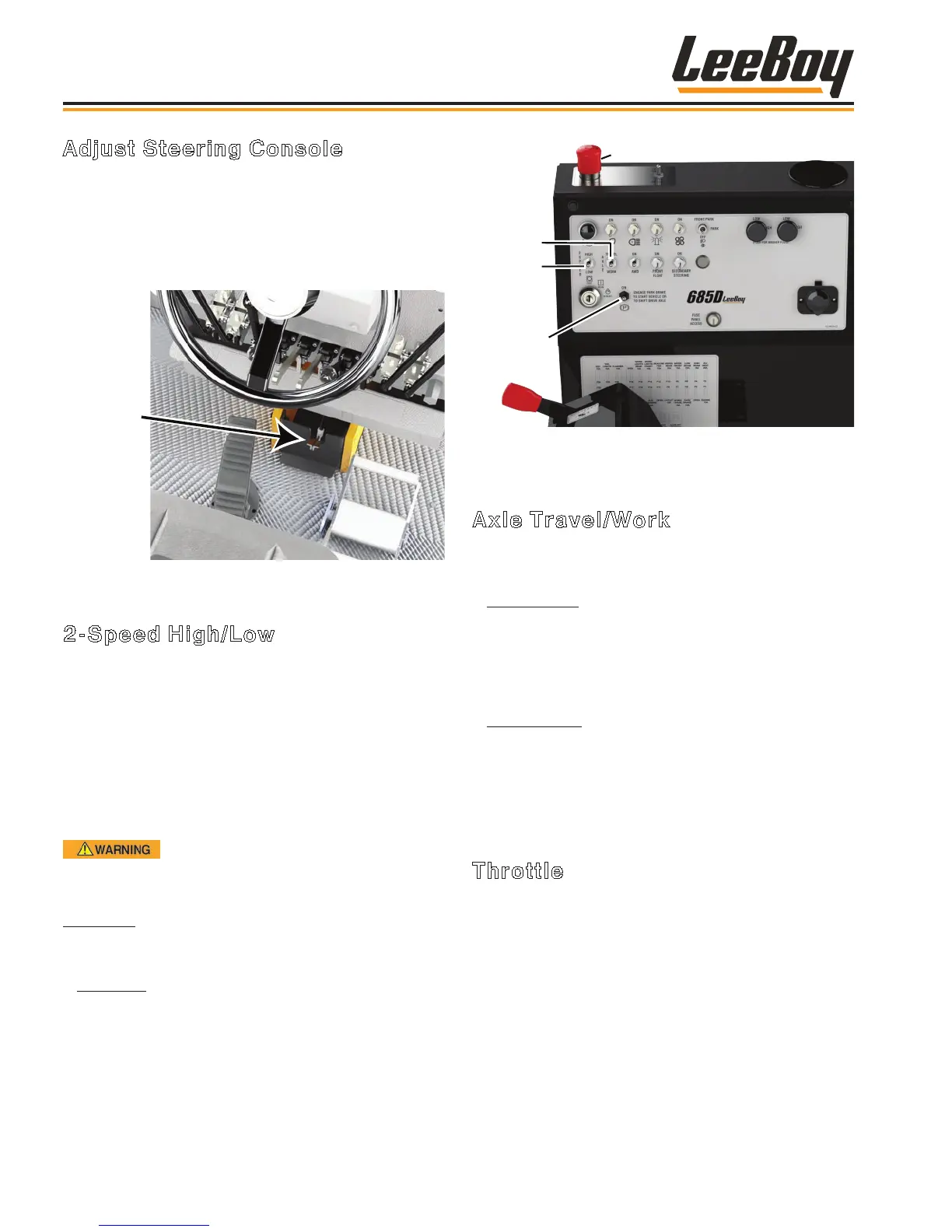
You can adjust the steering wheel console using the
console tilt lock toe pedal at the bottom of the steering
wheel column. (Figure 4-25) To adjust, simply depress
the toe pedal and push the steering console forward or
backward to a comfortable position, then release the tilt
lock pedal and it locks it into place.
Tilt Lock
Toe Pedal
Figure 4-25. Tilt Lock Toe Pedal
2-Speed High/Low
Grader speed is controlled by the 2-Speed High/Low
switch on the control panel to the right of the operator
seat. (Figure 4-26) This switch controls the rear axle
gearbox. Turn the switch down for Low gear. Always
use low gear while grading.
NOTE: You MUST STOP the machine on level
ground, place the FNR pedal in neutral and
engage the park brake to shift between high
and low gear.
ALWAYS move the FNR lever (or foot
pedal if equipped) SLOWLY after changing gears to
prevent lunging.
High Gear: Turn the switch UP for HIGH gear, used
when traveling to and from the work site. Maximum
speed in high gear is 20 mph (32 kph).
• Low Gear: Turn the switch DOWN for LOW gear.
The machine may reach up to 10 mph (16 kph),
depending upon speed in relation to torque condition.
NOTE: If equipped with the AWD option, it only
functions in Low gear.
2-Speed
High/
Low
E-Stop
Park Brake
Axle
Work/
Travel
Figure 4-26. 2-Speed, Axle Work/Travel,Park Brake
and E-Stop Controls
Axle Travel/Work
This switch controls the hydrostatic drive motor (Figure
4-26).
• Work Speed: Turn the switch DOWN for Work
speed. This maintains the hydrostatic drive motor
at a constant speed, but you can use the FNR pedal
to increase or decrease speed as needed. Use this
setting when grading for constant speed regardless
of load.
• Travel Speed: Turn the switch UP to select Travel
speed. This allows the grader to travel at a higher
speed when maximum torque is not needed, but
automatically slows when more torque is needed. Use
this setting when grading or traveling between job
sites.
Throttle
After selecting high or low gear, use the red-tipped
throttle lever beside the operator seat to increase or
decrease RPMs. (Figure 4-27)
A tachometer on the PV485 digital display controller
shows engine RPM speed. (Page 4-8)
• Pushing the throttle lever forward increases engine
speed.
• Pulling the throttle lever rearward decreases engine
speed.
Operation
LeeBoy 685D Motor Grader4-18



 To Next Page