System Info
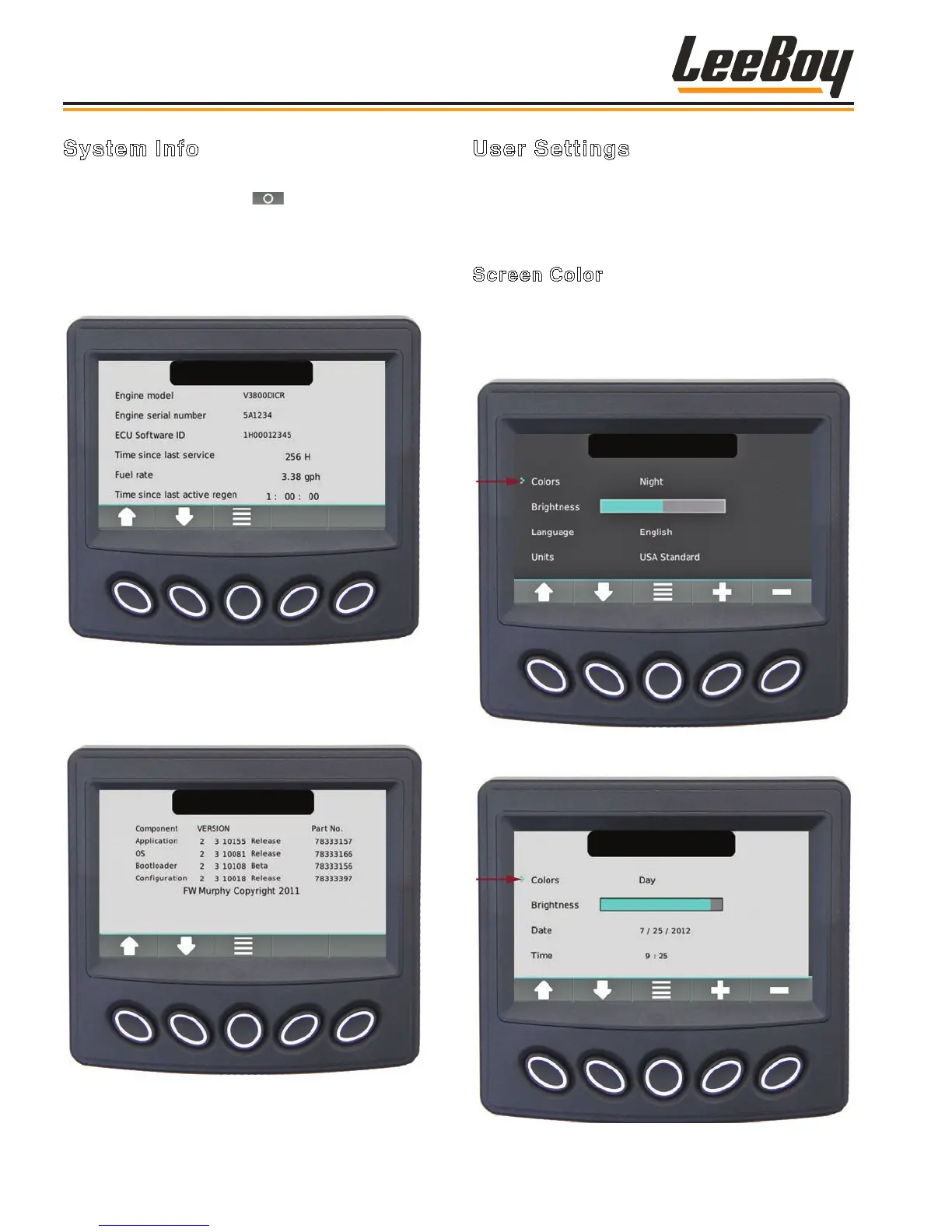
Scroll through the Menu list using the UP/DOWN soft
keys, then press the select ( ) soft key when the
cursor (>) points to the desired information. (Figure
4-11) The screen displays the engine model, serial
number, ECU Software ID, fuel rate, and the amount of
time since the last active regeneration process was
performed.
Figure 4-11. System Info Screen
Press the UP/DOWN soft keys to scroll to the screen
with application and conguration information. (Figure
4-12)
Figure 4-12. Application and Conguration
Information Screen
User Settings
These screens displays the following action items:
Screen Color; Brightness; Language; Units; Date and
Time.
Screen Color
Use the UP/DOWN soft keys and stop the cursor (>)
next to the action item Colors. (Figures 4-13 and 4-14)
Set your preference for day or night vision using the +/–
soft keys.
Figure 4-13. Set Night Vision Color Preferences
Screen
Figure 4-14. Set Day Vision Color Preferences
Screen
Operation
LeeBoy 685D Motor Grader4-12



 To Next Page