The User Interface
149
O
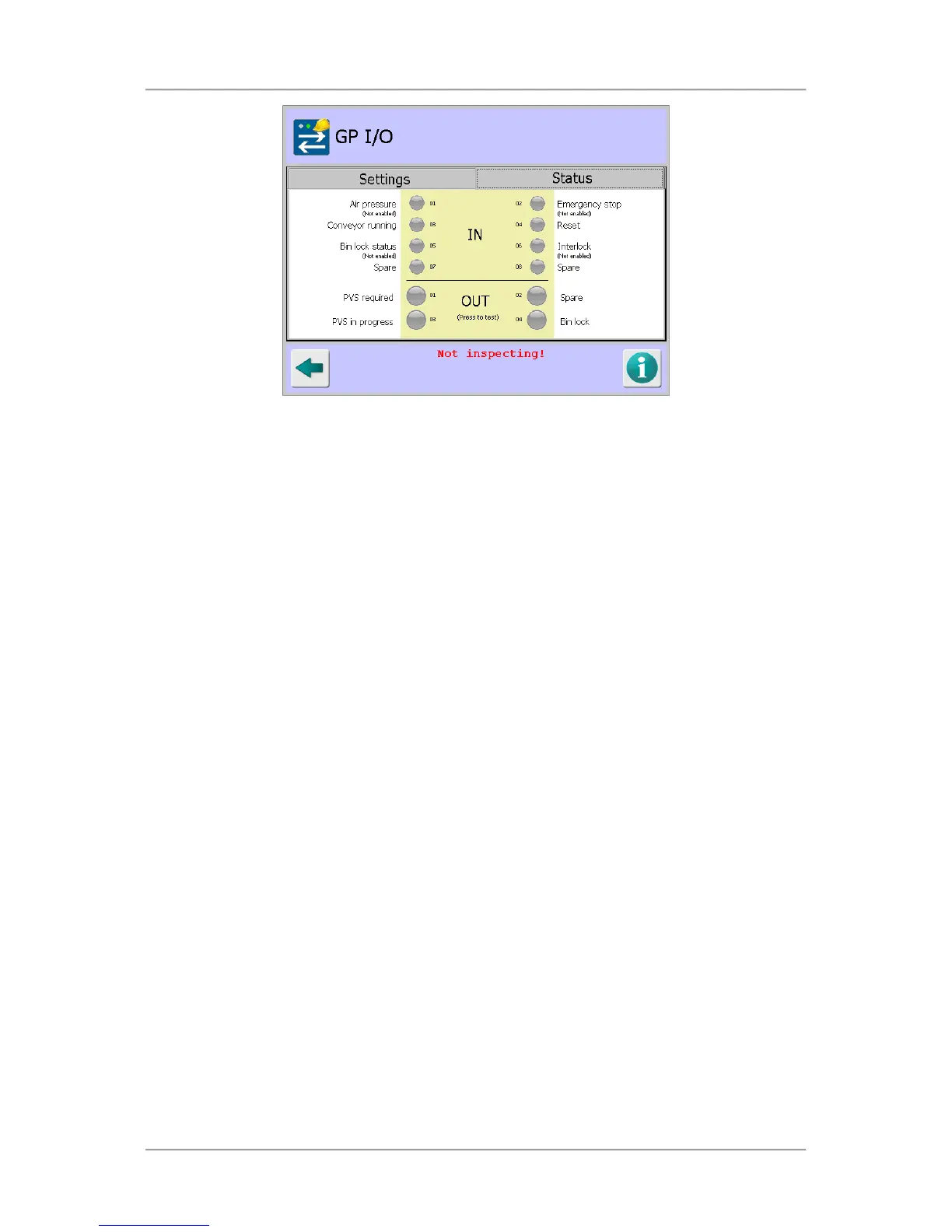
Inputs
Air pressure - (input 01)
Monitors the air pressure to the reject device (if applicable). If the air pressure goes low
for a continuous period of 3s or longer, the detector will generate a fault and the Air
pressure status indicator will turn red.
Emergency stop - (input 02)
Monitors the detector emergency stop status, normally on the metal detector conveyor.
When the emergency stop has been activated the status indicator will turn red.
Conveyor running - (input 03)
Monitors whether the detector conveyor belt is running.
Reset - (input 04)
Use this input to send a remote fault reset pulse to the IQ+ metal detector.
Bin lock status - (input 05)
Monitors whether the reject bin is locked (see above). If input 05 goes low for an
extended, the machine will generate a fault. The timeout period can be set in the
Rejects screen.
Interlock - (input 06)
Monitors whether a required safety interlock is activated or not.
Inputs 07 and 08 are currently not allocated.
O
Outputs
To test any output, tap the circle for the output to be tested. When this screen is exited, all
outputs are returned to their correct state.
PVS required - (output 01)
Set when a PV test is due. Typically, this output is used to light a lamp which will alert
operators that a PV test is required.
Output 02 is currently spare
PVS in progress - (output 03)



 To Next Page