Acc/Dec Time Based on Operation Frequency – Setting Details
Set the parameter value to 1 (Delta Freq) to set Acc/Dec times based
on Maximum frequency.
Set the Acc/Dec time based on maximum
frequency.
Set the Acc/Dec time based on operating
frequency.
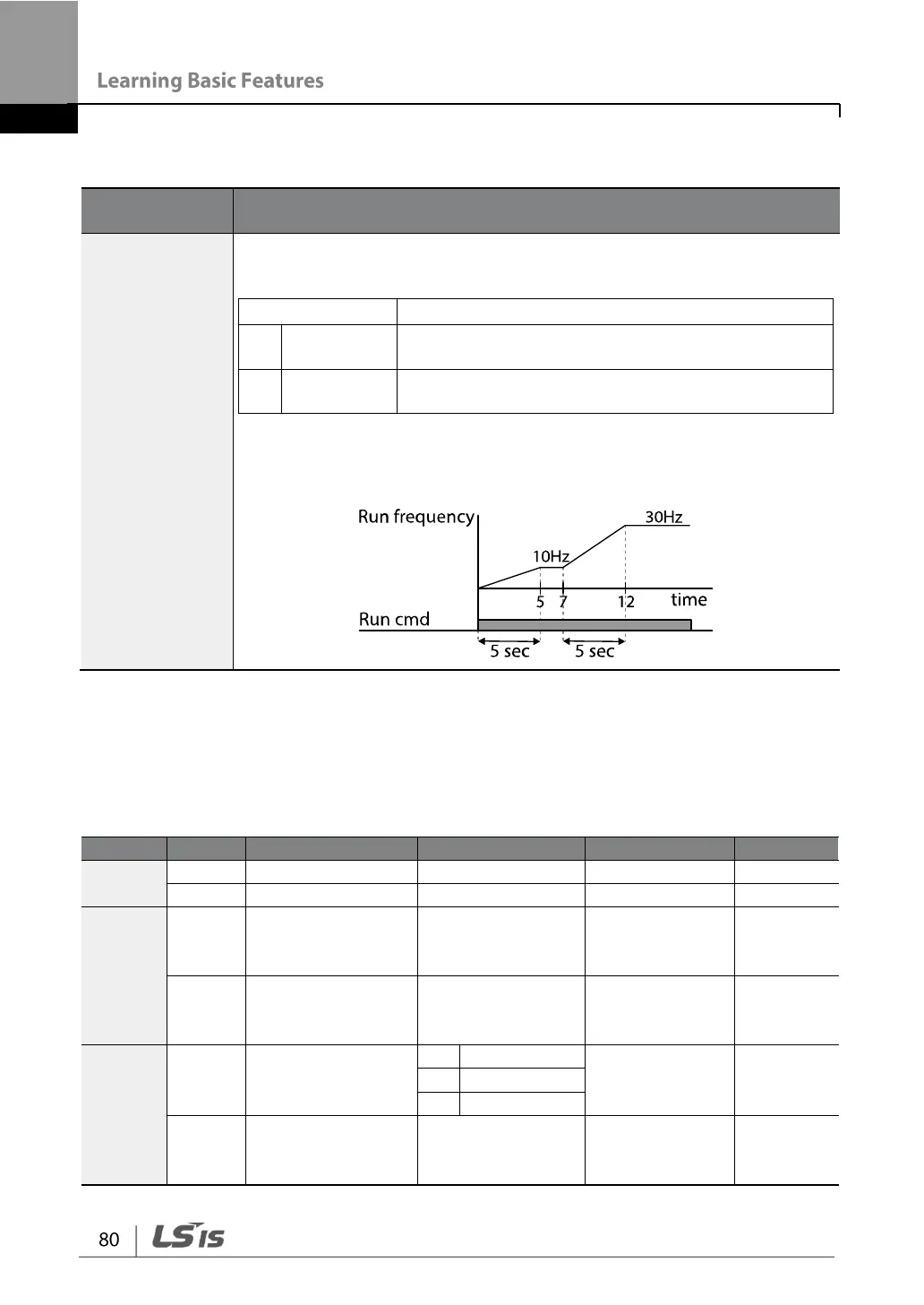
If Acc/Dec times are set to 5 seconds, and multiple frequency
references are used in the operation in 2 steps, at 10 Hz and 30 Hz, the
time to accelerate will be as follows.
4.8.3 Multi-step Acc/Dec Time Configuration
Acc/Dec times can be configured via a multi-function terminal by setting the ACC
(acceleration time) and dEC (deceleration time) codes in the Operation group.
Multi-step
acceleration time
1–7
Multi-step
deceleration time
1–7
Px terminal
setting options
Multi-step
command delay
time


 To Next Page